Building OpenShift PowerShell Cmdlets
VMware to OpenShift Virtualization — Article 13 of 15
Technical baseline: OpenShift Virtualization 4.20 and MTV 2.11 documentation. Reviewed 31 October 2026. Examples are instructional and have not been executed against a production cluster; check your installed release, support matrix, and environment before use.
PowerShell wrappers can make OpenShift administration familiar to a Windows-focused operations team while retaining Kubernetes’ resource model. This guide develops a small module that returns objects, requires explicit cluster context, checks native exit codes, and supports -WhatIf for lifecycle changes.
Design the contract before writing functions
Use names such as Get-OcpVM and Start-OcpVM to avoid collisions with PowerCLI’s Get-VM and Start-VM. Require context and namespace rather than relying on whichever cluster happened to be selected earlier. Return domain data or an explicit request result, not formatted tables.
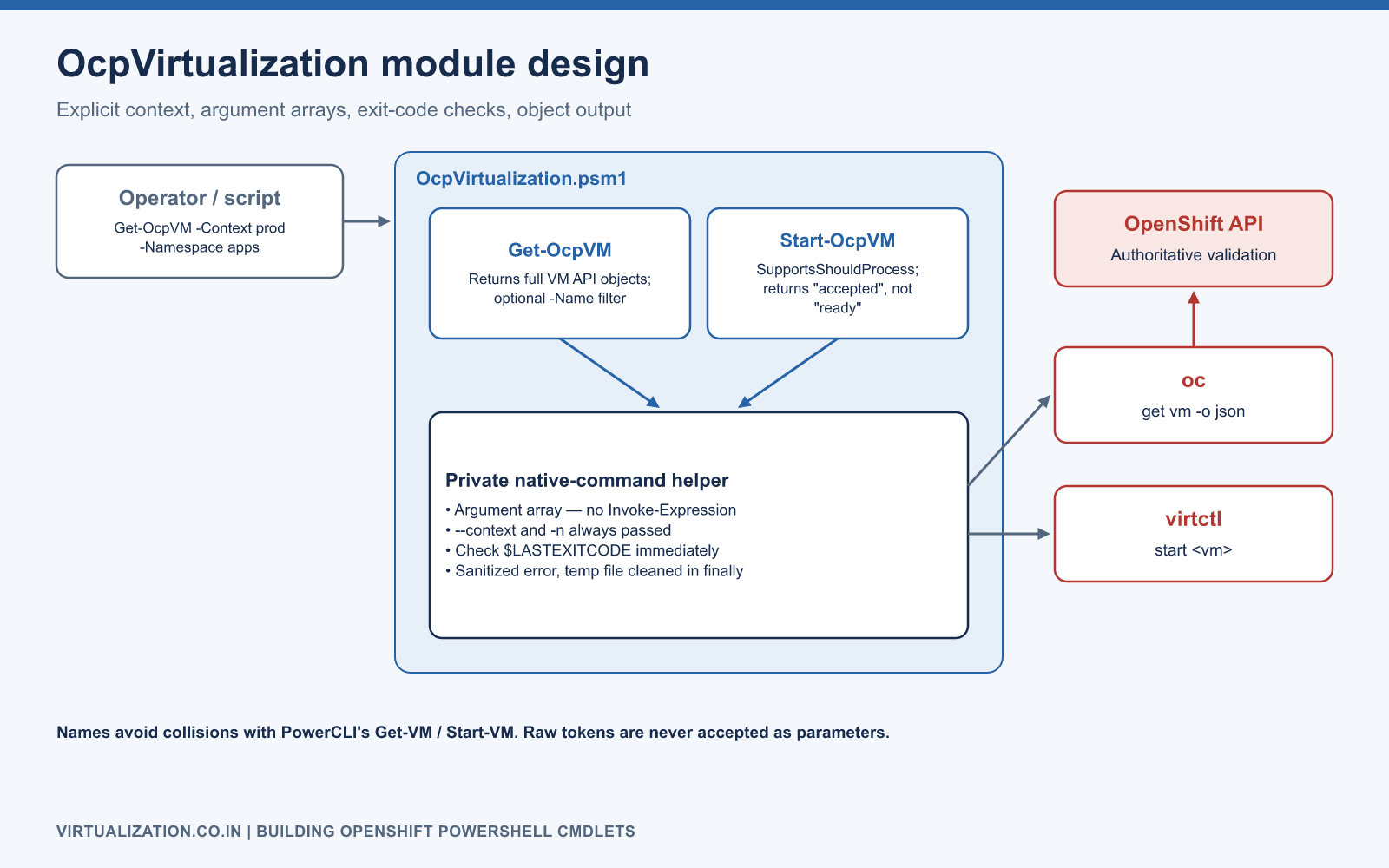
For this example, Get-OcpVM returns the full VM API objects and optionally filters one name. Start-OcpVM submits a start request and reports that it was accepted. It deliberately does not claim application readiness. Both use installed, authenticated oc/virtctl clients. They do not accept raw tokens or replace login management.
Create the module
Create a folder OcpVirtualization containing OcpVirtualization.psm1. The following complete instructional module targets PowerShell 5.1 or later and uses argument-array invocation rather than constructing a shell command string.
Set-StrictMode -Version Latest

function Invoke-OcpNative {
    [CmdletBinding()]
    param(
        [Parameter(Mandatory)]
        [ValidateSet('oc', 'virtctl')]
        [string]$Tool,
        [Parameter(Mandatory)]
        [string[]]$ArgumentList
    )
    $command = Get-Command $Tool -CommandType Application -ErrorAction Stop |
        Select-Object -First 1
    $errorFile = [System.IO.Path]::GetTempFileName()
    $savedPreference = $ErrorActionPreference
    try {
        # Handle the native exit code explicitly across PowerShell versions.
        $ErrorActionPreference = 'Continue'
        $PSNativeCommandUseErrorActionPreference = $false
        $lines = & $command.Source @ArgumentList 2> $errorFile
        $exitCode = $LASTEXITCODE
        $ErrorActionPreference = $savedPreference
        if ($exitCode -ne 0) {
            throw "$Tool failed with exit code $exitCode. Re-run the scoped command to inspect its diagnostic."
        }
        return ($lines -join "`n")
    }
    finally {
        $ErrorActionPreference = $savedPreference
        Remove-Item -LiteralPath $errorFile -Force -ErrorAction SilentlyContinue
    }
}

function Get-OcpVM {
    [CmdletBinding()]
    param(
        [Parameter(Mandatory)]
        [ValidateNotNullOrEmpty()]
        [string]$Context,
        [Parameter(Mandatory)]
        [ValidatePattern('^[a-z0-9]([-a-z0-9]*[a-z0-9])?$')]
        [ValidateLength(1,63)]
        [string]$Namespace,
        [ValidatePattern('^[a-z0-9]([-a-z0-9.]*[a-z0-9])?$')]
        [string]$Name
    )
    $arguments = @('--context', $Context, 'get', 'virtualmachines',
                   '-n', $Namespace, '-o', 'json', '--request-timeout=30s')
    if ($Name) { $arguments += @('--field-selector', "metadata.name=$Name") }
    $json = Invoke-OcpNative -Tool oc -ArgumentList $arguments
    $document = $json | ConvertFrom-Json -ErrorAction Stop
    if ($null -eq $document -or
        $document.PSObject.Properties.Name -notcontains 'items') {
        throw 'Unexpected VM list response.'
    }
    foreach ($item in $document.items) { Write-Output $item }
}

function Start-OcpVM {
    [CmdletBinding(SupportsShouldProcess, ConfirmImpact='Medium')]
    param(
        [Parameter(Mandatory)]
        [ValidateNotNullOrEmpty()]
        [string]$Context,
        [Parameter(Mandatory)]
        [ValidatePattern('^[a-z0-9]([-a-z0-9]*[a-z0-9])?$')]
        [ValidateLength(1,63)]
        [string]$Namespace,
        [Parameter(Mandatory)]
        [ValidatePattern('^[a-z0-9]([-a-z0-9.]*[a-z0-9])?$')]
        [string]$Name
    )
    $target = "$Context/$Namespace/$Name"
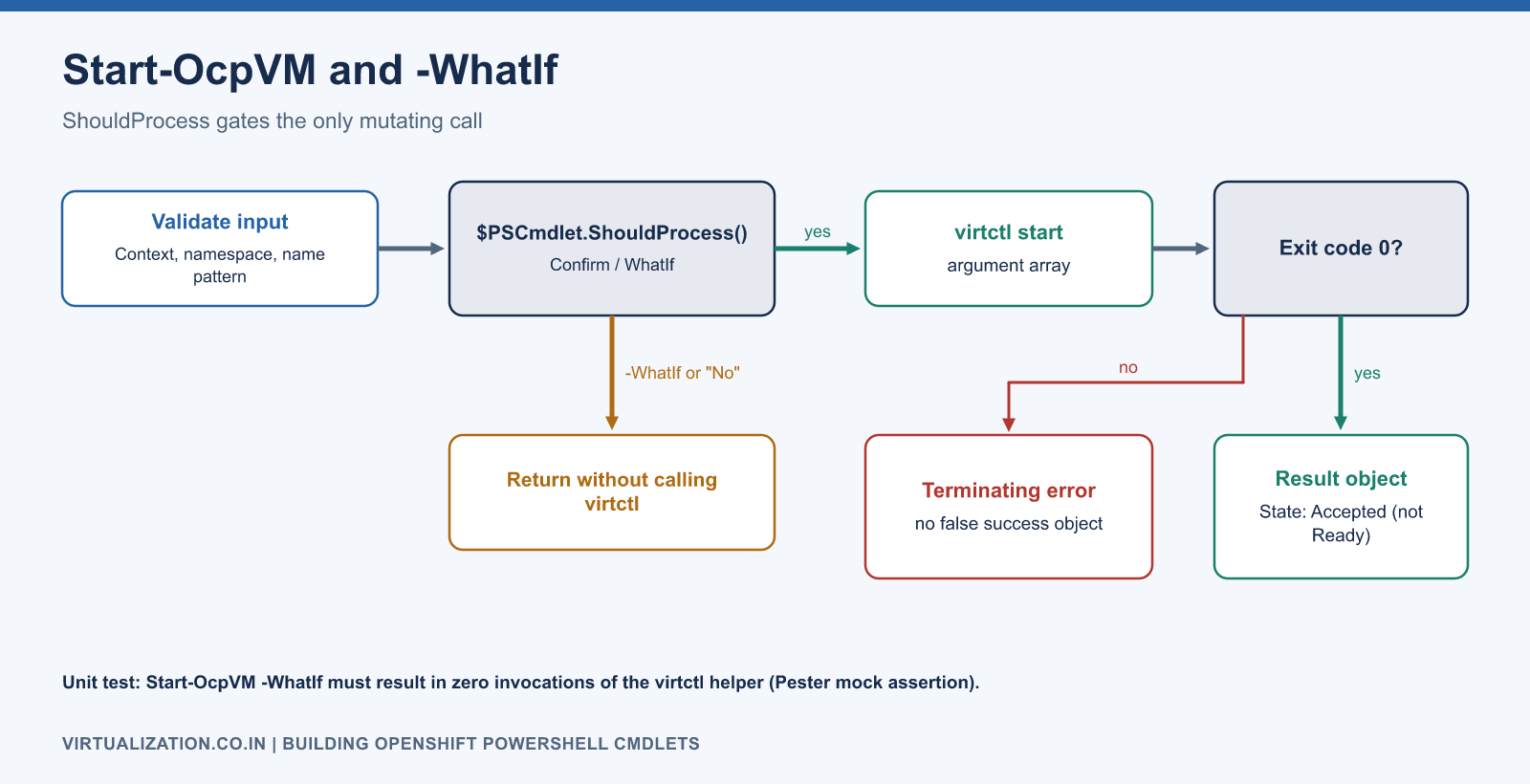
    if ($PSCmdlet.ShouldProcess($target, 'Submit VM start request')) {
        $arguments = @('--context', $Context, 'start', $Name, '-n', $Namespace)
        $null = Invoke-OcpNative -Tool virtctl -ArgumentList $arguments
        [pscustomobject]@{
            Context = $Context
            Namespace = $Namespace
            Name = $Name
            Operation = 'Start'
            RequestAccepted = $true
            RequestedAtUtc = [DateTime]::UtcNow
        }
    }
}

Export-ModuleMember -Function Get-OcpVM, Start-OcpVM
The temporary diagnostic file is removed in finally, including failures. The public error reports the tool and exit code without dumping arbitrary server output into an automation log. This small example trades rich diagnostics for a narrow output contract; a production module should add structured, sanitized diagnostics and a bounded process timeout for every external invocation.
The validation patterns are a preliminary input guard, not a replacement for server-side name validation. The Kubernetes API remains authoritative. The context is passed as one argument, and neither function uses Invoke-Expression.
Package and use it
From the directory containing the module folder:
New-ModuleManifest -Path '.\OcpVirtualization\OcpVirtualization.psd1' `
    -RootModule 'OcpVirtualization.psm1' `
    -ModuleVersion '0.1.0' `
    -PowerShellVersion '5.1' `
    -FunctionsToExport @('Get-OcpVM','Start-OcpVM') `
    -CmdletsToExport @() -AliasesToExport @() -VariablesToExport @()

Import-Module '.\OcpVirtualization\OcpVirtualization.psd1' -Force
Get-OcpVM -Context lab-cluster -Namespace apps |
    Select-Object @{n='Name';e={$_.metadata.name}},
                  @{n='RunStrategy';e={$_.spec.runStrategy}}

Start-OcpVM -Context lab-cluster -Namespace apps -Name app01 -WhatIf
Start-OcpVM -Context lab-cluster -Namespace apps -Name app01 -Confirm
The final command can start a VM after confirmation. -WhatIf must prevent the native mutation call entirely; it is not merely a message printed before a write. Microsoft’s advanced-function methods and CmdletBinding reference describe ShouldProcess behavior.
Add readiness as a separate operation
A future Wait-OcpVM should have an explicit deadline and return a result containing the observed condition, elapsed time, and last known state. It should first handle VMI creation, then readiness, then any optional application check. A missing VMI, a forbidden response, and an unreachable API are different outcomes.
Do not retry every error indiscriminately. A wrong namespace will not improve with 100 retries, and a forbidden response needs permission correction. A transient network failure may warrant a limited retry with backoff. If a start request times out, inspect current state before submitting another mutation.
Unit tests that protect the behavior
Use Pester or your team’s preferred framework to test behavior at the native-command boundary. Mock the private helper when testing the public functions and test the helper separately with a harmless local executable.
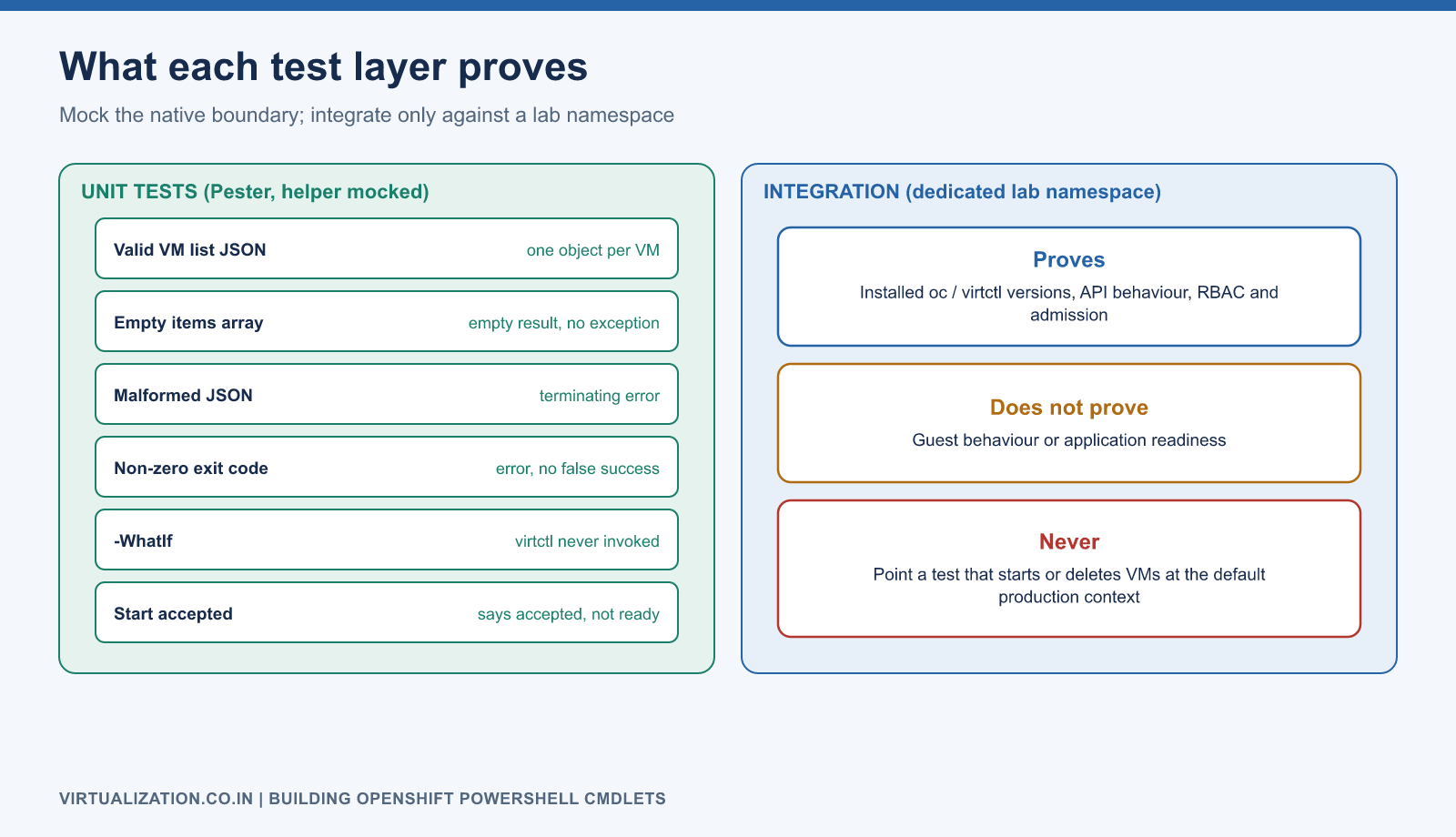
| Test | Expected result |
|---|---|
| Valid VM list JSON | One object per VM |
Empty items array |
Empty result, not an exception |
| Malformed JSON | Terminating error |
| Nonzero native exit | Terminating error, no false success object |
| Context/namespace selection | Correct argument array |
Start-OcpVM -WhatIf |
No invocation of virtctl |
| Start accepted | Result says accepted, not ready |
| Unsupported/invalid input | Rejected before a mutation |
Add an integration suite against a dedicated lab namespace to validate the installed client and API versions. Unit tests do not prove RBAC, admission, or guest behavior. Never point a test that starts or deletes VMs at the default production context.
Operational hardening
Pin and record supported client versions. Add module help with examples, expected errors, output types, and privileges. Keep logging structured with context, namespace, name, operation, timestamp, duration, and result; exclude credentials and full secret-bearing manifests.
Use signing and a controlled distribution channel where organizational policy requires them. For scheduled automation, use an appropriate narrowly scoped identity and a supported credential lifecycle. Audit the executed operation separately from the application’s health result.
For deletion and stop functions, define graceful behavior, retention handling, confirmation impact, and timeout escalation before implementation. A function named Remove-OcpVM must not silently imply that related disks are retained. The VM/VMI guide and storage guide explain why that contract matters.
Explore the complete series
- VMware vs OpenShift Virtualization: Complete Technical Comparison
- OpenShift Virtualization Architecture Explained
- Understanding KubeVirt, VM and VMI
- VMware to OpenShift: Complete Migration Strategy
- MTV Architecture and Internal Working
- OpenShift Virtualization Networking Deep Dive
- OpenShift Virtualization Storage Deep Dive
- OpenShift VM Live Migration Explained
- OpenShift Cluster Sizing for Virtualization
- Migrating Windows VMs Using MTV
- Migrating Linux VMs Using MTV
- VMware PowerCLI vs OpenShift CLI
- Building OpenShift PowerShell Cmdlets
- OpenShift Virtualization Troubleshooting Guide
- Enterprise-Scale VMware to OpenShift Migration Architecture