VMware to OpenShift Virtualization — Article 3 of 15
Technical baseline: OpenShift Virtualization 4.20 and MTV 2.11 documentation. Reviewed 31 October 2026. Examples are instructional and have not been executed against a production cluster; check your installed release, support matrix, and environment before use.
KubeVirt adds virtual-machine resources and controllers to Kubernetes. Its most useful operational distinction is between a VirtualMachine, which expresses persistent management intent, and a VirtualMachineInstance, which represents a particular execution of that guest.
- VM, VMI, pod, and disk are different objects
- Why the distinction matters
- Run strategies
- A minimal, deliberately halted VM definition
- Observe the right state
- Observe a complete lifecycle in a lab
- Interpreting conditions and phases
- Why deleting runtime objects is a poor power-control interface
- Storage ownership and deletion review
- Keep guest provisioning separate from VM lifecycle
- Configuration changes and persistence
VM, VMI, pod, and disk are different objects
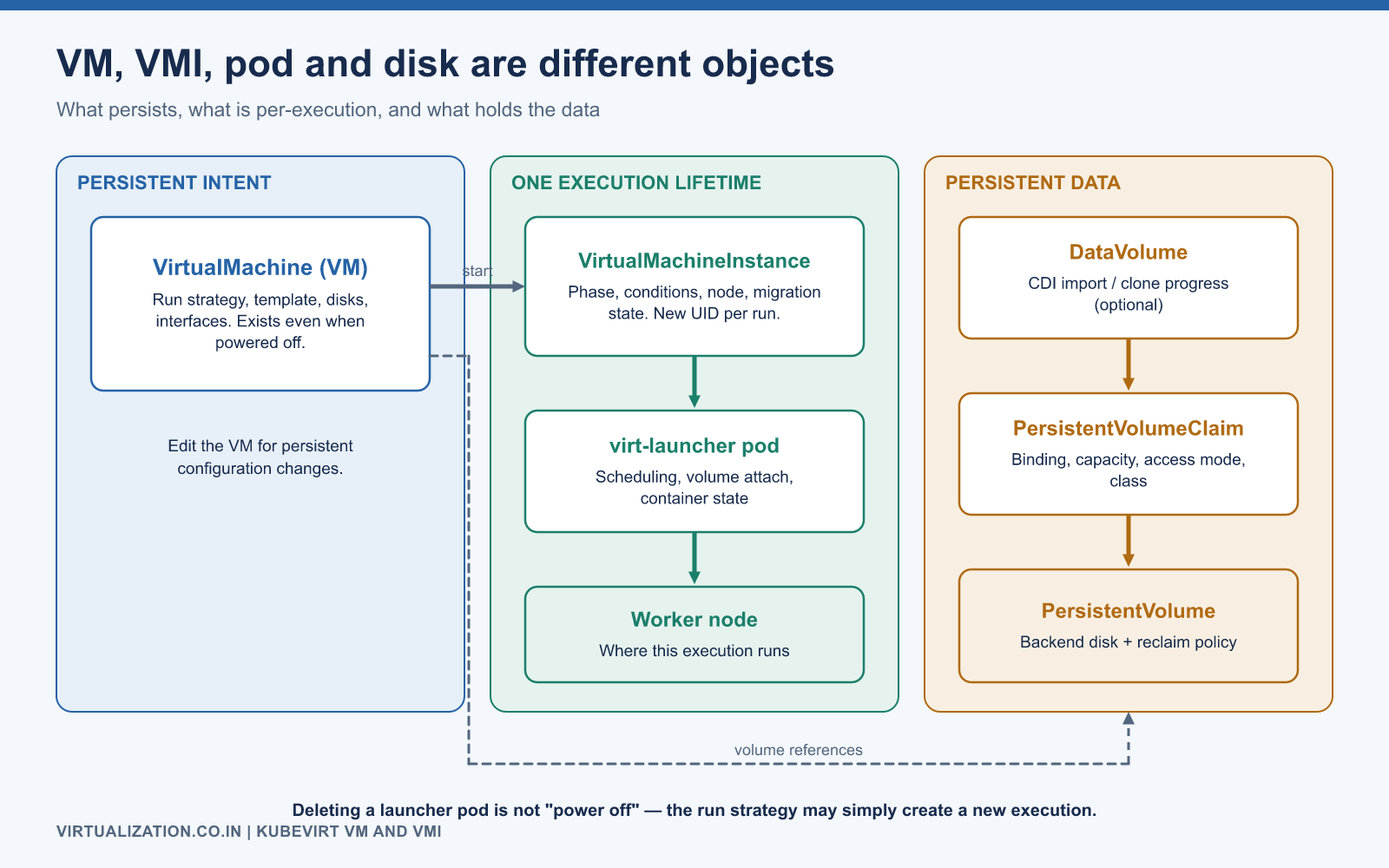
| Object | Meaning | What to inspect |
|---|---|---|
VirtualMachine / VM |
Managed guest definition and lifecycle policy | Run strategy, template, disks, interfaces |
VirtualMachineInstance / VMI |
Current guest execution | Phase, conditions, node, migration state |
virt-launcher pod |
Kubernetes execution context for that instance | Scheduling, volume attachment, container state |
| PVC | Claim for persistent storage | Binding, capacity, access mode, storage class |
| DataVolume | CDI-managed data population abstraction | Import/clone progress and conditions |
These relationships are described in the KubeVirt architecture and VMI reference. A VM can exist while powered off with no active VMI. A new execution may have the same human-readable name while using a different Kubernetes UID.
Why the distinction matters
Suppose app01 exists but users cannot connect. Looking only at oc get vm does not establish whether a guest is running. Inspect the VMI, launcher pod, disks, and guest console. Conversely, deleting a launcher pod is not a clean declaration that the managed VM should remain powered off; its lifecycle policy may request another execution.
Persistent data needs its own protection. Whether deleting a VM also removes related storage depends on ownership references and the deletion workflow. Before deleting any VM, inspect PVC ownership and reclaim behavior, and verify that backups cover the disks you intend to preserve.
Run strategies
The spec.runStrategy field controls lifecycle behavior. Do not combine it with the older spec.running field in one manifest.
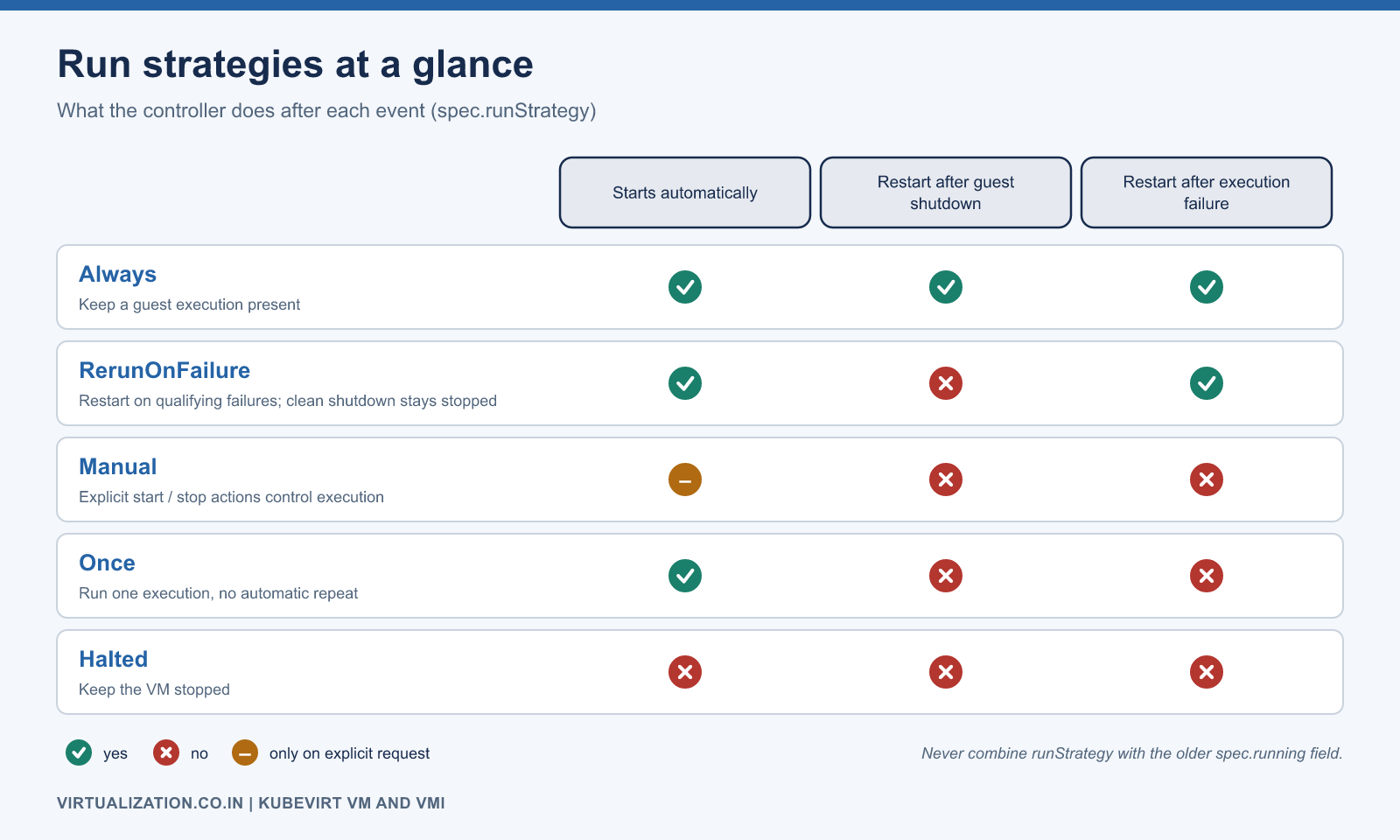
| Strategy | Intended behavior |
|---|---|
Always |
Keep a guest execution present, including after guest shutdown |
RerunOnFailure |
Restart after qualifying infrastructure/execution failures; allow a normal guest shutdown to remain stopped |
Manual |
Let explicit lifecycle actions control execution |
Once |
Run one execution without automatic repeat |
Halted |
Keep the VM stopped |
The run-strategy reference provides the detailed semantics. RerunOnFailure does not guarantee recovery from every failure inside a guest, such as an application crash or a guest blue screen that leaves the virtual machine process alive.
A minimal, deliberately halted VM definition
This instructional example assumes namespace apps already exists and app01-root is an existing bootable PVC containing a compatible operating system. It does not create an OS image, user account, SSH key, or network service. The PVC’s storage configuration must suit your availability design.
apiVersion: kubevirt.io/v1
kind: VirtualMachine
metadata:
  name: app01
  namespace: apps
spec:
  runStrategy: Halted
  template:
    metadata:
      labels:
        app: app01
    spec:
      domain:
        cpu:
          cores: 2
        resources:
          requests:
            memory: 4Gi
        devices:
          disks:
            - name: rootdisk
              disk:
                bus: virtio
          interfaces:
            - name: default
              masquerade: {}
      networks:
        - name: default
          pod: {}
      volumes:
        - name: rootdisk
          persistentVolumeClaim:
            claimName: app01-root
Validate against the actual API before creating it:
oc apply --dry-run=server -f app01.yaml
oc apply -f app01.yaml
virtctl start app01 -n apps
oc get vm,vmi -n apps
oc describe vmi app01 -n apps
The second and third commands change the cluster. Server-side dry run checks admission and schema; it does not prove the guest will boot or the application will work. Use a lab namespace and a release-compatible virtctl binary.
Observe the right state
Read VM status to understand the requested and reported lifecycle. Read VMI conditions for execution and mobility. Read pod events for scheduling and setup. Read the guest console and application probes for operating-system and service health. Each view answers a different question.
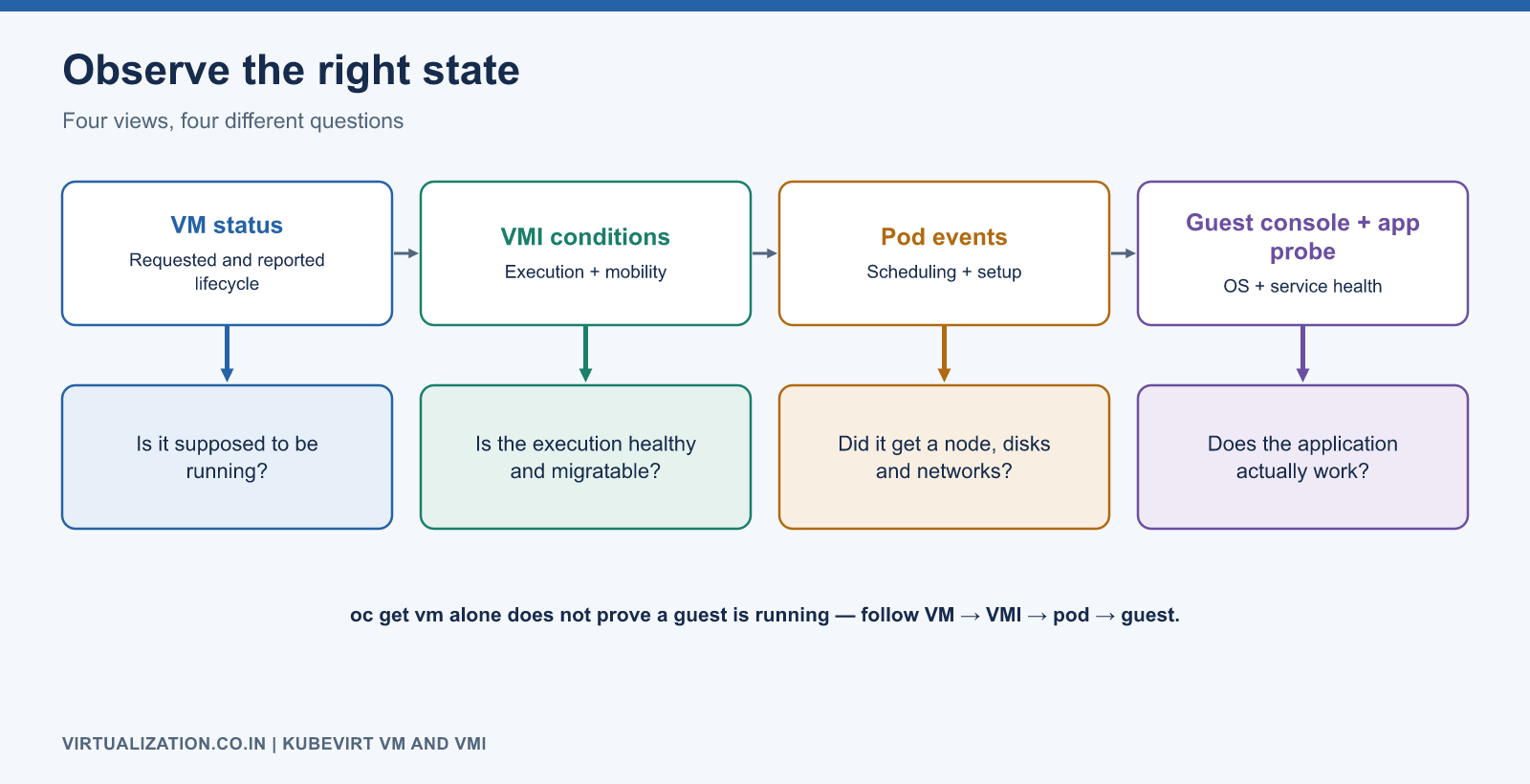
A useful inventory report includes namespace, VM name, desired run strategy, VMI presence, VMI phase, node, and application owner. Treat a missing VMI as a possible normal state for a stopped VM rather than automatically classifying it as an outage.
Observe a complete lifecycle in a lab
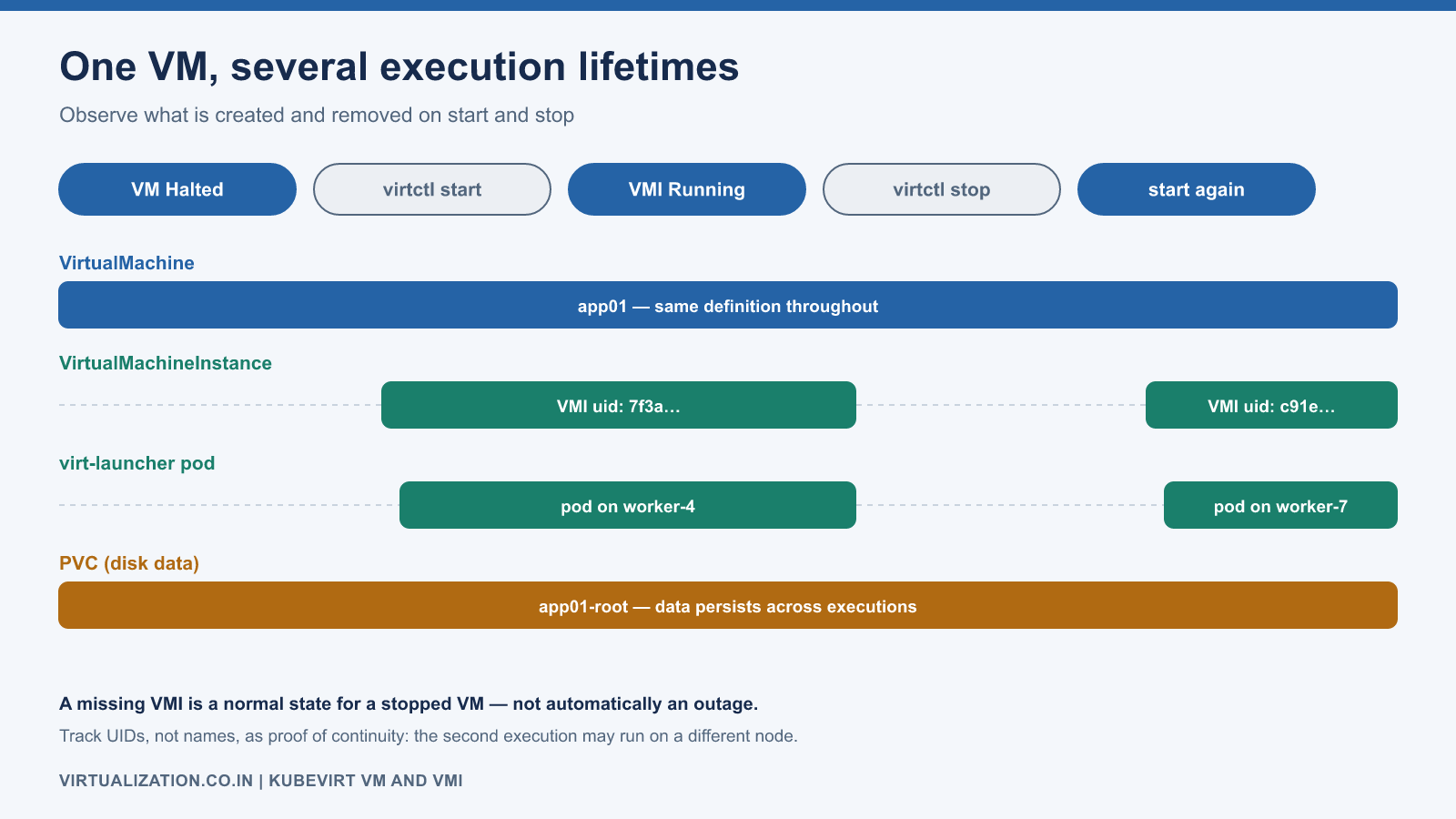
Start with the deliberately halted VM above. Confirm that the VM exists and that no running VMI is expected. Submit one start request, then observe the creation of the instance and its launcher pod. Record their UIDs and node placement.
oc get vm app01 -n apps
oc get vmi app01 -n apps
virtctl start app01 -n apps
oc get vmi app01 -n apps -w
The final watch runs until interrupted. Once the VMI exists, a bounded readiness wait is useful:
oc wait vmi/app01 -n apps --for=condition=Ready --timeout=180s
This checks a resource condition, not application readiness. Follow it with guest login, disk/mount verification, and an application transaction. If the timeout expires, inspect conditions and events rather than repeatedly starting the same VM.
Next, use the supported stop action in the lab and observe the remaining VM/PVC resources. A new start creates another execution lifetime; persistent disks should retain the intended data. The purpose of the exercise is to see the separation between definition, execution, and storage, not to rely on names as proof of continuity.
Interpreting conditions and phases
Treat conditions as structured evidence. Read the type, status, reason, message, and transition time together. A boolean copied into a report without its reason can hide whether the problem is expected, transient, or actionable.
| Observation | Possible interpretation | Next check |
|---|---|---|
| VM present, no VMI | Intentionally stopped or startup has not produced an instance | Run strategy, VM conditions, events |
| VMI pending | Execution exists but preparation/scheduling is incomplete | Launcher events and disk readiness |
| VMI running, no application | Guest or application not ready | Console, listener, dependency checks |
| Different VMI UID after restart | New execution lifetime | Expected lifecycle and persistent data |
| VM configuration changed, runtime unchanged | Change may need supported restart/update handling | Feature behavior for the installed release |
A status printer column is convenient for humans but should not be the only automation contract. Use the API fields appropriate to the task and handle absence explicitly.
Why deleting runtime objects is a poor power-control interface
The VM controller’s job is to reconcile desired lifecycle state. Removing a lower-level execution resource can therefore trigger recovery or another execution rather than a durable stop. It can also bypass the graceful shutdown path the application expects.
Use documented lifecycle operations and understand the selected run strategy. If an application requires orderly shutdown, define the guest shutdown behavior, timeout, and escalation in the operating procedure. A forced termination should be a deliberate recovery decision with data implications, not the default equivalent of a power button.
For investigation, gather oc describe output and relevant events before changing runtime objects. This preserves evidence about why the original instance was unhealthy.
Storage ownership and deletion review
Before deleting a VM, inspect its volumes and the corresponding DataVolumes/PVCs. Review owner references and the intended deletion workflow. Then inspect the bound PV’s reclaim policy and the backend’s retention behavior. The exact cascade depends on how the resources were created and how deletion is requested.
oc get vm app01 -n apps -o jsonpath='{.spec.template.spec.volumes}'
oc get dv app01-root -n apps -o yaml
oc get pvc app01-root -n apps -o yaml
These are inspection commands. They intentionally do not include deletion. A safe deletion checklist confirms the application owner, backup/restore evidence, data retention decision, and exact object identifiers before executing any destructive step.
Keep guest provisioning separate from VM lifecycle
The example manifest defines virtual hardware and attaches an existing disk. It does not create a guest account or configure the application. Cloud-init, Windows initialization mechanisms, image customization, and configuration management can fill those roles where supported.
Avoid embedding reusable passwords in VM definitions. Decide which system owns the hostname, IP configuration, packages, and application settings. Re-running a VM should not unexpectedly reset production configuration because an initialization source was treated as a general-purpose configuration manager.
Configuration changes and persistence
Change the managed VM definition for persistent configuration. Whether a change takes effect immediately or requires a restart depends on the specific feature and release. Do not assume that editing the VMI changes the source of truth for future executions. If GitOps manages the VM, update the repository and understand how its controller handles imperative lifecycle changes.
Use the CLI comparison for daily commands and storage guide before making disk or deletion decisions.
Explore the complete series
- VMware vs OpenShift Virtualization: Complete Technical Comparison
- OpenShift Virtualization Architecture Explained
- Understanding KubeVirt, VM and VMI
- VMware to OpenShift: Complete Migration Strategy
- MTV Architecture and Internal Working
- OpenShift Virtualization Networking Deep Dive
- OpenShift Virtualization Storage Deep Dive
- OpenShift VM Live Migration Explained
- OpenShift Cluster Sizing for Virtualization
- Migrating Windows VMs Using MTV
- Migrating Linux VMs Using MTV
- VMware PowerCLI vs OpenShift CLI
- Building OpenShift PowerShell Cmdlets
- OpenShift Virtualization Troubleshooting Guide
- Enterprise-Scale VMware to OpenShift Migration Architecture