Migrating Linux VMs Using MTV
VMware to OpenShift Virtualization — Article 11 of 15
Technical baseline: OpenShift Virtualization 4.20 and MTV 2.11 documentation. Reviewed 31 October 2026. Examples are instructional and have not been executed against a production cluster; check your installed release, support matrix, and environment before use.
Linux migration to OpenShift Virtualization requires attention to boot compatibility, persistent device references, network configuration, encryption, and application services. This procedure turns those concerns into a repeatable MTV preflight, cutover, and validation workflow.
- Inventory the guest, not only its vCenter settings
- Establish guest and conversion support
- Boot readiness and VirtIO
- Make disk references resilient
- Network configuration and identity
- Encryption, firmware, and security controls
- Execute the MTV plan
- Validate after boot
- Troubleshooting decision tree
- Close the migration with evidence
Inventory the guest, not only its vCenter settings
Record distribution and version, kernel, firmware, bootloader, filesystems, LVM layout, disk encryption, mount dependencies, network manager, application services, scheduled jobs, and security controls. Include package repositories and subscription dependencies needed after migration.
Run these read-only commands as an appropriately privileged user. Some commands are distribution-dependent; absence of a utility should be recorded rather than treated as a migration failure.
cat /etc/os-release
uname -r
lsblk -o NAME,SIZE,TYPE,FSTYPE,UUID,MOUNTPOINTS
findmnt --real
cat /etc/fstab
df -hT
ip -br address
ip route
systemctl --failed
systemctl list-unit-files --state=enabled
Protect the collected output as infrastructure documentation. Do not export application credentials or private keys while gathering configuration.
Establish guest and conversion support
Check both the MTV supported guest matrix and the target platform’s support conditions. Appliance vendors may require a native KVM image or a fresh deployment even when the embedded OS is recognizable. Upstream conversion support is useful technical context, but it does not override product or application support.
MTV 2.11’s release notes describe a compatibility consideration for older XFS filesystems after the conversion environment moved to RHEL 10, including a plan compatibility option. Review the exact release notes rather than assuming all XFS filesystems behave identically.
For an XFS root filesystem, an administrator can inspect its features with xfs_info / where the utility is available. If the configuration needs a documented compatibility path, test that path on a representative copy and record the setting in the plan review. Do not reformat filesystems or enable conversion bypass merely to suppress a warning.
Boot readiness and VirtIO
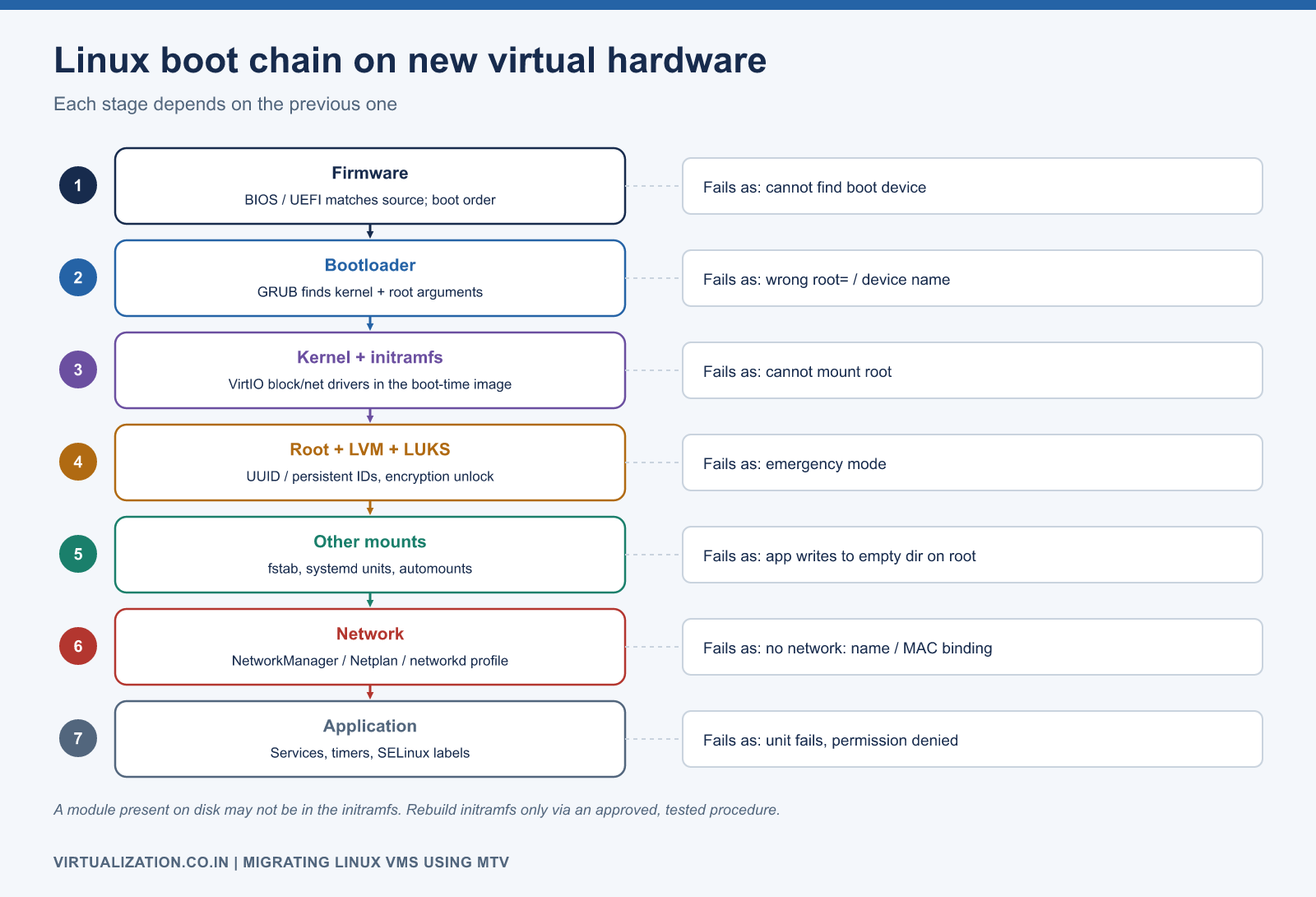
The target guest needs a kernel and initial RAM filesystem capable of accessing the presented boot disk and other required devices. Inspect the relevant VirtIO modules and the distribution’s initramfs contents; a module present on disk may not be included in the boot-time image.
modinfo virtio_pci
modinfo virtio_blk
modinfo virtio_scsi
# RHEL-family systems, when available:
lsinitrd
# Debian/Ubuntu systems, when available:
lsinitramfs /boot/initrd.img-$(uname -r)
Built-in kernel drivers can make a modinfo lookup inconclusive. Use the distribution’s supported boot tooling and kernel configuration to establish readiness. Rebuilding initramfs is a change operation: perform it only through an approved, distribution-specific procedure with a recovery path and a successful reboot test.
The virt-v2v conversion documentation explains supported guest adaptation. Do not assume conversion will install a suitable Linux kernel or resolve every custom boot configuration.
Make disk references resilient
Compare /etc/fstab, application configuration, LVM, and boot arguments with the actual device layout. Names such as /dev/sdb may not represent the same disk after hardware changes. UUIDs or supported persistent identifiers can improve stability, but changing production mounts should be a separate tested change.
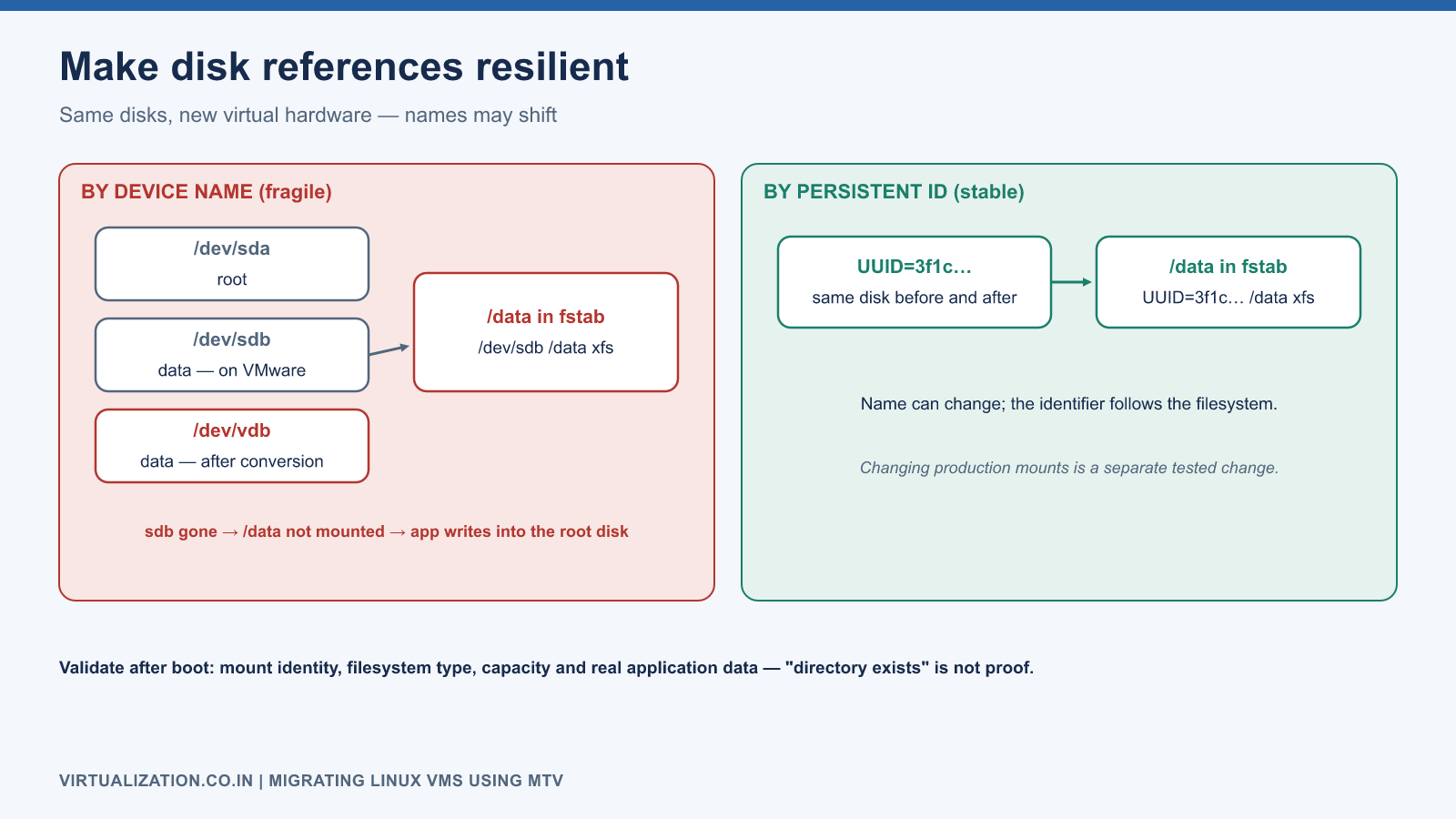
Document boot, root, swap, data, and log volumes individually. Identify filesystems mounted through systemd units, automounters, or application scripts as well as /etc/fstab. A server may boot normally while an unmounted data filesystem causes an application to write into an empty directory on the root disk.
Validate mount identity, filesystem type, capacity, and application data after conversion. Do not accept “directory exists” as proof that the intended disk is mounted.
Network configuration and identity
Determine whether the guest uses NetworkManager, Netplan, systemd-networkd, legacy network scripts, or another mechanism. Record connection profiles, interface names, MAC binding, static addresses, DNS, routes, and policy routing. Avoid applying commands for one network manager to a guest managed by another.
# NetworkManager-managed guests:
nmcli connection show
nmcli device status
# Generic runtime state:
ip -br link
ip -br address
ip rule
ip route show table all
A hardware change may alter an interface name or invalidate a profile bound to a source MAC. Prepare a console-based recovery procedure before cutover. If the migration plan offers address-preservation behavior, test its effect on the actual guest configuration; still verify routes and DNS afterward.
Prevent simultaneous source/target activation with the same identity. For test clones, isolate them from production services that might interpret the clone as the original node, such as clusters, schedulers, monitoring, or replication systems.
Encryption, firmware, and security controls
Encrypted disks, TPM-sealed keys, Secure Boot, and custom boot chains require specific support review. Have approved recovery material available through secure handling procedures. Do not place keys in YAML, shell history, or support logs.
Keep SELinux/AppArmor, host firewalls, endpoint protection, and audit services enabled unless an approved diagnostic procedure specifically requires a temporary change. A migrated application’s failure to start is not sufficient reason to disable security controls globally. Inspect denials and service logs to identify the actual cause.
Execute the MTV plan
Confirm provider readiness, complete network and storage mappings, destination capacity, guest support, and backup recovery evidence. Pilot the exact combination of OS, filesystem, firmware, and application class before the production wave.
For cold migration, budget for the full period between application shutdown and validated target service. For warm migration, monitor pre-copy progress and source load, then quiesce writes according to the application procedure before cutover. Follow the MTV migration workflow for the installed release.
oc get plans.forklift.konveyor.io -n openshift-mtv
oc get migrations.forklift.konveyor.io -n openshift-mtv
oc get vm,vmi,dv,pvc -n apps
oc get events -n apps --sort-by=.metadata.creationTimestamp
Capture the migration identifier and conversion logs. A plan marked successful does not establish application consistency or networking correctness.
Validate after boot
systemctl --failed
journalctl -b -p err --no-pager
lsblk -f
findmnt --real
df -hT
ip -br address
ip route
ss -lntup
timedatectl
systemctl status qemu-guest-agent
The guest-agent command applies when that service is installed and expected. Check actual time synchronization with the guest’s time service. Compare errors with the source baseline to distinguish pre-existing noise from new failures.
Validate application reads and writes, database consistency, queue processing, cron/systemd timers, outbound integrations, DNS resolution, and backup execution. Check file ownership and security labels where applications depend on them. Exercise a guest restart in the approved acceptance window to prove the boot and mount configuration persists.
Troubleshooting decision tree
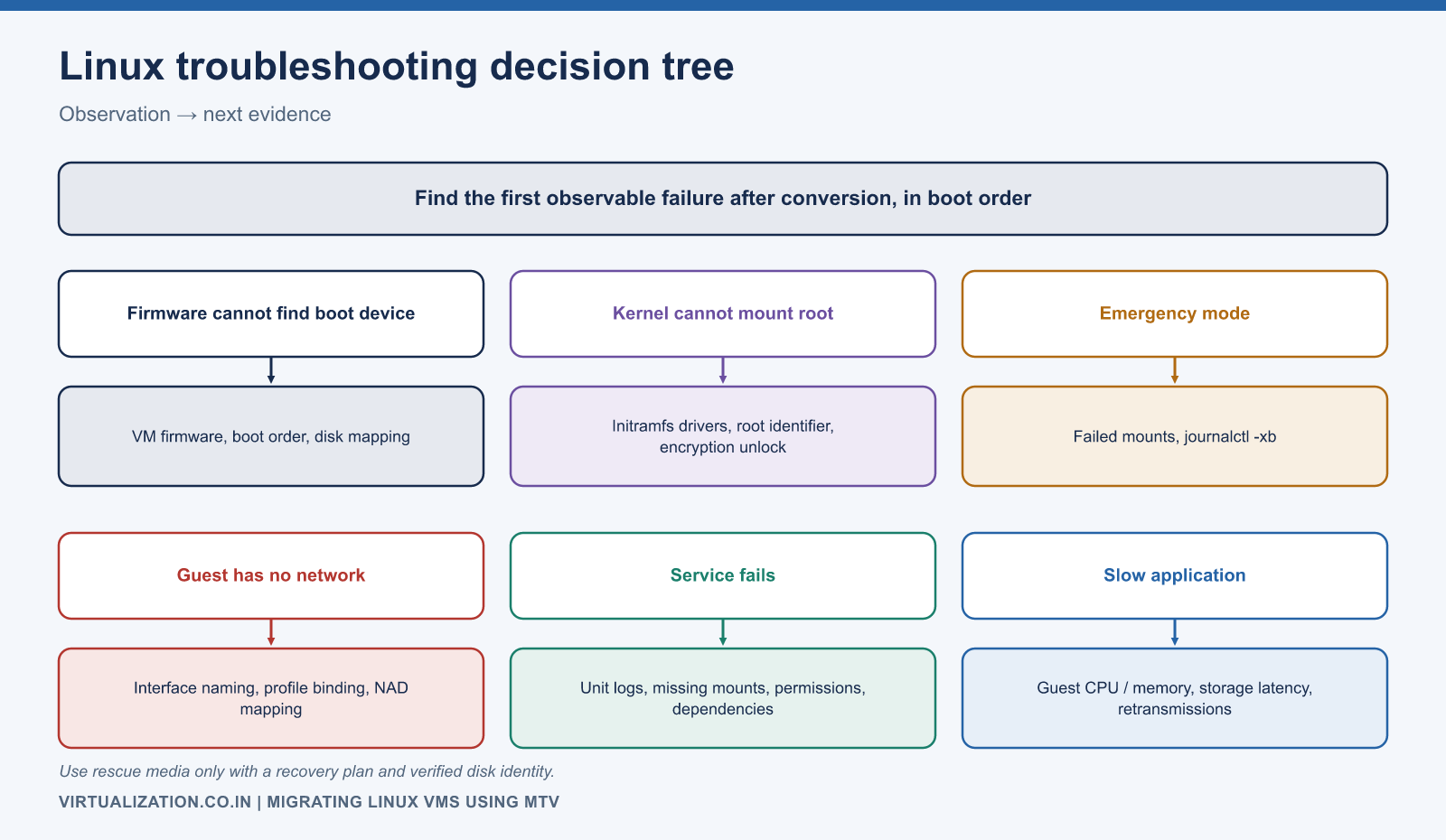
| Observation | Next evidence |
|---|---|
| Firmware cannot find boot device | VM firmware, boot order, disk mapping |
| Kernel cannot mount root | Initramfs drivers, root identifier, encryption unlock |
| Emergency mode | Failed mounts and journalctl -xb |
| Guest has no network | Interface naming, profile binding, NAD mapping |
| Service fails | Unit logs, missing mounts, permissions, dependency reachability |
| Slow application | Guest CPU/memory, storage latency, network retransmissions |
Use rescue media only with a clear recovery plan and verified disk identity. Do not run destructive filesystem repair against the only copy without backup and diagnosis.
Close the migration with evidence
Record the source-to-target disk and NIC mapping, completed application tests, performance comparison, backup result, and operational ownership. Keep rollback logic tied to whether the target has accepted authoritative writes. After that point, data reconciliation or restore may be required before returning to the source.
Use the troubleshooting guide to separate cluster and guest failures, and the enterprise architecture to standardize these checks across many Linux workloads.
Explore the complete series
- VMware vs OpenShift Virtualization: Complete Technical Comparison
- OpenShift Virtualization Architecture Explained
- Understanding KubeVirt, VM and VMI
- VMware to OpenShift: Complete Migration Strategy
- MTV Architecture and Internal Working
- OpenShift Virtualization Networking Deep Dive
- OpenShift Virtualization Storage Deep Dive
- OpenShift VM Live Migration Explained
- OpenShift Cluster Sizing for Virtualization
- Migrating Windows VMs Using MTV
- Migrating Linux VMs Using MTV
- VMware PowerCLI vs OpenShift CLI
- Building OpenShift PowerShell Cmdlets
- OpenShift Virtualization Troubleshooting Guide
- Enterprise-Scale VMware to OpenShift Migration Architecture