VMware to OpenShift Virtualization — Article 1 of 15
Technical baseline: OpenShift Virtualization 4.20 and MTV 2.11 documentation. Reviewed 31 October 2026. Examples are instructional and have not been executed against a production cluster; check your installed release, support matrix, and environment before use.
VMware vSphere and Red Hat OpenShift Virtualization can both run enterprise virtual machines, but their management models, operational dependencies, and migration implications differ. The right decision depends on workload requirements and the team’s ability to operate the entire platform, including storage, networking, recovery, and automation.
- Scope and terminology
- Technical comparison
- Availability is an end-to-end property
- Storage and networking deserve separate proof of concept tracks
- Cost comparison without misleading assumptions
- A practical selection scorecard
- Map advanced operations without assuming equivalence
- CPU compatibility and performance methodology
- Compare the automation and ownership models
- Build a weighted decision with mandatory gates
- Proof-of-concept acceptance matrix
- Decision and next steps
Scope and terminology
Here, VMware means a vSphere environment built around ESXi and vCenter. VMware Cloud Foundation, NSX, vSAN, and third-party backup products add capabilities and commercial considerations; they are not assumed to be present everywhere. OpenShift Virtualization means Red Hat’s supported virtualization capability on OpenShift, built on KubeVirt and KVM. Upstream KubeVirt features do not automatically establish Red Hat product support. Red Hat’s product overview describes this platform model.
Technical comparison
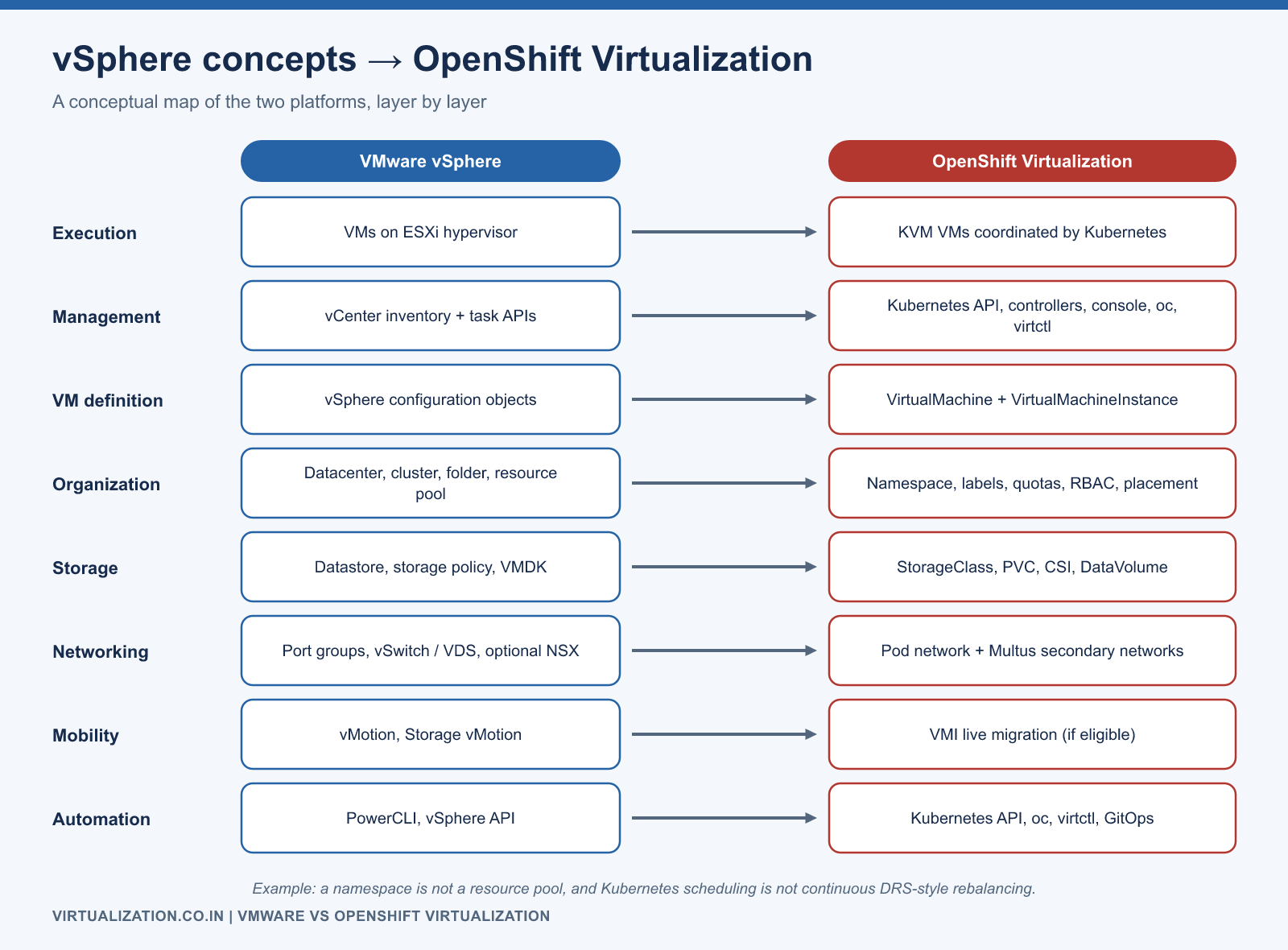
| Area | VMware vSphere | OpenShift Virtualization | Evaluation question |
|---|---|---|---|
| Execution | VM workloads on ESXi | KVM virtual machines coordinated through Kubernetes | Is the guest and application combination supported? |
| Management | vCenter inventory and task APIs | Kubernetes resources, controllers, web console, oc, and virtctl |
Can operations troubleshoot reconciliation and scheduling? |
| VM definition | vSphere configuration objects | VirtualMachine and VirtualMachineInstance resources |
Which system owns desired configuration? |
| Organization | Datacenters, clusters, folders, resource pools | Namespaces, labels, quotas, RBAC, placement rules | How will ownership and tenancy be represented? |
| Storage | Datastores, policies, virtual disks | PVCs, StorageClasses, CSI integration, DataVolumes | Have snapshots, restore, and mobility been qualified? |
| Networking | Port groups and virtual switches; optional NSX | Cluster networking and supported additional VM networks | Can required VLANs, IPs, and security policies be reproduced? |
| Mobility | vMotion and storage-related migration workflows | VMI live migration subject to configuration eligibility | Can every production VM evacuate its node? |
| Automation | PowerCLI and vSphere APIs | Kubernetes API, oc, virtctl, GitOps integrations |
How will API failures and drift be handled? |
This table is a conceptual mapping, not a feature-equivalence guarantee. For example, a namespace is not a direct replacement for a VMware resource pool, and Kubernetes scheduling is not a promise of continuous DRS-style VM rebalancing.
Availability is an end-to-end property
Distinguish three events during evaluation: planned maintenance, sudden host failure, and application failure inside a healthy guest. A successful planned move says little about recovery after storage loss. Likewise, a healthy VMI says little about whether a database accepts transactions.
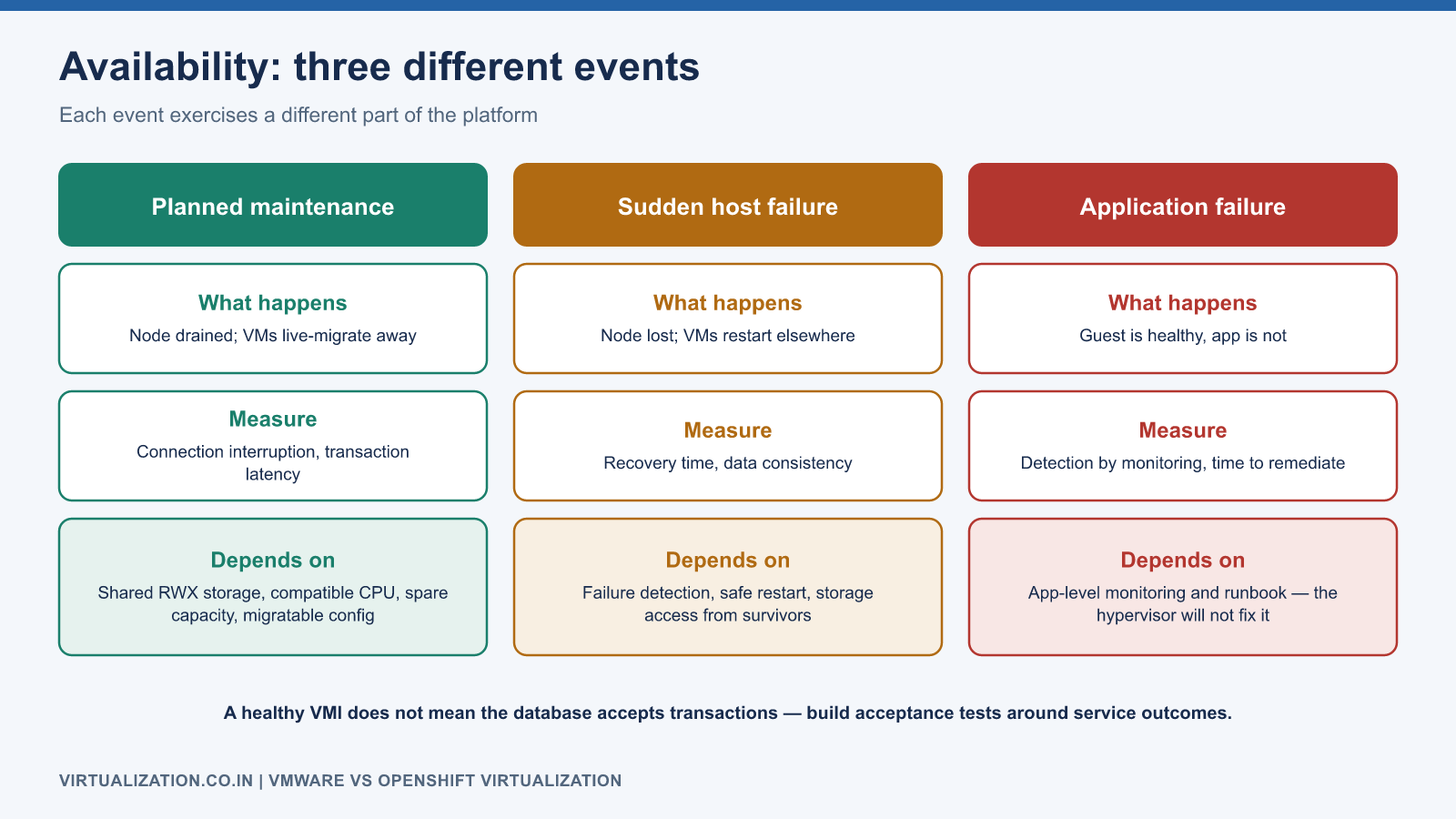
Build acceptance tests around service outcomes. During maintenance, measure connection interruption and transaction latency. During a controlled failure exercise, measure recovery time and verify data consistency. During an application fault, confirm monitoring detects the problem without assuming the hypervisor will repair it.
For the documented OpenShift 4.20 baseline, live migration requires appropriate shared RWX storage, compatible CPUs, spare resources, and a compatible VM configuration. Hardware passthrough and other constraints require individual review. Red Hat live migration requirements are the support reference.
Storage and networking deserve separate proof of concept tracks
For storage, record the current application’s latency distribution, IOPS, throughput, disk growth, and backup duration. Repeat the same workload after migration using a representative dataset. Include snapshot creation, restore to an isolated namespace, and restart on a different node. A boot test alone does not establish storage readiness.
For networking, document each interface’s purpose, IP assignment, DNS registration, routing, firewall rules, and dependencies. Test from real clients, not only from a node shell. If an IP must remain unchanged, prove that the target network reaches the correct subnet and that the source cannot come online simultaneously with the same identity.
Cost comparison without misleading assumptions
Compare a three-year operating model using actual supplier quotes and measured utilization. Include platform subscriptions, hardware, storage licensing, backup software, support, training, migration effort, temporary coexistence, and staff on-call time. Open source foundations do not make an enterprise deployment free, and a quoted per-core price does not describe the full service cost.
Use a worksheet with three scenarios: continue the existing platform, migrate all eligible workloads, and operate a mixed estate. Record which constraints make a VM ineligible and the cost of retaining those exceptions. This prevents an attractive average cost from hiding expensive specialist workloads.
A practical selection scorecard
Score each platform from one to five for guest support, application certification, recovery capability, measured performance, operational competence, automation fit, and total cost. Choose weights before conducting the proof of concept. A financial win should not override a failed mandatory recovery or application-support requirement.
Keep evidence with each score: test report, vendor statement, measured graph, or written operating procedure. Avoid scores based solely on demos. For critical applications, require an application owner to sign off the actual business transaction test.
Map advanced operations without assuming equivalence
| Existing operational requirement | Target design exercise | Evidence required |
|---|---|---|
| DRS-assisted placement and balancing | Define initial scheduling, placement constraints, and supported rebalance procedures separately | A loaded-cluster placement and maintenance test |
| HA recovery after a host outage | Define failure detection, safe restart, storage access, and recovery timing | Controlled failure with application recovery measurements |
| Storage vMotion-style relocation | Select a supported disk relocation or migration workflow | Tested data consistency and outage behavior |
| Snapshot-based protection | Qualify CSI snapshot integration and the chosen backup product | Isolated restore with application checks |
| NSX microsegmentation | Map rules to controls available on each target network | Positive and negative connectivity tests |
| Templates and customization | Define approved images, initialization, and configuration ownership | Repeatable deployment without embedded secrets |
| Resource pools and reservations | Design namespace quotas, VM requests, and placement policy | Admission, contention, and recovery tests |
This comparison intentionally separates requirements that are often bundled under one product feature name. For example, initial scheduling and continuous balancing are distinct outcomes. A platform can satisfy one without reproducing every aspect of the other.
CPU compatibility and performance methodology
Select a CPU strategy before populating the target with production VMs. The decision affects instruction availability, placement flexibility, and mobility across host generations. Record whether a workload needs a specific instruction set, dedicated CPU placement, or NUMA-sensitive topology. Validate licensing implications with the relevant supplier rather than deriving them from vCPU counts alone.
For a fair performance comparison, hold the guest version, application build, dataset, concurrency, storage durability settings, and test duration constant. Record the virtual hardware and driver differences. Warm caches consistently and compare both steady state and recovery from a restart. Report tail latency as well as throughput.
Do not publish a universal “platform A is faster” conclusion from one workload. A useful result is specific: a defined application achieved a measured transaction rate within a latency target on a documented host/storage/network configuration. That result can support the decision for similar workloads, but should not be generalized to unrelated workloads without evidence.
Compare the automation and ownership models
In a vSphere-centered environment, operators commonly reason about inventory objects and imperative tasks. On OpenShift, desired resources are reconciled by controllers and may also be owned by GitOps. The important transition is learning to inspect both requested state and observed state.
For instance, a VM creation request can succeed while its launcher remains pending because no node satisfies placement. A lifecycle action can be accepted before the guest starts. A manual configuration edit may later be reverted by a controller. Automation must model these transitions with bounded waits and explicit failure states.
Create an ownership matrix for VM definition, guest configuration, disks, network attachments, backup policy, and application health. Decide which system is authoritative for each. This prevents a configuration-management agent, GitOps controller, and administrator from repeatedly undoing one another’s changes.
Build a weighted decision with mandatory gates
An illustrative scorecard might weight application support at 25%, recovery at 25%, measured performance at 20%, operations at 15%, and cost at 15%. Score each dimension from one to five and compute sum(weight × score). Keep the evidence and assumptions beside the score.
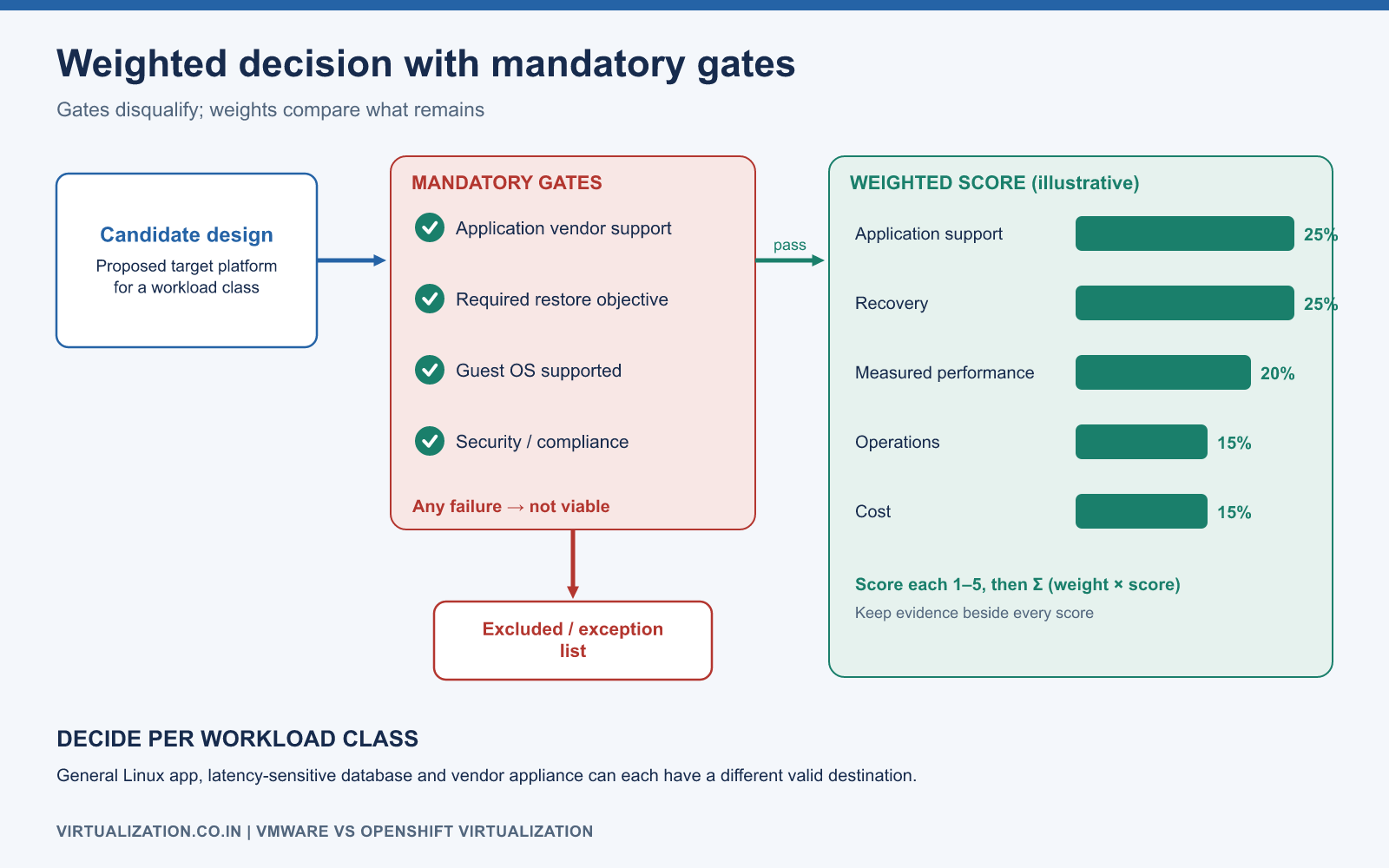
Apply mandatory gates before considering the weighted result. A platform that cannot meet a required restore objective or support a critical application should not win merely because its cost score compensates mathematically. Use the weighted score to compare viable designs, not to hide disqualifying failures.
For a mixed estate, calculate results by workload class. A general-purpose Linux application, a latency-sensitive database, and a vendor appliance may have different valid destinations. The resulting architecture can legitimately retain exceptions while migrating the majority.
Proof-of-concept acceptance matrix
Run at least one test in each category below using the actual proposed target design:
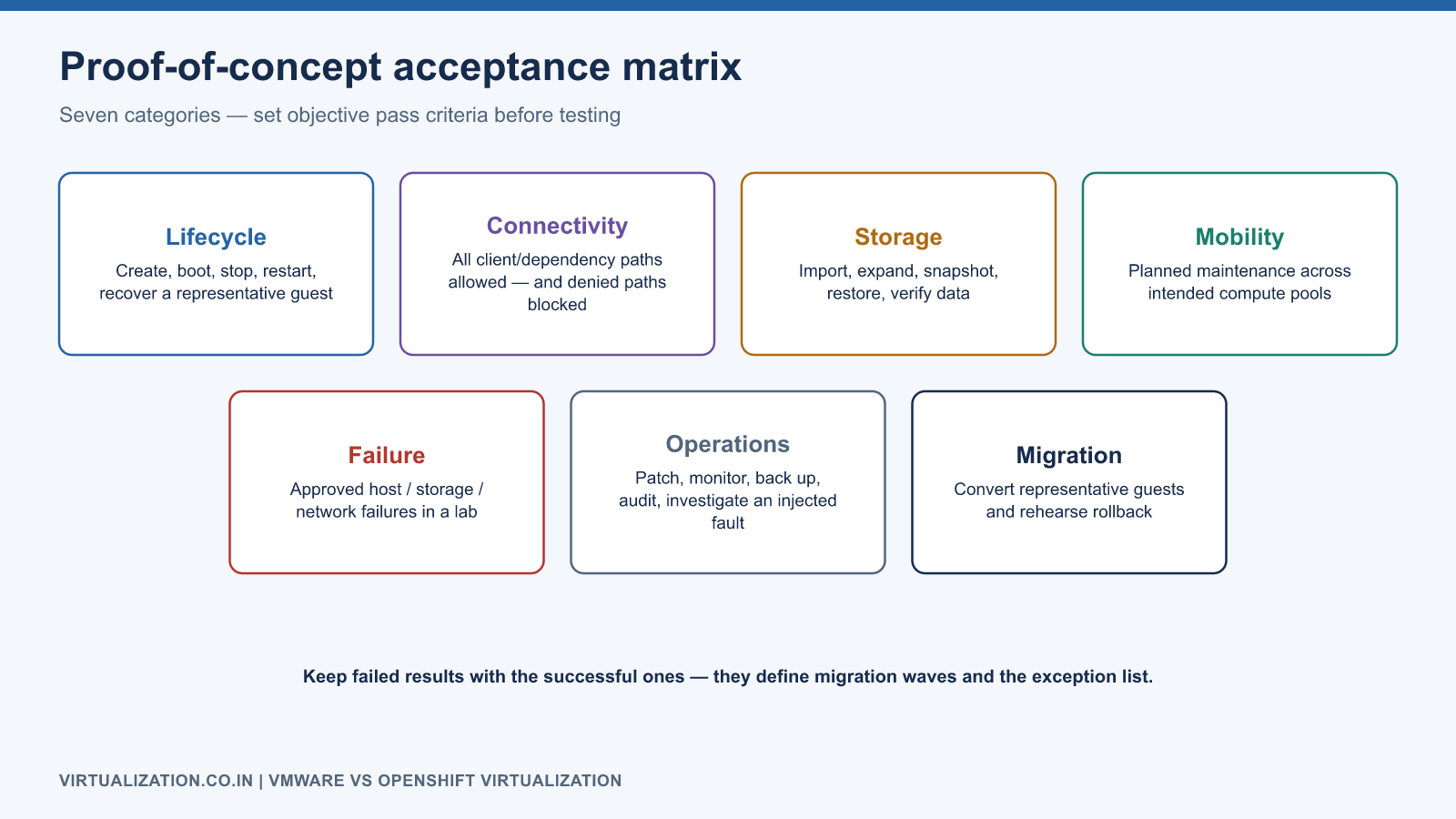
- Lifecycle: create, boot, stop, restart, and recover a representative guest.
- Connectivity: verify all expected client/dependency paths and denied paths.
- Storage: import, expand where supported, snapshot, restore, and verify data.
- Mobility: perform planned maintenance across intended compute pools.
- Failure: exercise the approved host/storage/network failure scenarios in a lab.
- Operations: patch, monitor, back up, audit access, and investigate a deliberately introduced fault.
- Migration: convert representative source guests and execute rollback rehearsals.
Set objective pass criteria before running tests. Preserve failed results along with successful ones; they often identify constraints that should shape the migration waves and exception list.
Decision and next steps
Choose OpenShift Virtualization when the validated target design and operating model meet the application’s requirements and the organization can support Kubernetes-based operations. Retain or separately handle workloads whose dependencies, support conditions, or recovery needs are not yet satisfied. Use the architecture guide to understand the target and the migration strategy to turn the evaluation into a controlled delivery program.
Explore the complete series
- VMware vs OpenShift Virtualization: Complete Technical Comparison
- OpenShift Virtualization Architecture Explained
- Understanding KubeVirt, VM and VMI
- VMware to OpenShift: Complete Migration Strategy
- MTV Architecture and Internal Working
- OpenShift Virtualization Networking Deep Dive
- OpenShift Virtualization Storage Deep Dive
- OpenShift VM Live Migration Explained
- OpenShift Cluster Sizing for Virtualization
- Migrating Windows VMs Using MTV
- Migrating Linux VMs Using MTV
- VMware PowerCLI vs OpenShift CLI
- Building OpenShift PowerShell Cmdlets
- OpenShift Virtualization Troubleshooting Guide
- Enterprise-Scale VMware to OpenShift Migration Architecture