VMware to OpenShift Virtualization — Article 5 of 15
Technical baseline: OpenShift Virtualization 4.20 and MTV 2.11 documentation. Reviewed 31 October 2026. Examples are instructional and have not been executed against a production cluster; check your installed release, support matrix, and environment before use.
Migration Toolkit for Virtualization (MTV) coordinates discovery, mapping, disk movement, conversion, and target VM creation. Understanding these responsibilities makes it easier to determine whether a failed migration is a provider-access issue, a transfer issue, a conversion issue, or a target-platform issue.
- The main logical components
- Resources that describe intent
- What happens during migration
- Cold and warm execution
- Diagnosing by stage
- Internal service boundaries and transfer paths
- Example: separate plan definition from execution
- Inspect execution without guessing pod names
- Failure recovery and cleanup ownership
- Capacity and security design
The main logical components
MTV is based on the upstream Forklift project. Its exact deployment layout and transfer implementation vary by product version, provider, and selected migration method. The Forklift project is useful for implementation context; Red Hat’s release documentation governs the supported product.
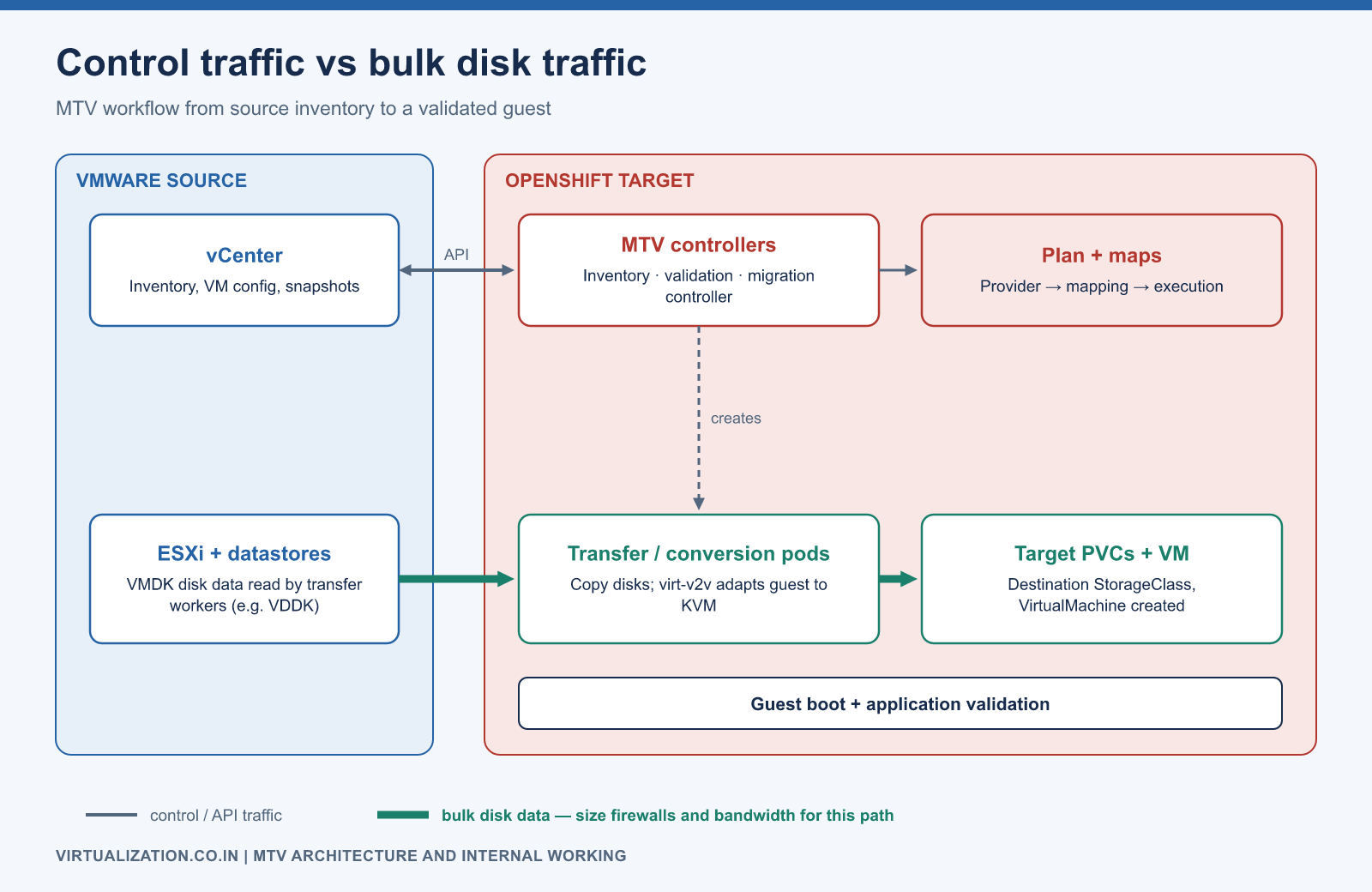
Source inventory and credentials
             |
Provider discovery and validation
             |
Plan + network map + storage map
             |
Migration execution and reconciliation
             |
Disk transfer / conversion resources
             |
Destination storage + VM definition
             |
Guest boot and application validation
Separate control traffic from bulk disk traffic in the design. A provider can be visible in the console even when a transfer worker cannot reach the data endpoint it needs.
Resources that describe intent
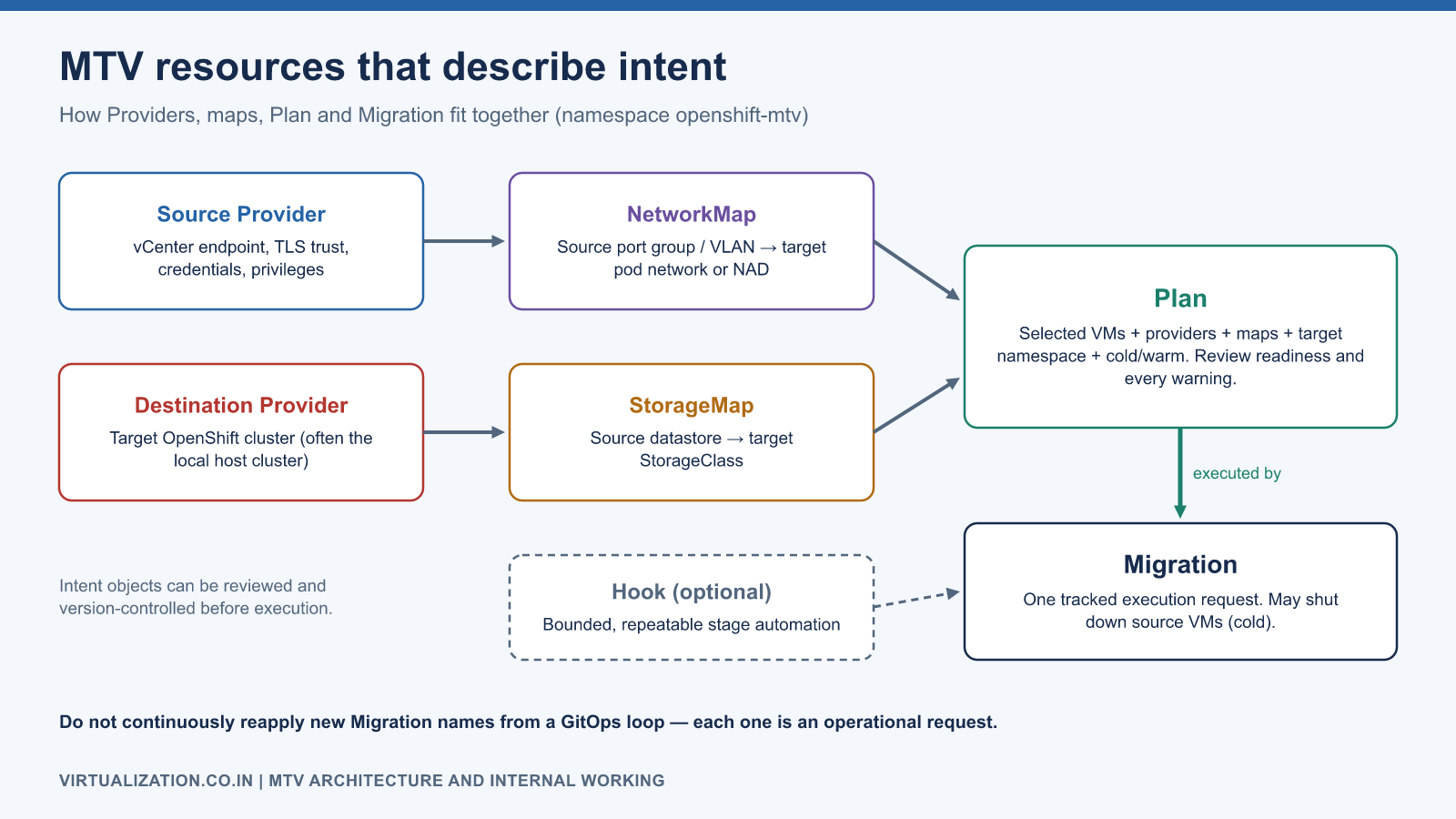
| Resource | Purpose | Operator responsibility |
|---|---|---|
| Provider | Describes source or destination access | Validate endpoint, trust, credentials, privileges |
| NetworkMap | Maps source networks to target networks | Confirm each NIC’s connectivity and security |
| StorageMap | Maps source storage to target storage classes | Confirm capacity, access mode, and performance |
| Plan | Selects VMs and migration configuration | Review warnings and migration readiness |
| Migration | Represents an execution request for a plan | Track status and collect failure evidence |
| Hook, when used | Runs supported migration-stage automation | Make actions bounded, repeatable, and observable |
Use CRD discovery rather than relying on resource abbreviations from a different release:
oc api-resources --api-group=forklift.konveyor.io
oc get providers.forklift.konveyor.io -n openshift-mtv
oc get plans.forklift.konveyor.io -n openshift-mtv
oc get migrations.forklift.konveyor.io -n openshift-mtv
oc get pods -n openshift-mtv -o wide
The namespace shown is the common deployment namespace; use the actual namespace where your installation and plans reside.
What happens during migration
The operator first establishes provider access and inventory. Maps translate source references into target choices. A plan selects a group of VMs and an execution strategy. When execution starts, controllers reconcile migration tasks and create the required working resources.
For VMware workflows, disk transfer and guest conversion are related but distinct responsibilities. Conversion adapts a supported guest to the target virtual hardware; it is not just a file extension change. Do not assume every method creates the same pod chain or that every disk always traverses a generic CDI importer. Storage copy offload and other release-specific paths can differ.
The MTV migration procedures and installed resource status should be used together to identify the active workflow.
Cold and warm execution
For cold migration, source downtime includes the work required before the target can serve the application. For warm migration, bulk disk data is copied while the source still runs, followed by a cutover that handles remaining changes and target startup. A high source write rate can substantially increase the final work.
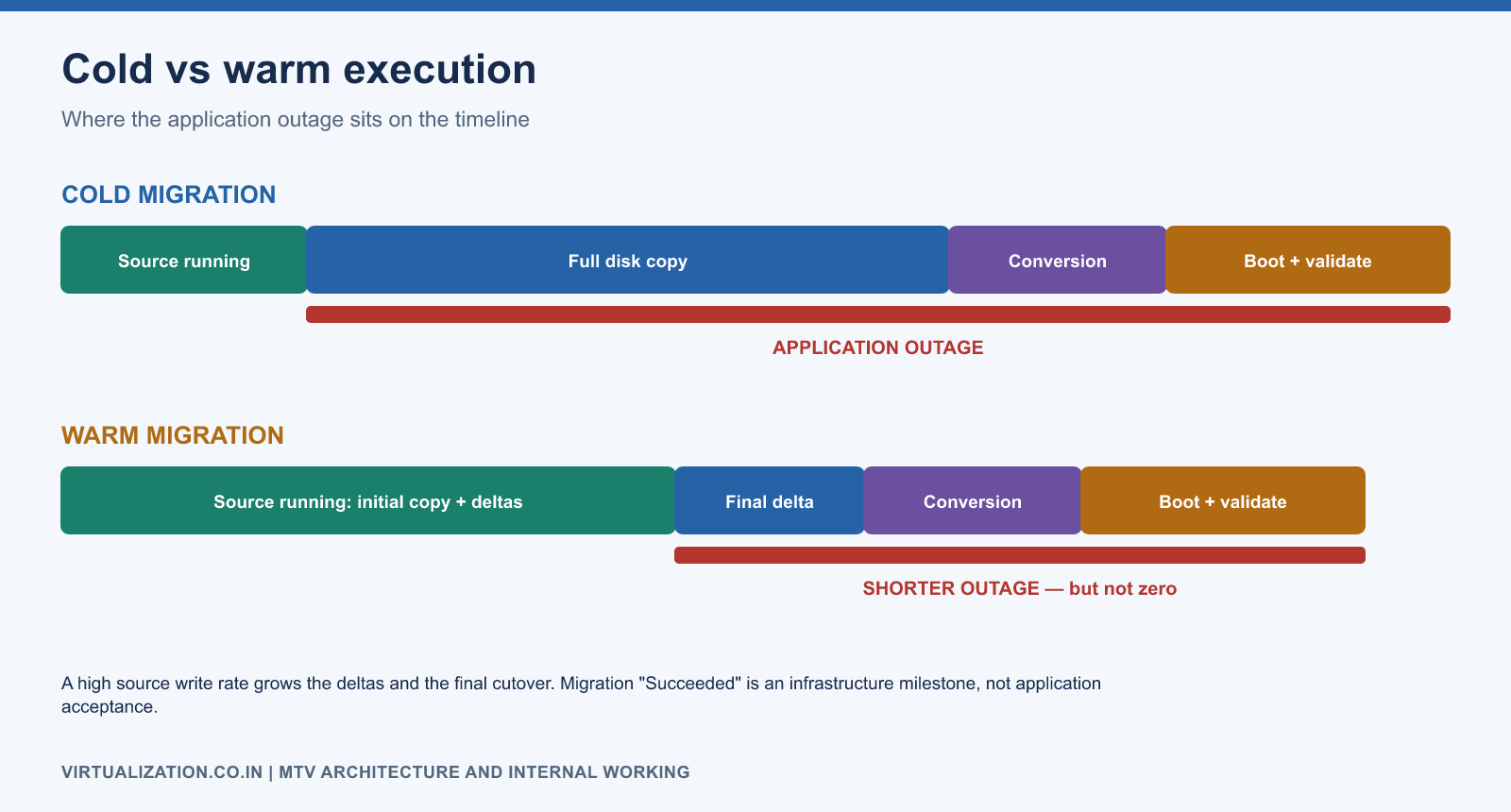
Treat migration completion as an infrastructure milestone. It does not prove that an application has the right address, valid licensing, working database connections, or an acceptable transaction response time.
Diagnosing by stage
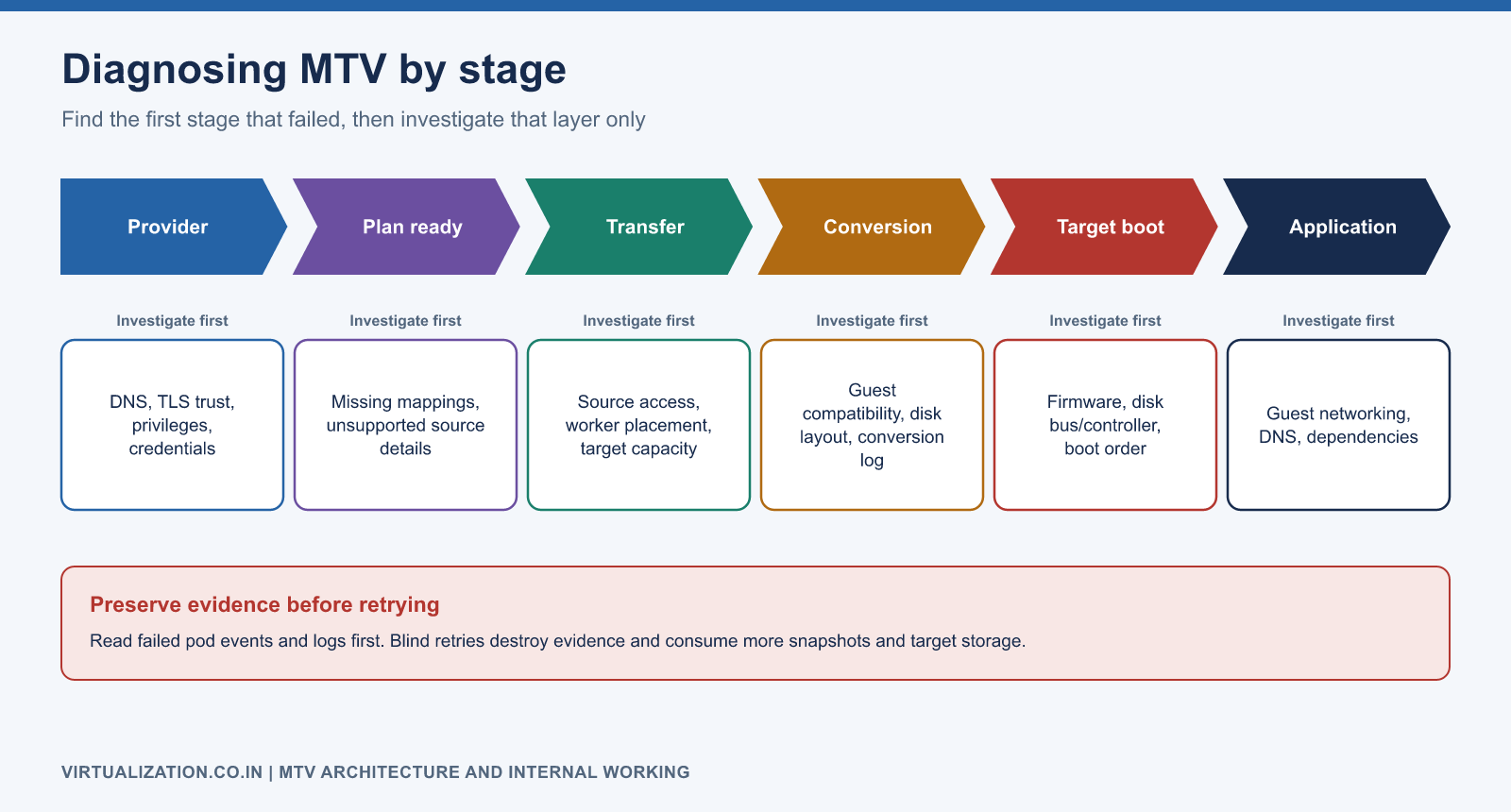
| Observed stage | Investigate first | Evidence to preserve |
|---|---|---|
| Provider unavailable | DNS, TLS trust, privileges, credentials | Provider conditions and sanitized error |
| Plan not ready | Missing mappings or unsupported source details | Plan conditions and VM-specific findings |
| Transfer stalled | Source access, worker placement, target capacity | Worker events, transfer logs, PVC status |
| Conversion failed | Guest compatibility, disk layout, conversion error | Exact conversion log and guest metadata |
| Target cannot boot | Firmware, disk/controller compatibility, boot selection | Console output and VM/VMI configuration |
| Application unavailable | Guest networking and dependencies | Guest logs and application test results |
Read a failed pod’s events and relevant logs before removing it. Blind retries can destroy useful evidence or compound source snapshot and target storage consumption.
Internal service boundaries and transfer paths
Inventory discovers provider objects; validation evaluates migration suitability; the migration controller coordinates execution. For the documented VMware-to-local-OpenShift cold path, blank target claims are prepared and a conversion workload handles disk transfer and conversion. Warm/remote paths can use per-disk import followed by conversion. Inspect the actual method before choosing which pod’s logs explain the transfer.
That distinction matters operationally. If a cold conversion workload is unschedulable, waiting for a separate per-disk importer that does not exist will waste time. If a warm import fails before conversion, guest-driver troubleshooting is premature. Follow the resource references and execution stages exposed by your installed release.
Example: separate plan definition from execution
The following illustrative cold-migration plan assumes ready source/destination Providers and reviewed NetworkMap/StorageMap objects already exist in openshift-mtv. Namespace apps is the destination. vm-123 is an example VMware managed-object reference and must be replaced with the exact source VM ID.
apiVersion: forklift.konveyor.io/v1beta1
kind: Plan
metadata:
  name: wave01-lab
  namespace: openshift-mtv
spec:
  warm: false
  provider:
    source:
      name: vsphere-source
      namespace: openshift-mtv
    destination:
      name: openshift-target
      namespace: openshift-mtv
  map:
    network:
      name: wave01-networks
      namespace: openshift-mtv
    storage:
      name: wave01-storage
      namespace: openshift-mtv
  targetNamespace: apps
  vms:
    - id: vm-123
Create the plan only after replacing these references, then inspect readiness and all warnings:
oc explain plan.spec --api-version=forklift.konveyor.io/v1beta1
oc apply --dry-run=server -f wave01-plan.yaml
oc apply -f wave01-plan.yaml
oc describe plan wave01-lab -n openshift-mtv
The separate execution object is shown below. Creating it can initiate migration, including source shutdown for the selected cold workflow; it belongs inside an approved test or production change window.
apiVersion: forklift.konveyor.io/v1beta1
kind: Migration
metadata:
  name: wave01-lab-run01
  namespace: openshift-mtv
spec:
  plan:
    name: wave01-lab
    namespace: openshift-mtv
Use server-side dry run to check the execution manifest, then create it once when ready. Give each intended execution a tracked identity. Do not continuously reapply new execution names from a generic GitOps loop, because that can turn reconciliation into repeated operational requests.
Inspect execution without guessing pod names
oc get migration wave01-lab-run01 -n openshift-mtv -o yaml
oc get plan wave01-lab -n openshift-mtv -o yaml
oc get pods -n openshift-mtv --show-labels
oc get pods -n apps --show-labels
oc get dv,pvc -n apps -o wide
Look for references and labels associating working resources with the plan, execution, and source VM. Pod names and namespaces can differ by workflow and release, so avoid a script that assumes every conversion pod has one hardcoded name. Inspect container names before requesting container logs.
For every failed VM, record the current stage, last successful stage, exact condition, working pod, source object ID, and target claims. This evidence lets an engineer distinguish a retryable network failure from a persistent guest incompatibility or a storage configuration error.
Failure recovery and cleanup ownership
A migration can create temporary pods, target disks, source snapshots, and execution records. Classify each resource before cleanup: temporary working state, evidence, intended final disk, or source recovery dependency. Do not delete all resources with a matching label until the product’s cleanup behavior and data ownership are understood.
Before retrying, verify whether source writes continued, whether target disks contain partial data, and whether the plan configuration changed. Preserve the original execution record. A retry should have a reason and a known expected effect, rather than being the default response to every failure.
Cancellation is not the same as application rollback. It controls migration execution; restoring service may still require guest/network actions and data-authority decisions. Follow the installed version’s cancellation procedure and the application’s rollback runbook together.
Capacity and security design
Reserve resources for temporary transfer/conversion workloads, not only final VMs. Start with conservative concurrency and measure whether adding parallel work improves throughput or merely increases storage latency. Use the documented controller configuration for the installed release rather than copying arbitrary tuning fields from an upstream example.
Keep provider credentials in the supported secret mechanism. Limit source privileges to the documented operations, verify certificate trust, and avoid placing credentials in plan files or support bundles. VDDK packaging and use require following the applicable vendor instructions and terms.
Before a production wave, prove one complete migration, one controlled failure recovery, and one application rollback rehearsal. See the Windows, Linux, and migration strategy articles for the workload-level procedures.
Explore the complete series
- VMware vs OpenShift Virtualization: Complete Technical Comparison
- OpenShift Virtualization Architecture Explained
- Understanding KubeVirt, VM and VMI
- VMware to OpenShift: Complete Migration Strategy
- MTV Architecture and Internal Working
- OpenShift Virtualization Networking Deep Dive
- OpenShift Virtualization Storage Deep Dive
- OpenShift VM Live Migration Explained
- OpenShift Cluster Sizing for Virtualization
- Migrating Windows VMs Using MTV
- Migrating Linux VMs Using MTV
- VMware PowerCLI vs OpenShift CLI
- Building OpenShift PowerShell Cmdlets
- OpenShift Virtualization Troubleshooting Guide
- Enterprise-Scale VMware to OpenShift Migration Architecture