OpenShift VM Live Migration Explained
VMware to OpenShift Virtualization — Article 8 of 15
Technical baseline: OpenShift Virtualization 4.20 and MTV 2.11 documentation. Reviewed 31 October 2026. Examples are instructional and have not been executed against a production cluster; check your installed release, support matrix, and environment before use.
Live migration relocates a running OpenShift VM between eligible nodes. The engineering challenge is to create a compatible destination and transfer execution state quickly enough for the application’s interruption tolerance while keeping storage and network identity consistent.
- Distinguish three different migration problems
- How pre-copy converges
- Eligibility is the intersection of constraints
- Inspect a VM before requesting migration
- Request and observe one migration
- Network and concurrency engineering
- Post-copy and interruption tradeoffs
- Draining nodes safely
- Troubleshooting and acceptance
Distinguish three different migration problems
Moving a VMware guest into OpenShift changes virtualization platforms and may require disk conversion and an outage. Moving a running VM between OpenShift nodes is VMI live migration. Moving a VM between clusters introduces additional identity, connectivity, and support considerations. Do not use a successful in-cluster test as evidence that the other two workflows are supported.
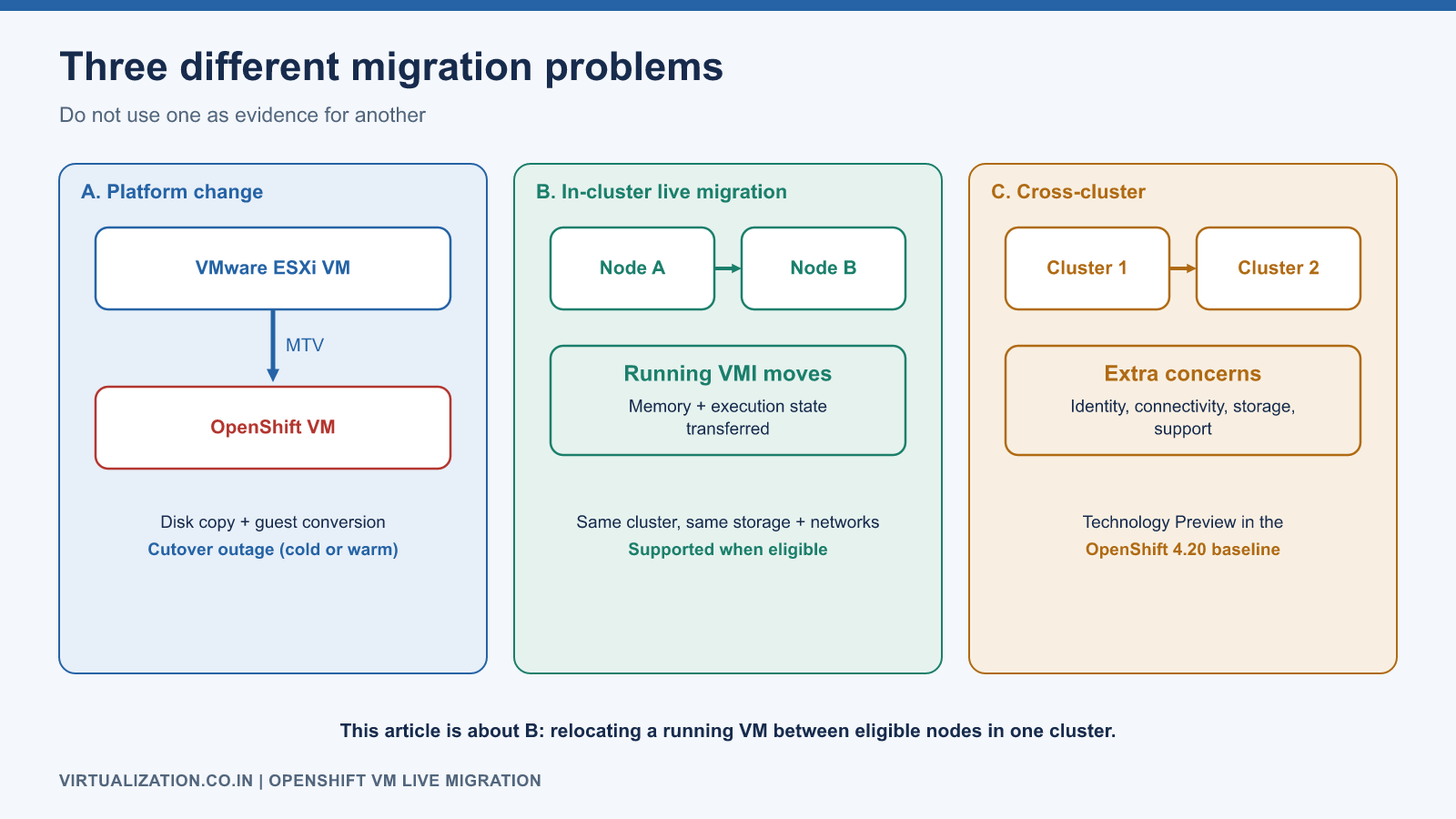
In the OpenShift 4.20 documentation baseline, cross-cluster live migration is Technology Preview. Treat that separately from a production in-cluster maintenance design. Consult the Red Hat live migration chapter for the release-specific support boundary.
How pre-copy converges
Conceptually, a destination execution context is prepared while the source continues running. Memory is copied, then pages changed during that copy are copied again. Eventually a short transition transfers the remaining execution state and the destination resumes the guest. Actual behavior depends on the implementation and selected migration settings.
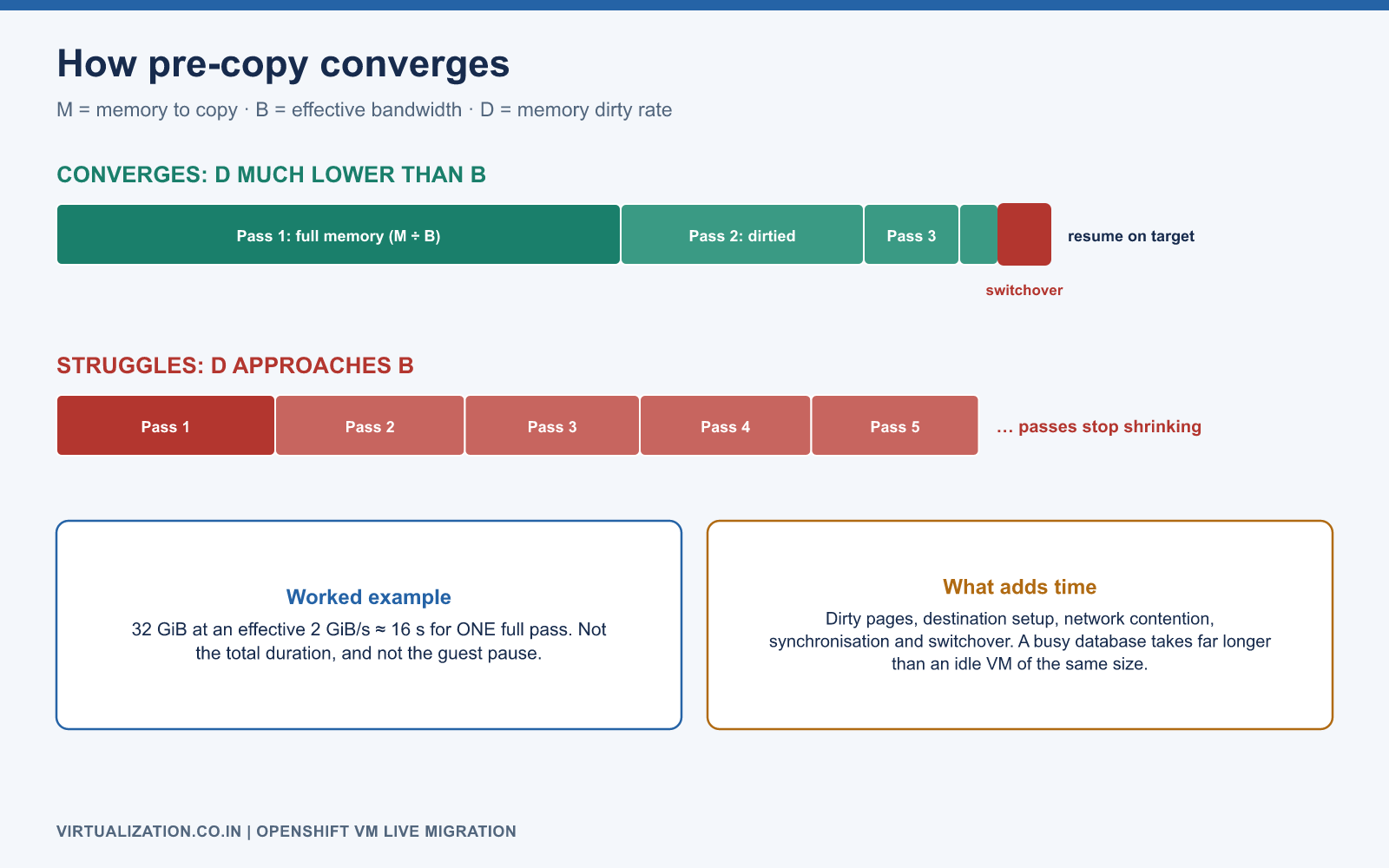
Let M be memory needing initial transfer, B effective transfer bandwidth, and D the guest’s memory dirtying rate. A simple first-pass estimate is M / B. If D approaches or exceeds B, repeated copying may struggle to converge. These are explanatory variables, not a substitute for the implementation’s measured migration counters.
Example: transferring 32 GiB at an effective 2 GiB/s takes roughly 16 seconds for one full pass. That is not the total duration or application outage. Dirty pages, synchronization, destination setup, network contention, and transition time add work. A high-write guest can take much longer than a similarly sized idle VM.
The upstream live migration guide provides the underlying mechanism and configuration constraints; product support must still be checked against Red Hat’s release documentation.
Eligibility is the intersection of constraints
An eligible destination must satisfy CPU compatibility, memory and other resource requests, node placement, network availability, disk access, device requirements, and platform health. Total cluster free RAM is insufficient if it exists only on incompatible nodes.
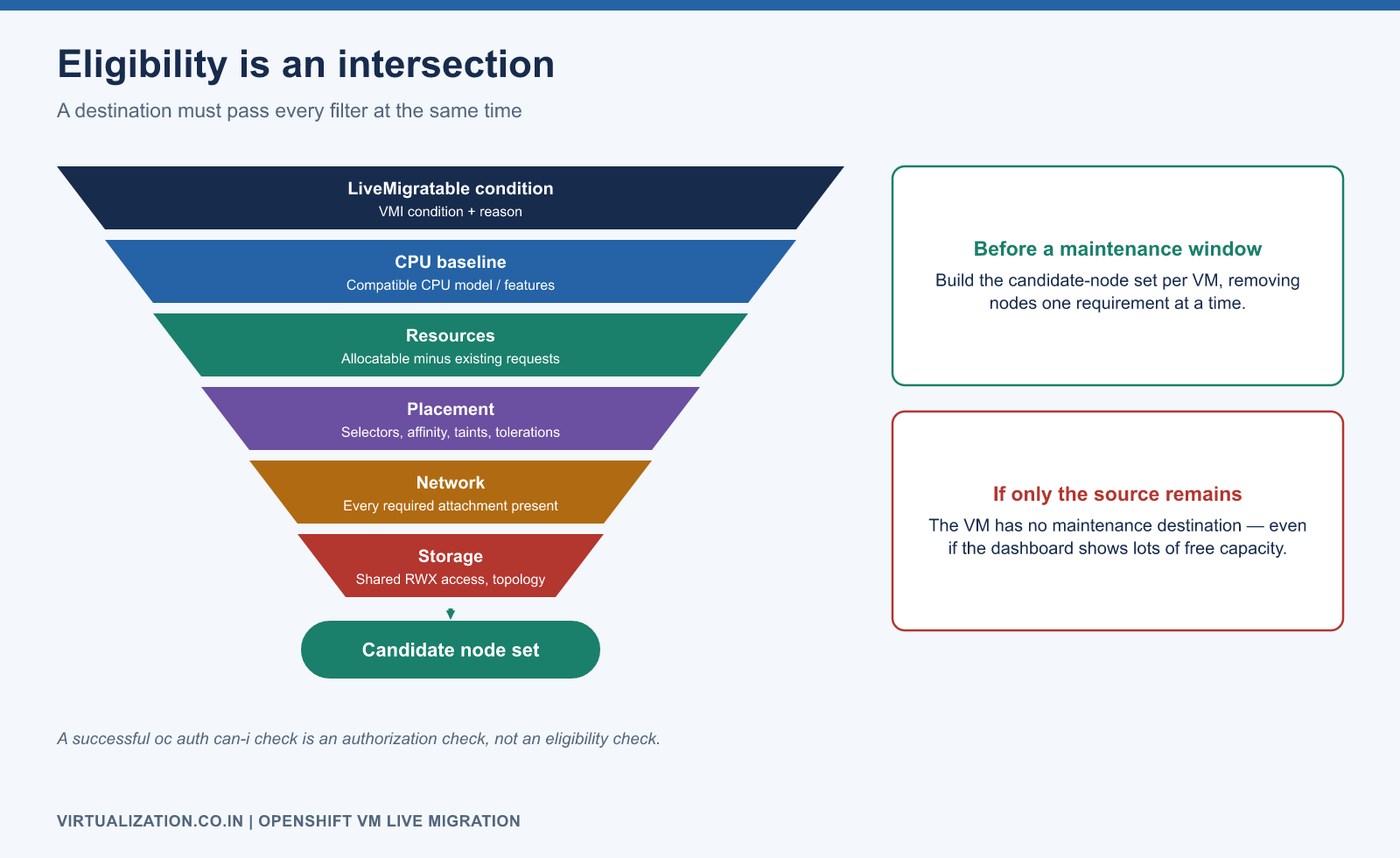
Before a maintenance window, build a candidate-node set for each VM. Remove nodes that fail one requirement at a time. If only the source remains, the VM has no maintenance destination even if the cluster dashboard shows abundant spare capacity.
| Constraint | Evidence to inspect |
|---|---|
| Runtime migratability | VMI LiveMigratable condition and reason |
| CPU baseline | VM CPU configuration and target node capabilities |
| Storage | PVC access/mode, backend availability, target topology |
| Network | Every required attachment on candidate nodes |
| Resources | Destination allocatable capacity minus existing requests |
| Placement | Node selectors, affinity, taints, tolerations |
| Devices | Release-supported migration behavior for attached devices |
Inspect a VM before requesting migration
oc get vmi app01 -n apps -o wide
oc describe vmi app01 -n apps
oc get vmi app01 -n apps -o jsonpath='{.status.conditions}'
oc get vm app01 -n apps -o yaml
oc get pvc -n apps
oc auth can-i create virtualmachineinstancemigrations.kubevirt.io -n apps
The permission check addresses creation of the migration resource. Product-specific migration authorization may impose additional requirements; use the documented role bindings for your release. A successful authorization check is not an eligibility check.
Request and observe one migration
The following manifest requests a move for a running lab VMI. It does not select a specific target node and should not be copied over an existing migration object with the same name.
apiVersion: kubevirt.io/v1
kind: VirtualMachineInstanceMigration
metadata:
  generateName: app01-maintenance-
  namespace: apps
spec:
  vmiName: app01
oc create --dry-run=server -f app01-migration.yaml
oc create -f app01-migration.yaml
oc get virtualmachineinstancemigrations -n apps -w
oc get vmi app01 -n apps -o yaml
Alternatively, use virtctl migrate app01 -n apps with a compatible client. Do not issue both methods for the same intended operation. Preserve the migration object’s name, UID, start/end time, source, target, and outcome for the change record.
Verify the node changed, migration state reports completion, and the application continues to meet its agreed health checks. Continuous TCP connections, transactions, and DNS-dependent client behavior should be tested; a ping alone is inadequate.
Network and concurrency engineering
Give migration traffic a deliberate capacity budget. A dedicated migration network can reduce competition with application traffic, but a separate VLAN on the same saturated NIC does not create additional bandwidth. Account for the physical uplinks, switch paths, oversubscription, and any shared storage transport.
Suppose a tested path sustains 4 GiB/s while preserving application latency. Four concurrent migrations do not necessarily receive 1 GiB/s each: per-node paths and memory dirty rates differ. Start with one, increase gradually, and stop increasing concurrency when aggregate throughput stops improving or application latency violates its limit.
Use supported Operator configuration and migration policies for tuning. Inspect the installed schema with oc explain and the current HyperConverged configuration before making changes. Avoid editing lower-level Operator-managed objects that will be reconciled back.
Post-copy and interruption tradeoffs
Post-copy can help a difficult migration complete by allowing the destination to run before all memory pages have arrived. It changes the failure risk because the destination may still depend on pages from the source. Enabling it should be an explicit workload-specific engineering decision, backed by network reliability and failure testing, rather than a universal remedy for slow migrations.
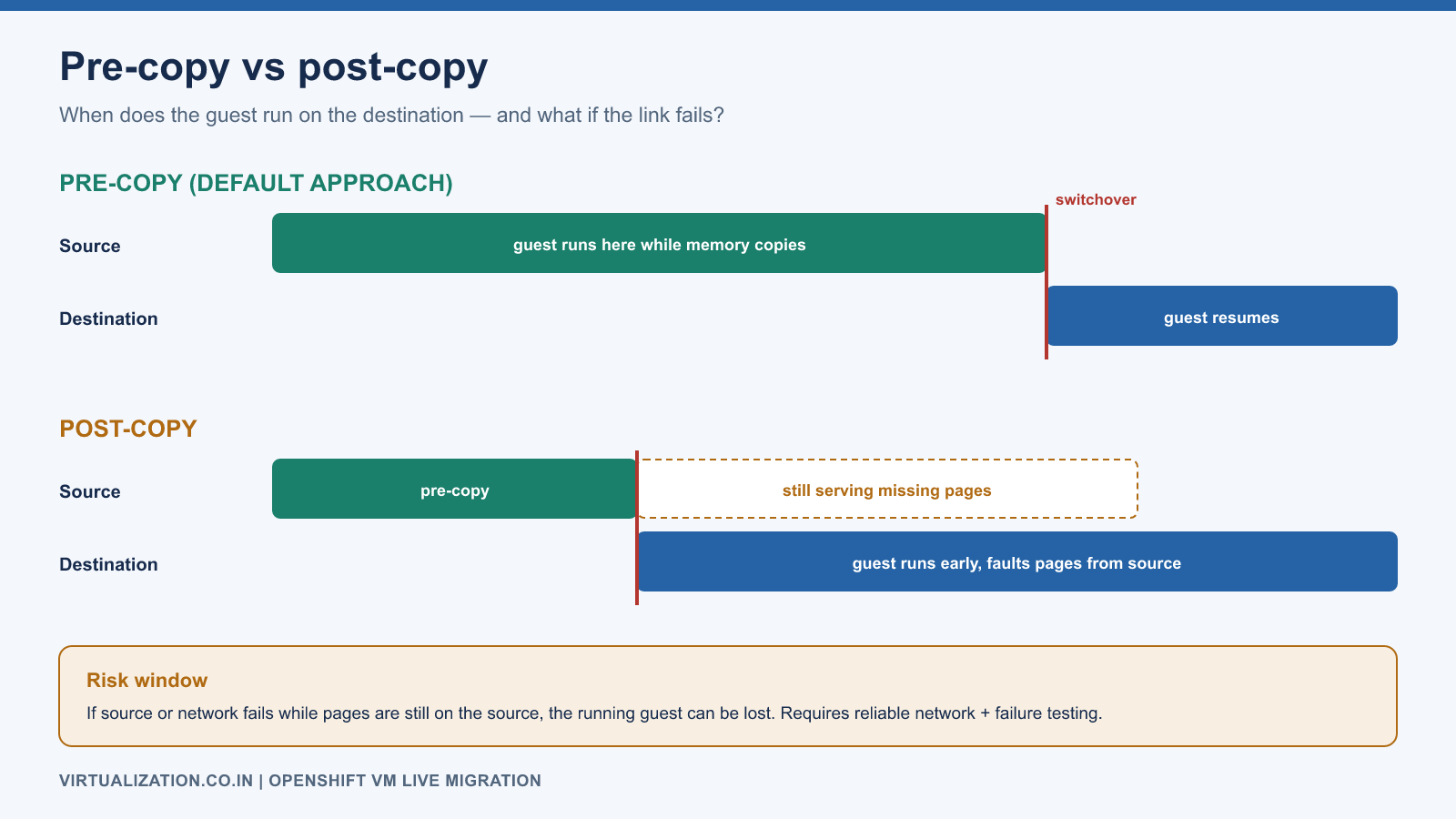
Similarly, a lower observed guest interruption is not the only objective. Consider total migration duration, application tail latency, source/destination resource consumption, and behavior if either path fails. Document which combinations are allowed for critical workloads.
Draining nodes safely
An eviction strategy expressing live-migration intent cannot make an otherwise ineligible VM migratable. Before draining, identify non-migratable workloads and plan their shutdown or other supported handling. Do not bypass disruption protections merely to make a drain command finish.
Calculate the reserve for the actual group of nodes that may drain concurrently. Include the largest VM and placement fragmentation. A maintenance policy that allows two simultaneous drains needs a different reserve from a one-node-at-a-time procedure.
Troubleshooting and acceptance
| Failure pattern | Investigate |
|---|---|
| No destination pod scheduling | Requests, affinity, node compatibility, taints |
| Migration rejected | VMI condition and unsupported configuration |
| Transfer makes little progress | Dirtying rate, effective bandwidth, contention |
| Target network fails after move | Attachment and physical path on destination |
| Migration appears complete but app fails | Guest/application state and client connectivity |
Treat cancellation according to the current phase and documented behavior; do not kill the source process manually. Preserve migration and VMI status before cleanup. A production acceptance report should include successful moves across every intended failure domain, measured client disruption, and a controlled failure exercise in a lab. See sizing for reserve calculations.
Explore the complete series
- VMware vs OpenShift Virtualization: Complete Technical Comparison
- OpenShift Virtualization Architecture Explained
- Understanding KubeVirt, VM and VMI
- VMware to OpenShift: Complete Migration Strategy
- MTV Architecture and Internal Working
- OpenShift Virtualization Networking Deep Dive
- OpenShift Virtualization Storage Deep Dive
- OpenShift VM Live Migration Explained
- OpenShift Cluster Sizing for Virtualization
- Migrating Windows VMs Using MTV
- Migrating Linux VMs Using MTV
- VMware PowerCLI vs OpenShift CLI
- Building OpenShift PowerShell Cmdlets
- OpenShift Virtualization Troubleshooting Guide
- Enterprise-Scale VMware to OpenShift Migration Architecture