OpenShift Virtualization Troubleshooting Guide
VMware to OpenShift Virtualization — Article 14 of 15
Technical baseline: OpenShift Virtualization 4.20 and MTV 2.11 documentation. Reviewed 31 October 2026. Examples are instructional and have not been executed against a production cluster; check your installed release, support matrix, and environment before use.
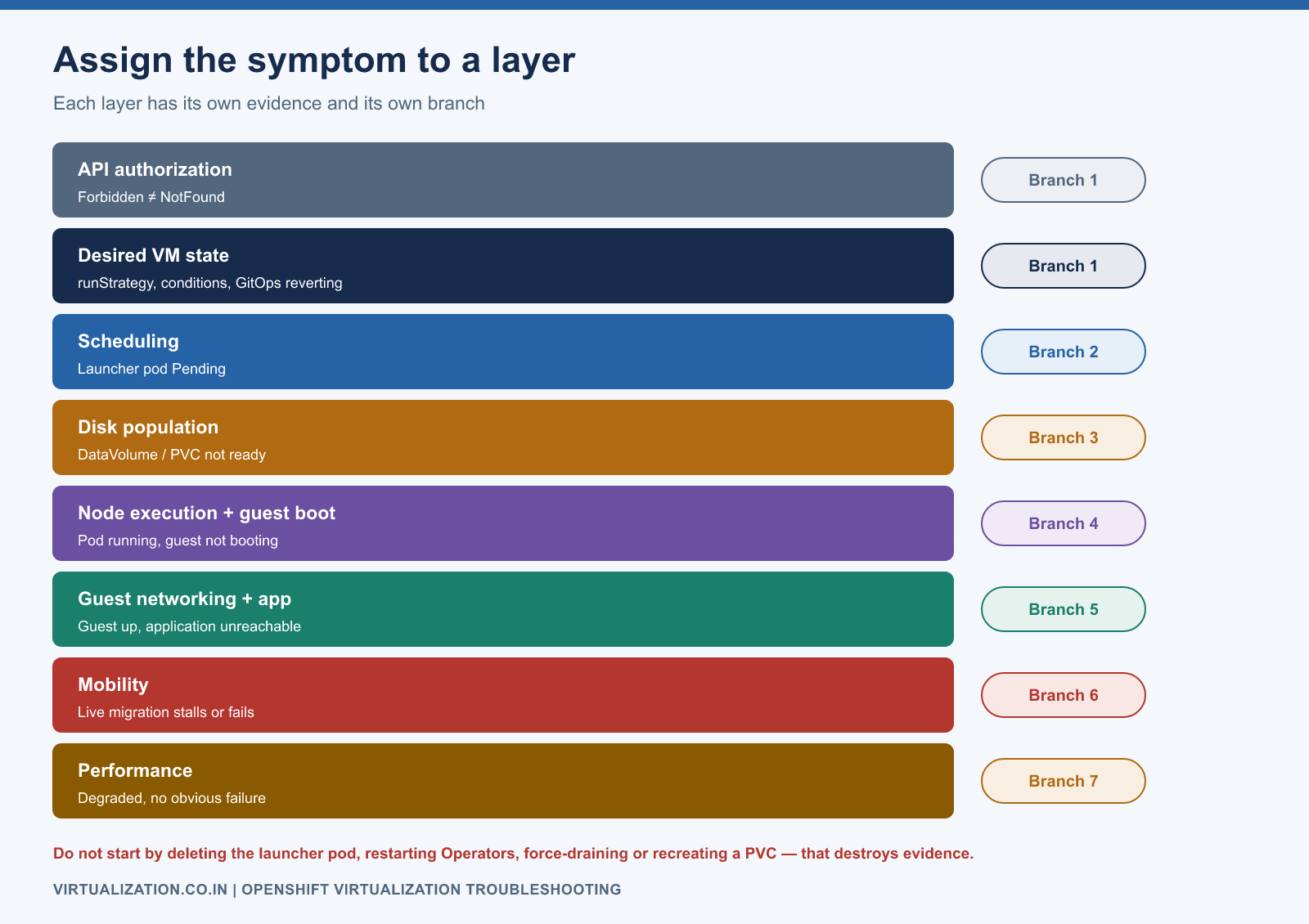
OpenShift Virtualization incidents become easier to diagnose when each observation is assigned to the correct layer: API authorization, desired VM state, scheduling, disk population, node execution, guest operating system, or application. This guide provides a repeatable evidence-first workflow and targeted failure branches.
- Establish scope before changing anything
- First-response command set
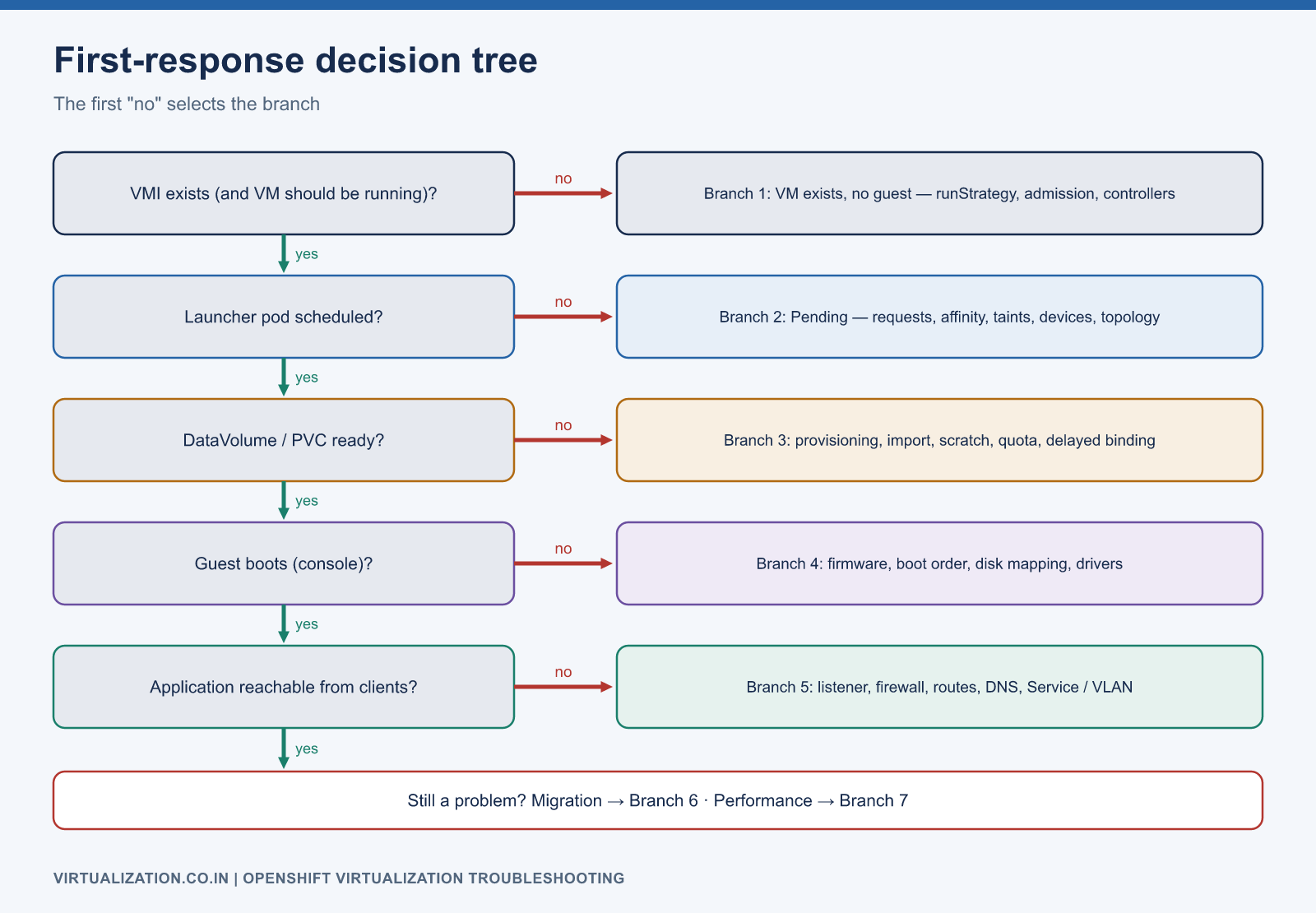
- Branch 1: VM exists but no guest runs
- Branch 2: launcher pod remains Pending
- Branch 3: DataVolume or PVC is not ready
- Branch 4: pod runs but guest does not boot
- Branch 5: guest runs but application is unreachable
- Branch 6: live migration stalls or fails
- Branch 7: performance degrades without an obvious failure
- Escalation package and recovery discipline
Establish scope before changing anything
Record the affected cluster, namespace, VM, application, first observed failure time, last successful operation, recent changes, and business impact. Determine whether one VM, one node, one storage class, one network, or the entire platform is affected.
Preserve the exact error and relevant object identifiers. A screenshot saying “VM failed” is less useful than the VMI UID, launcher pod, node, timestamp, and failing condition. Use consistent time zones in the incident record and note any clock skew.
Do not begin by deleting the launcher pod, restarting Operators, force-draining a node, or recreating a PVC. Those actions can change state, interrupt workloads, and remove evidence before the failure domain is understood.
First-response command set
The following Bash commands are read-only. Use the actual context and namespace, and collect cluster-wide data only when authorized:
oc config current-context
oc whoami
oc get clusterversion
oc get clusteroperators
oc get hyperconverged -n openshift-cnv -o yaml
oc get nodes
oc get vm app01 -n apps -o yaml
oc get vmi app01 -n apps -o yaml
oc get pods -n apps -l kubevirt.io=virt-launcher -o wide
oc get dv,pvc -n apps
oc get events -n apps --sort-by=.metadata.creationTimestamp
A NotFound response for a VMI can be expected when the VM is stopped. A Forbidden response indicates an access limitation and should not be interpreted as resource absence. Events are time-limited observations; collect them early rather than assuming they will remain available throughout a long incident.
Branch 1: VM exists but no guest runs
Inspect spec.runStrategy and VM conditions. A halted VM may be behaving exactly as configured. If running is intended, inspect admission errors, DataVolumes, and controller health. Check whether another controller, such as GitOps, is reverting the requested lifecycle or configuration.
Compare the requested change with its observed generation and conditions where the resource exposes them. A stale status or failed reconciliation needs a different remedy from a successful reconciliation that intentionally keeps the VM stopped.
If the start action failed, preserve its error and inspect authorization for the specific operation. Broad read access does not imply permission to invoke lifecycle subresources.
Branch 2: launcher pod remains Pending
oc describe pod <launcher-pod> -n apps
oc describe node <candidate-node>
oc get resourcequota,limitrange -n apps
oc get vm app01 -n apps -o yaml
Replace the angle-bracket names before execution. Read scheduling events literally. Distinguish insufficient resources, node affinity mismatch, untolerated taints, missing device resources, and volume topology constraints. Adding another generic worker may not help a VM restricted to a particular CPU or network pool.
Calculate the VM’s actual launcher request, including overhead, instead of comparing guest memory alone with free RAM. Current utilization is not the scheduler’s complete capacity model. See cluster sizing for placement and reserve analysis.
Branch 3: DataVolume or PVC is not ready
oc describe dv app01-root -n apps
oc describe pvc app01-root -n apps
oc get storageclass
oc get storageprofile
oc get pods -n apps -o wide
Identify whether the problem is provisioning, source download, scratch space, image conversion, quota, or delayed binding. A WaitForFirstConsumer class can intentionally wait for a consumer. Conversely, a real provisioning error should appear in events or CSI-related evidence.
For an importer or conversion pod, inspect its container names before selecting logs:
oc get pod <working-pod> -n apps -o jsonpath='{.spec.containers[*].name}'
oc logs <working-pod> -n apps -c <container> --since=30m
Use --previous only when the relevant container has restarted and previous logs exist. Keep credentials, signed URLs, and personal data out of shared incident excerpts. Follow the storage guide rather than deleting a claim to “try again.”
Branch 4: pod runs but guest does not boot
Inspect the console and identify the last successful boot stage: firmware, bootloader, kernel, root mount, service manager, or application. Verify firmware type, boot order, disk mapping, and boot-critical drivers. A running launcher container does not prove the guest OS is healthy.
virtctl console app01 -n apps
oc describe vmi app01 -n apps
Console availability depends on guest configuration and permissions. A blank serial console may mean no serial output is configured, not that the guest is powered off. Use the supported graphical console when appropriate.
For migrated Windows guests, inspect conversion and first-boot behavior before interrupting driver installation. For Linux, inspect initramfs, filesystem identifiers, and failed mounts. Follow the respective Windows and Linux runbooks.
Branch 5: guest runs but application is unreachable
Test from the guest outward: local listener, guest firewall, address and route, gateway, DNS, dependency, cluster service/external network, and real client. Record where the first failure occurs. Do not modify the cluster network while the application is bound only to loopback.
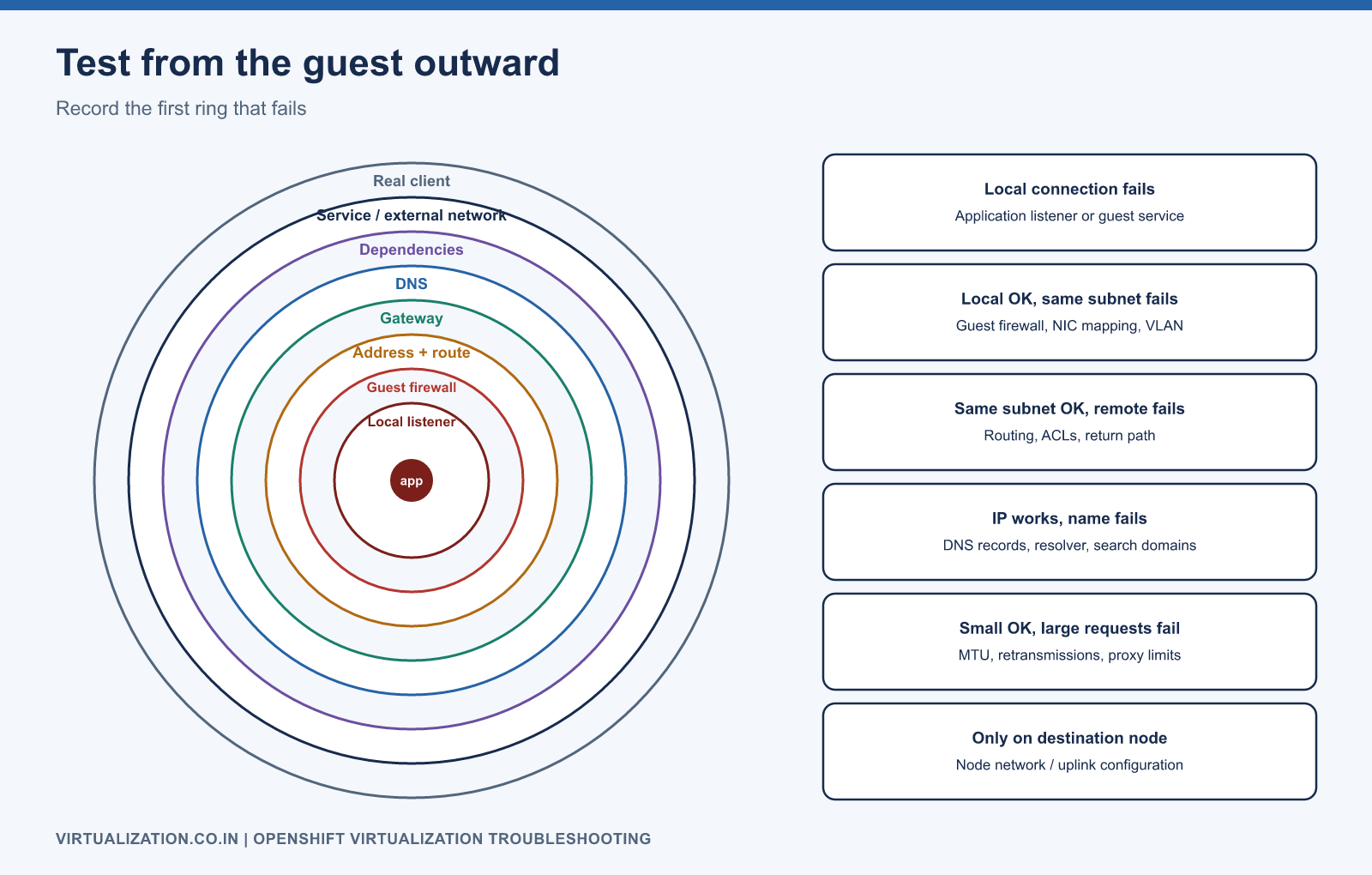
| Observation | Investigation |
|---|---|
| Local connection fails | Application listener or guest service |
| Local works, same subnet fails | Guest firewall, NIC mapping, VLAN |
| Same subnet works, remote fails | Routing, ACLs, return path |
| IP works, name fails | DNS records, resolver, search configuration |
| Small requests work, large fail | MTU, retransmissions, proxy limits |
| Only destination node fails | Node network/uplink configuration |
Avoid treating successful ping as application acceptance. Test the actual protocol, authentication, and transaction path.
Branch 6: live migration stalls or fails
oc get virtualmachineinstancemigrations -n apps
oc describe virtualmachineinstancemigration <migration-name> -n apps
oc get vmi app01 -n apps -o yaml
Check migratability, destination scheduling, storage access, network connectivity, and transfer progress. A high memory dirtying workload and a saturated migration path can produce similar elapsed times but need different remedies. Inspect measurements rather than increasing timeouts without a hypothesis.
Do not force-kill the source to finish a migration. Determine the current phase and use documented cancellation/recovery behavior. The live migration guide explains eligibility and convergence.
Branch 7: performance degrades without an obvious failure
Correlate application tail latency with guest CPU and memory, host scheduling, storage latency, network loss, and concurrent backup/migration activity. Compare with a known-good period. A single average utilization chart rarely isolates the cause.
Create a timeline: what changed, when latency rose, whether all guests on a node were affected, and whether the same storage/network path is shared. Reproduce in a lab where possible. Change one controlled variable at a time and record the result.
Red Hat’s virtualization monitoring guidance links supported metrics and alert runbooks. Use the runbook matching the exact alert and release rather than a generic restart recommendation.
Escalation package and recovery discipline
Collect the version/patch level, affected identifiers, sanitized manifests, relevant events/logs, timeline, recent changes, scope, and steps already attempted. Use the supported virtualization must-gather procedure for the installed release and handle the bundle as sensitive operational data. Generic cluster support guidance is available in the OpenShift troubleshooting documentation.
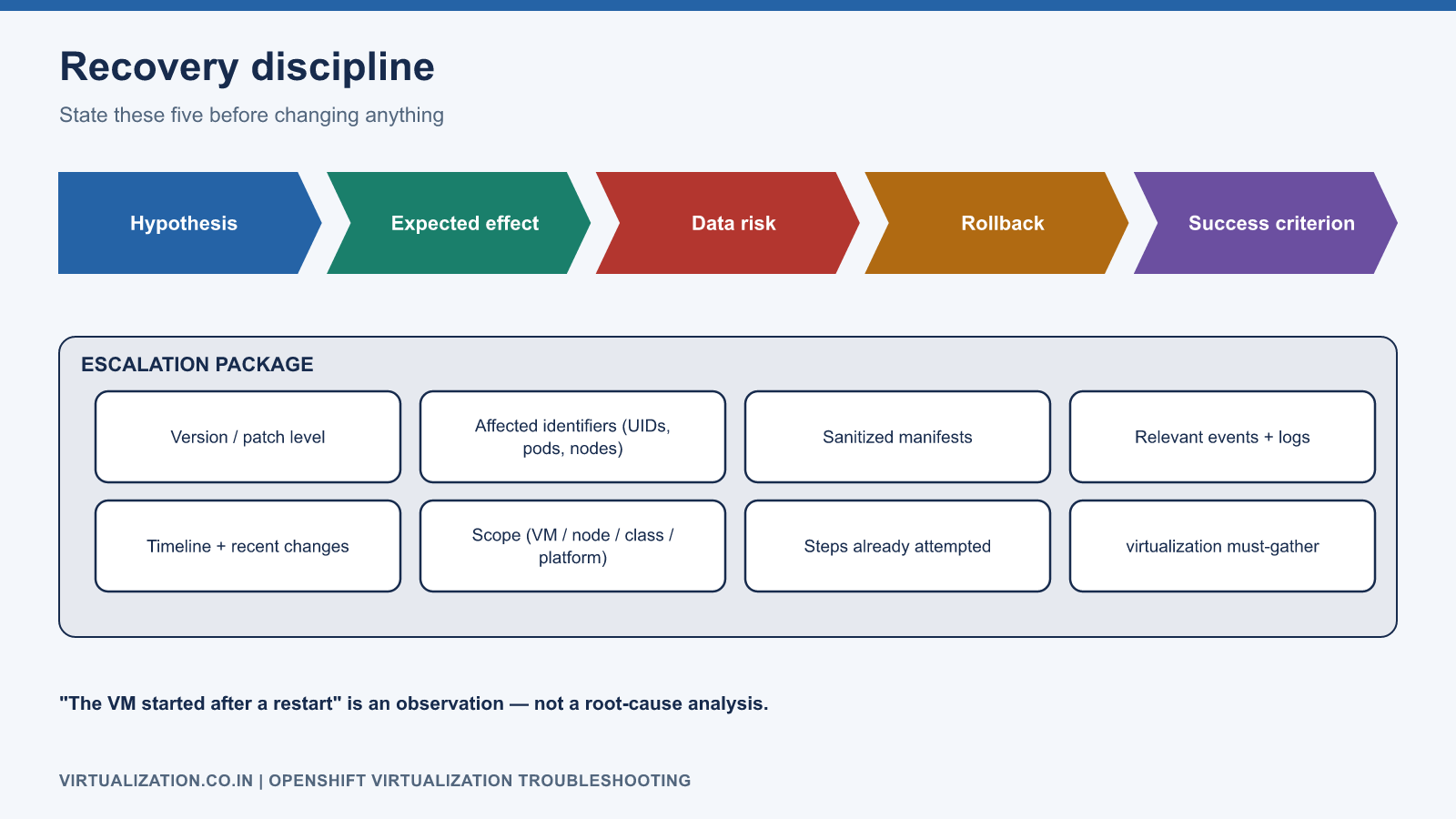
Before a recovery action, state the hypothesis, expected effect, data risk, rollback, and success criterion. After service restoration, validate applications and protection jobs, then document the root cause and prevention. “The VM started after a restart” is a useful observation, but it is not by itself a root-cause analysis.
Explore the complete series
- VMware vs OpenShift Virtualization: Complete Technical Comparison
- OpenShift Virtualization Architecture Explained
- Understanding KubeVirt, VM and VMI
- VMware to OpenShift: Complete Migration Strategy
- MTV Architecture and Internal Working
- OpenShift Virtualization Networking Deep Dive
- OpenShift Virtualization Storage Deep Dive
- OpenShift VM Live Migration Explained
- OpenShift Cluster Sizing for Virtualization
- Migrating Windows VMs Using MTV
- Migrating Linux VMs Using MTV
- VMware PowerCLI vs OpenShift CLI
- Building OpenShift PowerShell Cmdlets
- OpenShift Virtualization Troubleshooting Guide
- Enterprise-Scale VMware to OpenShift Migration Architecture