VMware to OpenShift Virtualization — Article 2 of 15
Technical baseline: OpenShift Virtualization 4.20 and MTV 2.11 documentation. Reviewed 31 October 2026. Examples are instructional and have not been executed against a production cluster; check your installed release, support matrix, and environment before use.
OpenShift Virtualization runs virtual machines as managed workloads within OpenShift. Understanding the boundary between the Kubernetes control plane, virtualization controllers, node execution, guest operating systems, and persistent storage makes design and troubleshooting much more precise.
- The control path and the data path
- Components and responsibilities
- Follow a VM from definition to running guest
- Read-only architecture inspection
- Design failure domains deliberately
- Security and operating boundaries
- Reconciliation explains asynchronous behavior
- Trace object identity with targeted queries
- Separate API objects from guest data
- Example: a read-only VM inventory role
- Failure-domain reasoning by scenario
- Upgrade and recovery planning
The control path and the data path
The control path begins when an operator or automation tool submits a VM definition to the Kubernetes API. Controllers work toward that desired state, scheduling and preparing execution resources. The data path is the guest’s actual CPU, memory, disk, and network activity on a worker node. A control-plane problem and a guest I/O problem require different investigations.
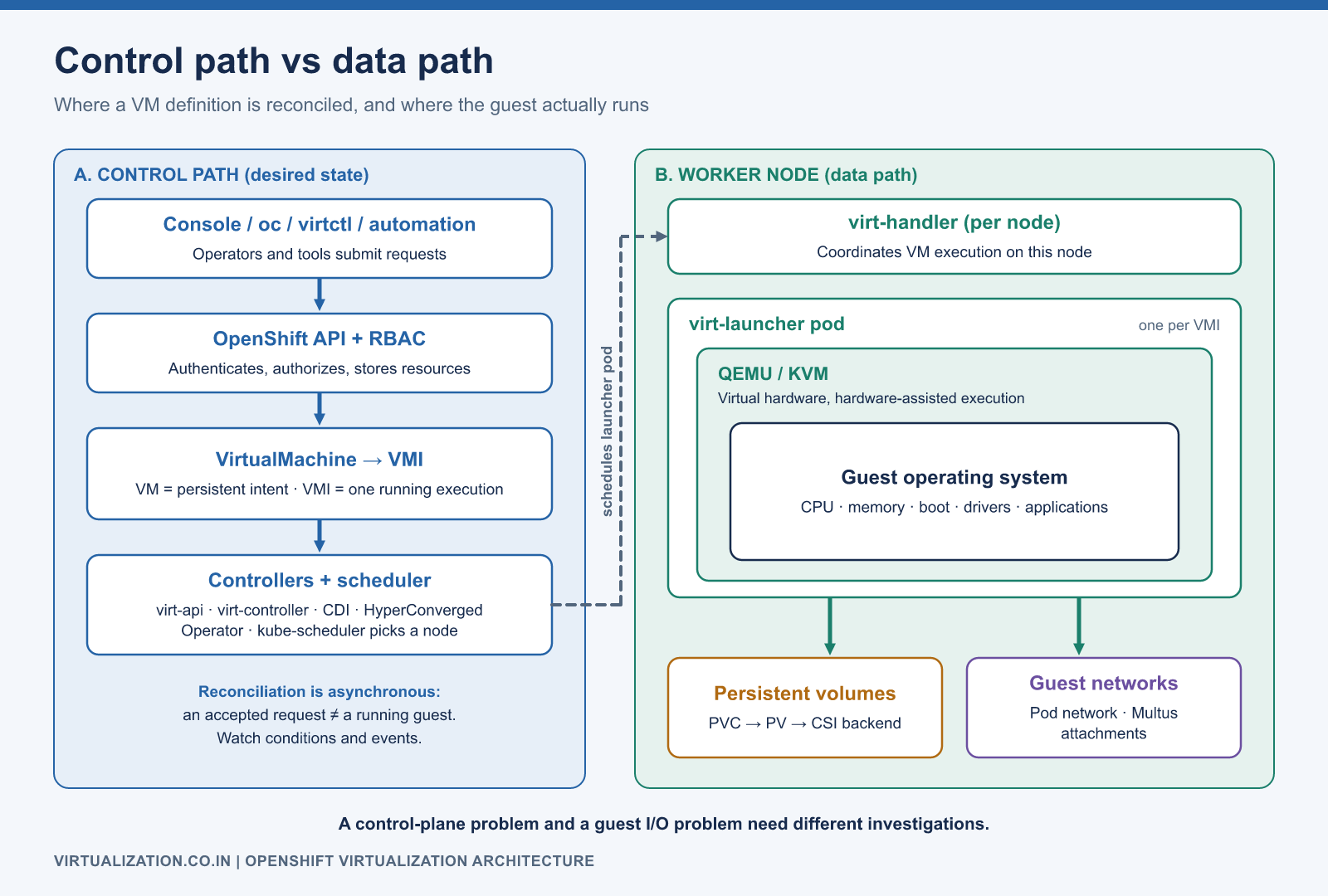
Console / oc / virtctl / automation
                 |
        OpenShift API and RBAC
                 |
      VirtualMachine -> VMI
                 |
       Controllers + scheduler
                 |
      Worker: virt-handler
                 |
      virt-launcher -> QEMU/KVM
                 |
          Guest operating system
          /                   \
   Persistent volumes     Guest networks
This is a logical diagram, not a packet-level trace or a claim that every API call traverses each component in sequence.
Components and responsibilities
| Component | Responsibility | First investigation question |
|---|---|---|
| HyperConverged Operator | Coordinates the supported virtualization deployment | Is the deployment reporting healthy conditions? |
virt-api |
Virtualization API functions and subresources | Is the requested action authorized and available? |
virt-controller |
Reconciles virtualization resources | Is desired state producing execution resources? |
virt-handler |
Coordinates VM execution on each applicable node | Is this node able to run and manage the guest? |
virt-launcher |
Pod associated with VMI execution | Can it schedule, attach disks, and start? |
| QEMU/KVM | Virtual hardware and hardware-assisted execution | Has the guest started, and is it healthy? |
| CDI | Disk import and related data population workflows | Has the requested disk become usable? |
The KubeVirt architecture reference explains the VM/VMI/controller relationship. Red Hat integrates these elements into its Operator-managed product; make supported product configuration changes through documented interfaces rather than assuming upstream deployment instructions apply unchanged.
Follow a VM from definition to running guest
Consider a VM named app01 in namespace apps. Its definition expresses the requested hardware, storage references, interfaces, and run strategy. A running instance needs a node satisfying its CPU and resource requirements. That node also needs the correct networks and access to the disks.
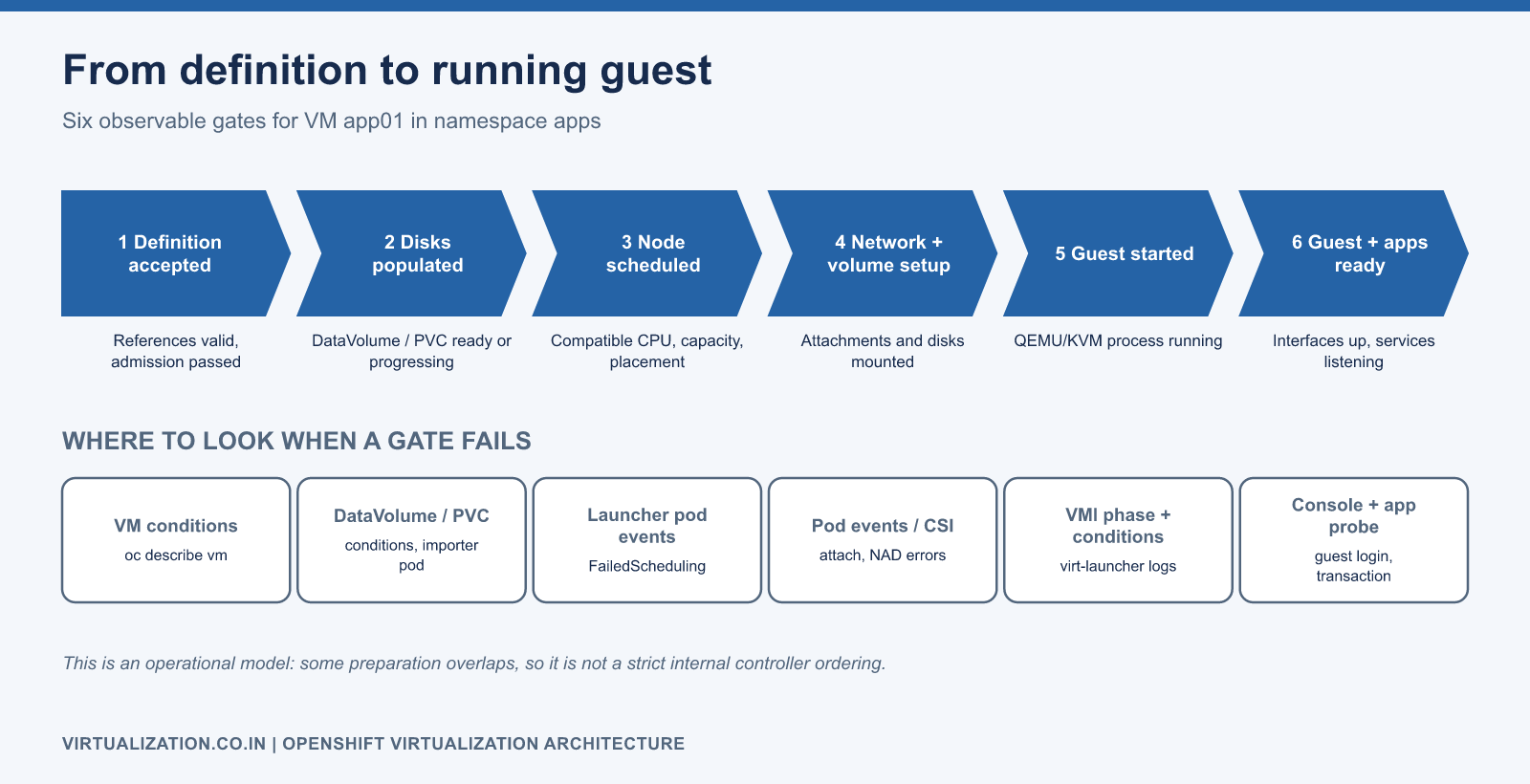
Treat startup as a sequence of observable gates:
- The definition is accepted and its references are valid.
- Required disk population has completed or can proceed.
- Scheduling finds a compatible node with sufficient capacity.
- Network and volume setup succeed.
- The virtualization process starts the guest.
- The guest boots, configures interfaces, and starts applications.
This diagnostic sequence is an operational model. Some preparations can overlap, so do not infer a strict internal controller ordering from it.
Read-only architecture inspection
The following Bash commands require an authenticated oc context and permission to read the selected resources:
oc whoami
oc get clusterversion
oc get hyperconverged -n openshift-cnv
oc get pods -n openshift-cnv -o wide
oc get vm,vmi -n apps
oc get pods -n apps -l kubevirt.io=virt-launcher -o wide
oc get dv,pvc -n apps
oc get nodes
Start at the VM and follow its related objects. Record the namespace, VM name, VMI UID, launcher pod, node, PVCs, and network attachments. These identifiers are more reliable for incident correlation than screenshots taken at different times.
Design failure domains deliberately
Separate the questions “how many nodes exist?” and “where can this particular VM run?” A cluster with ten workers may offer only two eligible targets for a VM that requires a specific CPU baseline, dedicated CPUs, a VLAN, or a storage topology.
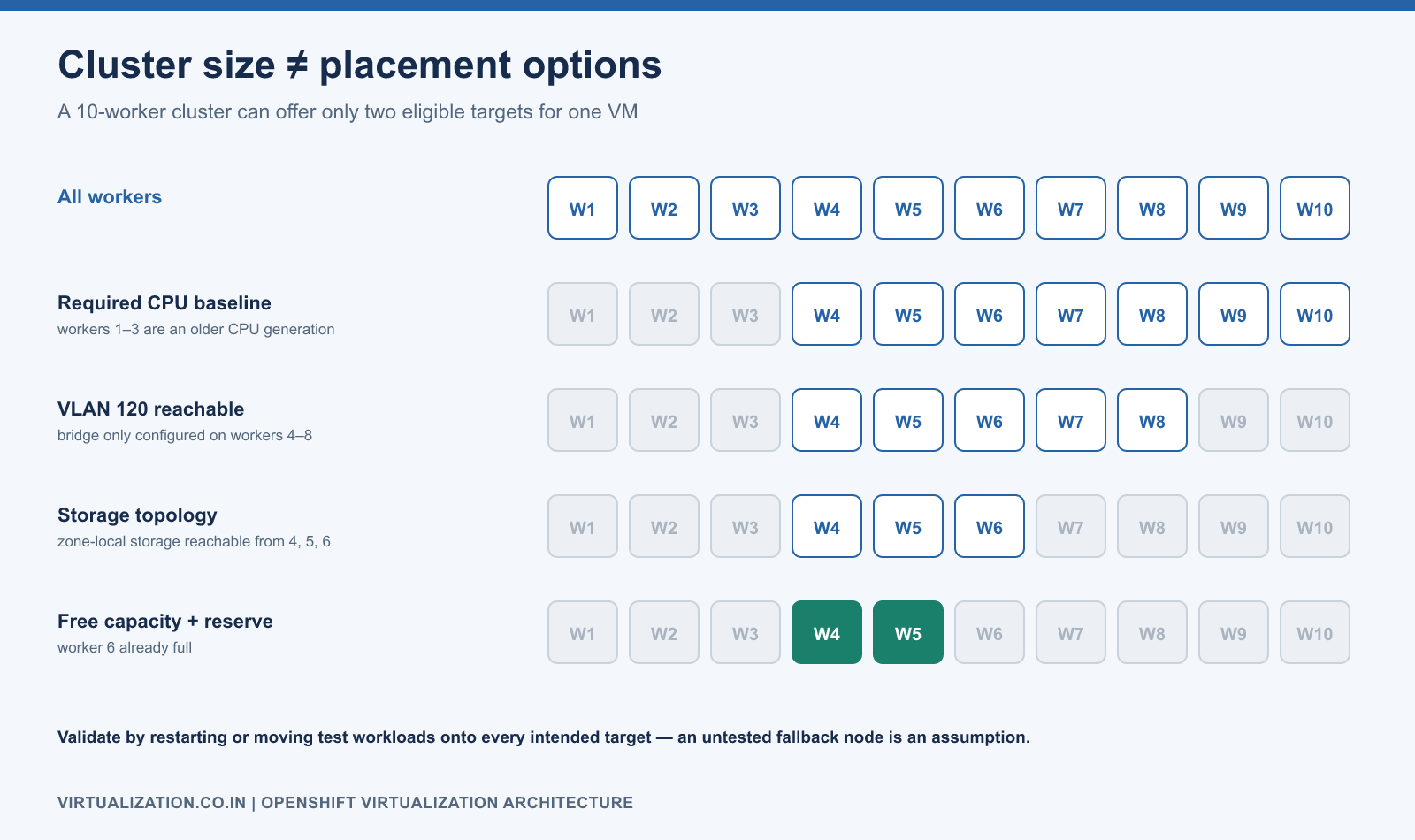
Document compute pools, network reachability, storage failure domains, and maintenance reserve together. Validate a placement constraint by moving or restarting representative test workloads onto every intended target. An untested fallback node is an assumption, not proven resilience.
Security and operating boundaries
Use namespaces and RBAC to express ownership, but also define who can change cluster networks, StorageClasses, node placement, and Operator configuration. Those changes can affect many tenants. Keep guest-administrator permissions separate from platform-administrator permissions wherever practical.
A VM remains a guest operating system that needs patching, identity management, endpoint protection, and application backup. Running it under Kubernetes does not convert its applications into containers or automatically make them stateless.
Reconciliation explains asynchronous behavior
The API stores a desired resource; controllers then act on it. If the next step depends on a disk import, schedulable capacity, or a network attachment, the final guest state can lag behind the accepted API request. Build dashboards and scripts around conditions and events rather than assuming an HTTP success means the workload is ready.
Consider a VM that references a 60 GiB DataVolume. The API can accept the VM while the image is still being populated. If the source image cannot be reached, inspecting only the VM’s CPU configuration will not help. Follow the reference to the DataVolume, its PVC, and working pod, then inspect the condition identifying the blocked operation.
The same reasoning applies during updates. An operator may reconcile deployment configuration, while an existing guest execution still needs a supported workload-update action. Separate platform version, desired VM definition, and the runtime actually serving the application in your change record.
Trace object identity with targeted queries
Use resource names to navigate and UIDs to distinguish object lifetimes. These Bash commands expose useful identifiers without exporting the entire cluster:
oc get vm app01 -n apps -o jsonpath='{.metadata.uid}'
oc get vmi app01 -n apps -o jsonpath='{.metadata.uid}'
oc get vmi app01 -n apps -o jsonpath='{.status.nodeName}'
oc get pods -n apps -l kubevirt.io=virt-launcher \
  -o custom-columns='NAME:.metadata.name,UID:.metadata.uid,NODE:.spec.nodeName'
oc get pvc app01-root -n apps -o jsonpath='{.spec.volumeName}'
Do not assume the launcher list contains only app01; a namespace can contain several VMs and a migration can temporarily involve more than one execution pod. Confirm owner references and VM/VMI association before collecting logs or taking action on a pod.
Separate API objects from guest data
OpenShift’s control-plane state contains resource definitions and control information. VM disk data resides in the configured storage backend. A cluster-state backup and a guest-data backup therefore protect different parts of the system.
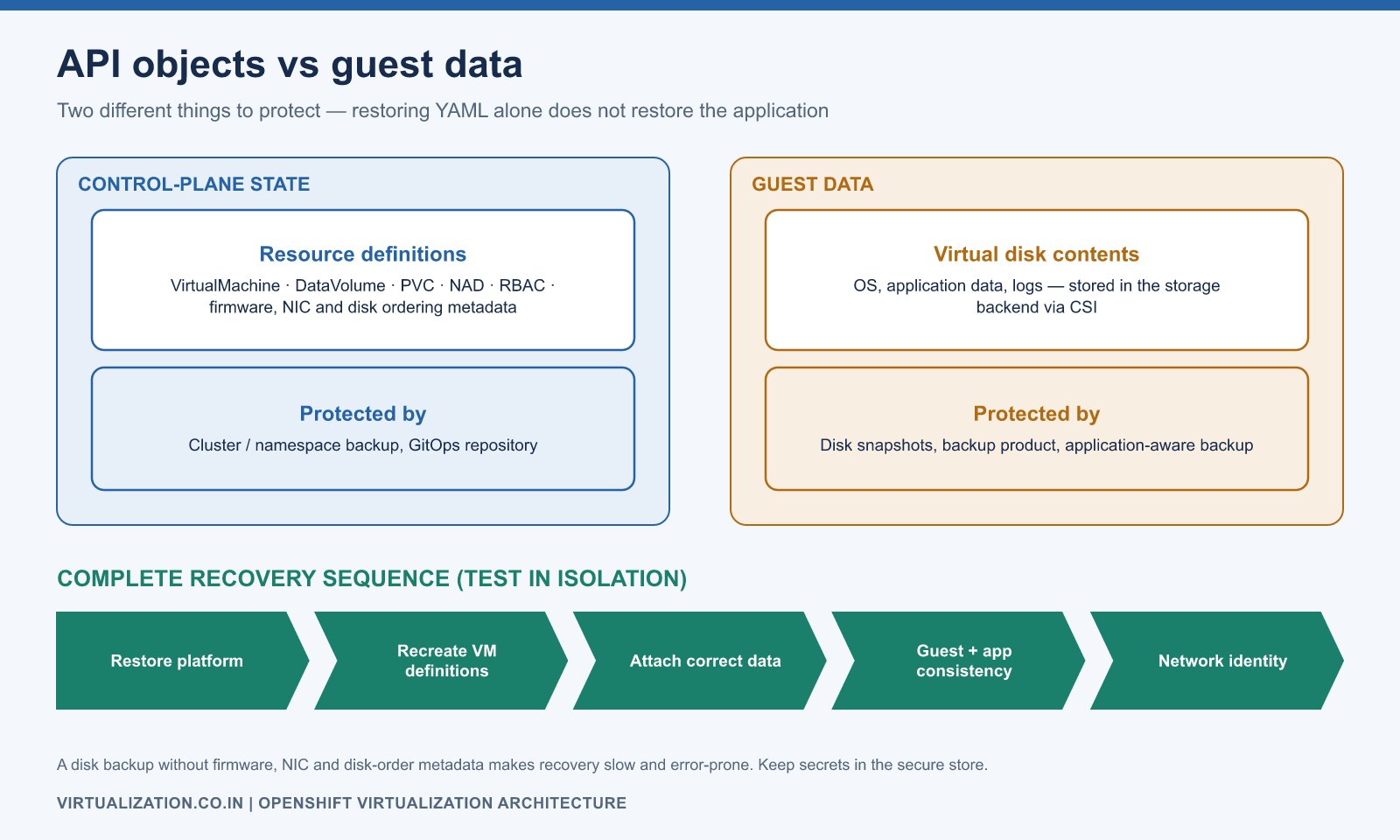
A complete recovery design identifies how to restore the platform, recreate or recover its VM definitions, attach the correct persistent data, restore guest/app consistency, and re-establish network identity. Test the sequence in an isolated environment. Restoring a YAML file without the corresponding disks does not restore the application.
Similarly, a disk backup without the VM’s firmware, NIC, disk ordering, and application context can make recovery slow and error-prone. Keep the required metadata with the recovery procedure, while storing secrets through the organization’s secure mechanism.
Example: a read-only VM inventory role
This namespace-scoped Role permits reading VM and VMI objects. It does not grant console, lifecycle, migration, pod-log, secret, or cluster-administration access. A separate RoleBinding must attach it to an approved user, group, or service account.
apiVersion: rbac.authorization.k8s.io/v1
kind: Role
metadata:
  name: vm-inventory-reader
  namespace: apps
rules:
  - apiGroups: ["kubevirt.io"]
    resources: ["virtualmachines", "virtualmachineinstances"]
    verbs: ["get", "list", "watch"]
Validate the resulting identity with oc auth can-i and actual inventory reads. Avoid granting cluster-admin to solve a narrowly scoped reporting problem. Also review the contents of VM definitions: access to an object can reveal configuration details even when direct Secret reads are prohibited.
Failure-domain reasoning by scenario
| Scenario | Architectural question | Acceptance evidence |
|---|---|---|
| Worker unavailable | Can affected guests restart safely on eligible survivors? | Recovery test with data and application checks |
| Planned worker maintenance | Can workloads evacuate within the maintenance window? | Successful supported migrations and capacity reserve |
| API temporarily unavailable | Which management actions stop, and what do running applications do? | Controlled test and documented operational limitations |
| Storage path failure | Does the backend recover access within application tolerance? | Storage failure test and latency timeline |
| Guest OS failure | Which probes detect it, and who owns remediation? | Alert-to-recovery exercise |
| Application failure | Can the service fail while infrastructure appears healthy? | Application-specific monitoring and runbook |
Do not infer all outcomes from a single host-failure test. Each scenario exercises a different part of the architecture and may require a different recovery procedure.
Upgrade and recovery planning
Plan upgrades around VM mobility, available destinations, backup readiness, and application windows. The Red Hat installation guidance defines platform prerequisites; postinstallation guidance covers placement, networking, and storage configuration.
Keep a recovery document that identifies who restores the cluster service, who restores guest data, and who validates the application. Next, study VM and VMI lifecycle and the troubleshooting guide to apply this architecture during everyday operations.
Explore the complete series
- VMware vs OpenShift Virtualization: Complete Technical Comparison
- OpenShift Virtualization Architecture Explained
- Understanding KubeVirt, VM and VMI
- VMware to OpenShift: Complete Migration Strategy
- MTV Architecture and Internal Working
- OpenShift Virtualization Networking Deep Dive
- OpenShift Virtualization Storage Deep Dive
- OpenShift VM Live Migration Explained
- OpenShift Cluster Sizing for Virtualization
- Migrating Windows VMs Using MTV
- Migrating Linux VMs Using MTV
- VMware PowerCLI vs OpenShift CLI
- Building OpenShift PowerShell Cmdlets
- OpenShift Virtualization Troubleshooting Guide
- Enterprise-Scale VMware to OpenShift Migration Architecture