VMware to OpenShift Virtualization — Article 6 of 15
Technical baseline: OpenShift Virtualization 4.20 and MTV 2.11 documentation. Reviewed 31 October 2026. Examples are instructional and have not been executed against a production cluster; check your installed release, support matrix, and environment before use.
OpenShift Virtualization networking combines Kubernetes connectivity, guest interfaces, node configuration, and the physical network. This guide follows the packet path, builds a secondary bridge example, and provides a diagnostic sequence for migrated applications that must retain their existing network identity.
- Start with a network contract for each interface
- Understand the available paths
- Trace two packet paths
- Lab example: a dedicated secondary Linux bridge
- Define the attachment and connect a VM
- Expose a service without confusing ports and protocols
- MTU, IP retention, and mobility
- Troubleshooting workflow
Start with a network contract for each interface
Before selecting a CNI or creating a NetworkAttachmentDefinition, record what the application needs. For each NIC capture its source port group, VLAN, subnet, address allocation method, gateway, MTU, DNS servers, security zone, permitted flows, and whether the IP or MAC is tied to a license. Specify whether outbound traffic, inbound traffic, broadcast, multicast, or a routed service endpoint is required.
Do not equate a source port-group name with a destination network’s behavior. Two objects called Production may carry different VLANs or apply different controls. The migration map should be reviewed against the actual network contract and tested from application clients.
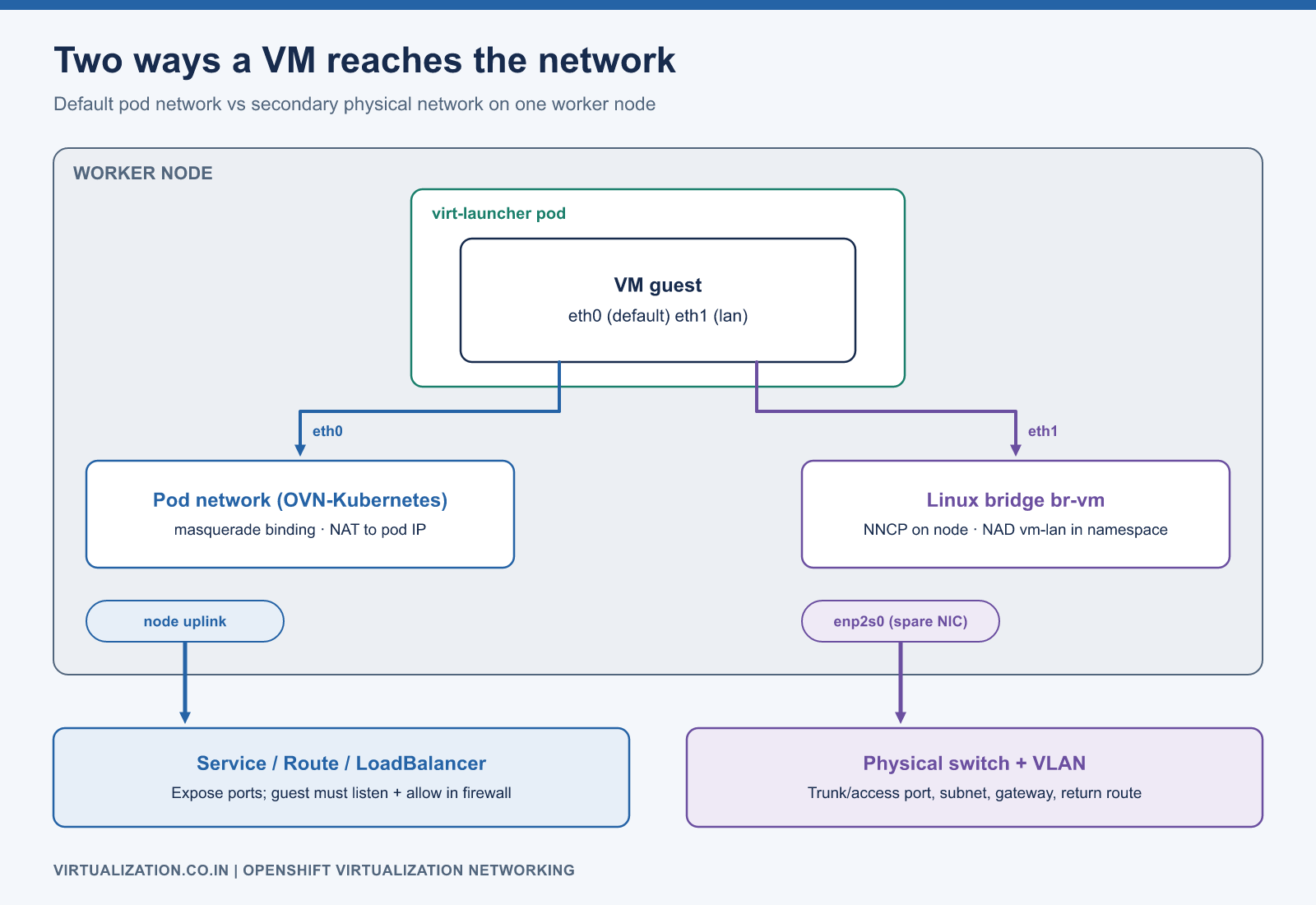
Understand the available paths
| Path | Typical purpose | Design check |
|---|---|---|
| Default pod network | Cluster-integrated connectivity | Guest binding, service exposure, policy behavior |
| Secondary physical network | Existing VLAN and subnet connectivity | Node uplinks, switch trunks, bridge configuration |
| Supported OVN overlay network | Tenant connectivity without direct physical attachment | Address persistence, isolation, routing, release support |
| SR-IOV network | Specialized performance requirements | Hardware resources, placement, support and mobility constraints |
Multus enables additional attachments; it is not the data-plane implementation of every attached network. A VM’s network reference and its interface binding are separate parts of its definition. The KubeVirt interface reference explains these relationships. Use Red Hat’s supported network combinations for the installed release, especially on public-cloud platforms.
Trace two packet paths
With a masquerade binding on the default pod network, guest traffic passes through the virtualization networking setup into pod networking. An inbound application generally needs an appropriate exposure mechanism, such as a Service, and a matching guest listener and firewall rule. A healthy pod address does not prove a guest service is reachable.
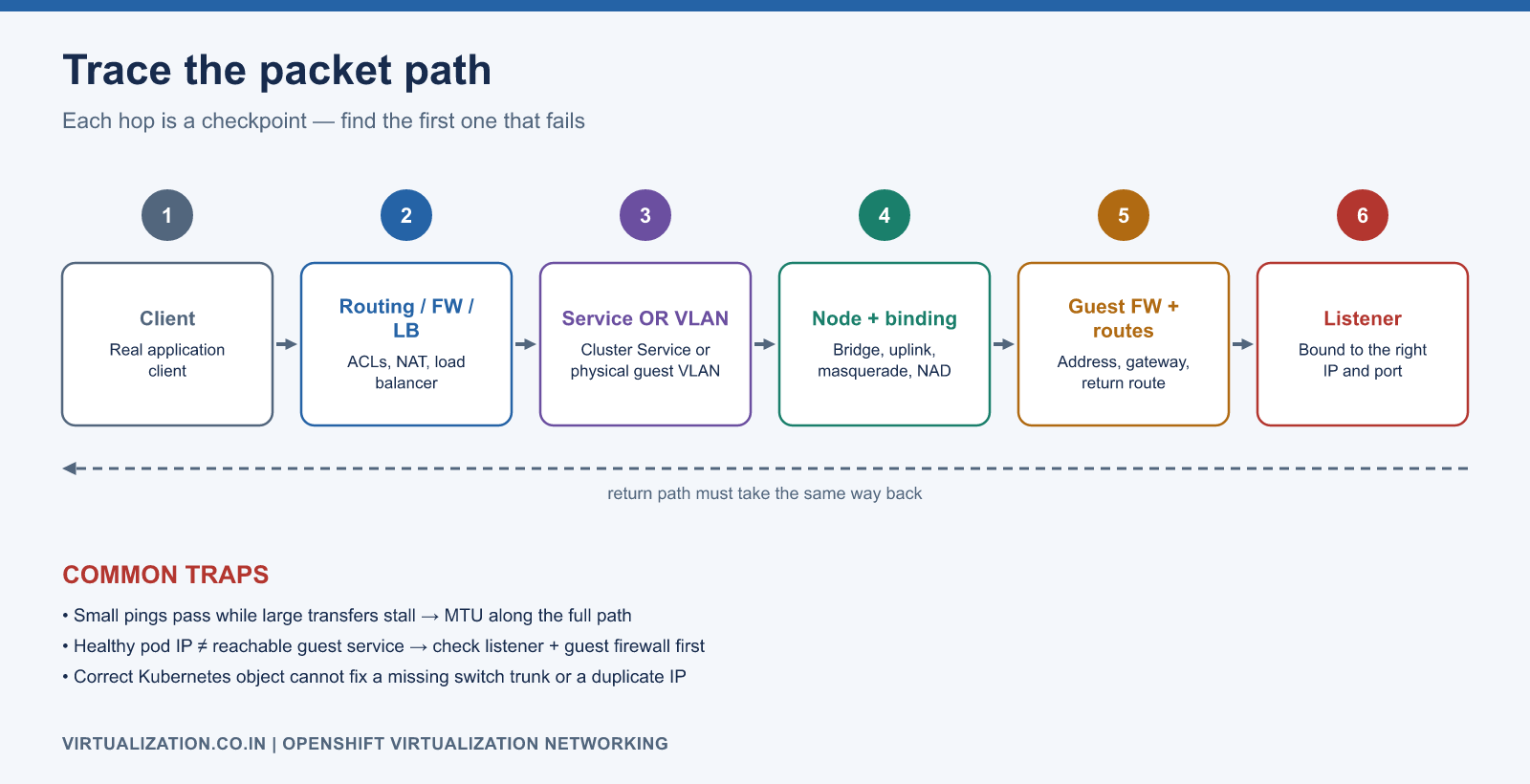
With a secondary physical bridge, a guest NIC is attached through the configured network to the node’s physical uplink. The VLAN, switch configuration, guest address, and return route must all agree. A correct Kubernetes object cannot repair a missing switch trunk or a duplicate IP address.
Application client
  -> routing / firewall / load balancer
  -> cluster Service OR physical guest VLAN
  -> node network and VM interface binding
  -> guest firewall and routing
  -> application listener
Use this path as the diagnostic checklist. Test both directions; asymmetric routing can make one-way packet captures look deceptively healthy.
Lab example: a dedicated secondary Linux bridge
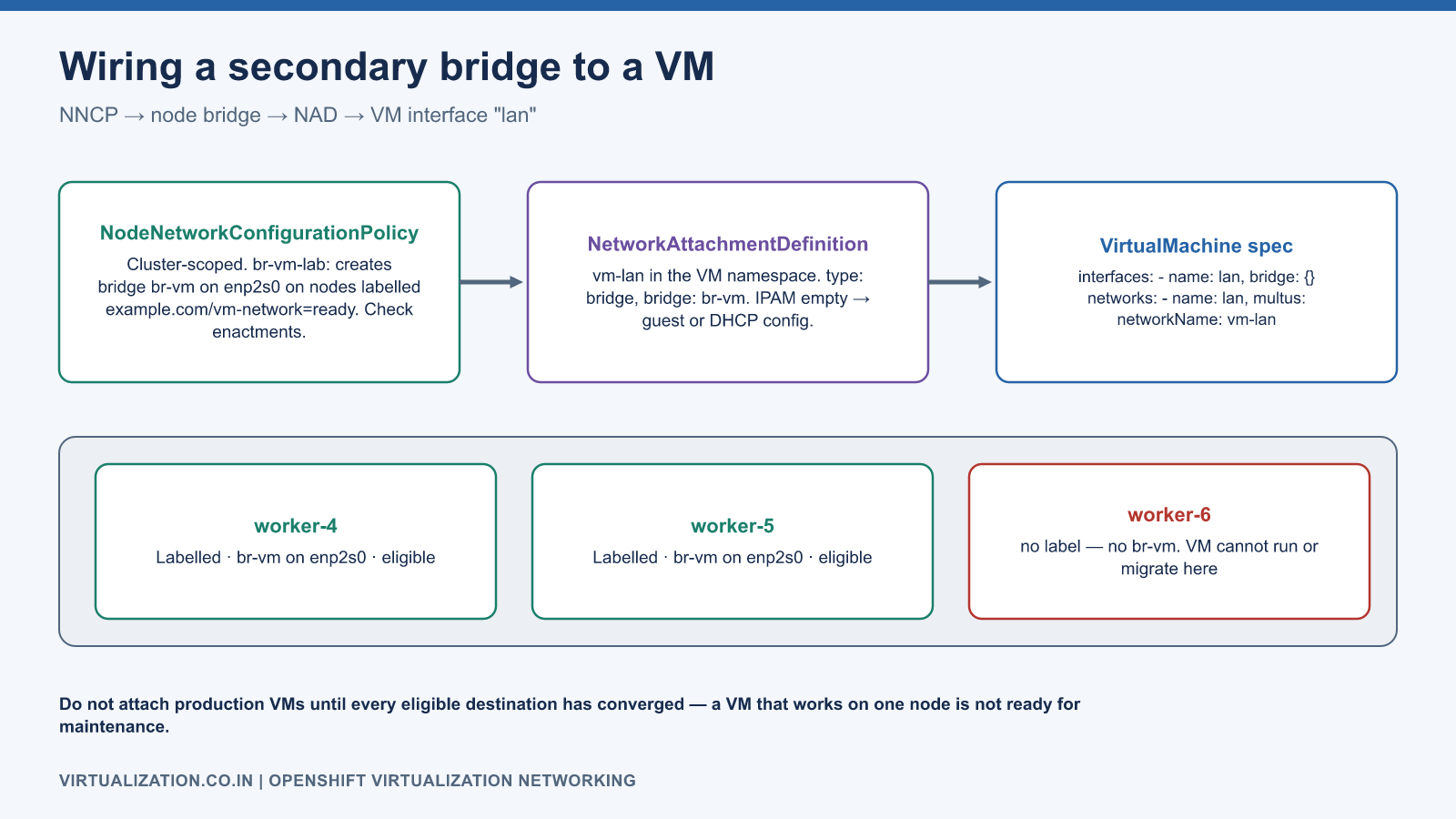
This example assumes a supported bare-metal topology, the Kubernetes NMState Operator, and a spare NIC named enp2s0 on every selected worker. That NIC must not carry the node’s management connection, default route, or existing production traffic. The switch port is an untagged access port for the guest network. Do not apply this unchanged to an existing uplink.
apiVersion: nmstate.io/v1
kind: NodeNetworkConfigurationPolicy
metadata:
  name: br-vm-lab
spec:
  nodeSelector:
    virtualization.example.com/vm-network: "ready"
  desiredState:
    interfaces:
      - name: enp2s0
        type: ethernet
        state: up
        ipv4:
          enabled: false
        ipv6:
          enabled: false
      - name: br-vm
        type: linux-bridge
        state: up
        ipv4:
          enabled: false
        ipv6:
          enabled: false
        bridge:
          options:
            stp:
              enabled: false
          port:
            - name: enp2s0
The custom node label is an explicit administrator-controlled selection mechanism. Initially label only a lab worker after verifying its physical interface. A loop-free topology is a prerequisite for the illustrated STP choice. Follow your network team’s design for production spanning-tree behavior.
After server-side validation and application, inspect NNCP and per-node enactment conditions. Do not attach production VMs until every eligible destination has converged:
oc apply --dry-run=server -f br-vm-lab.yaml
oc apply -f br-vm-lab.yaml
oc get nncp
oc get nnce
oc get nns
The documented NNCP/NAD approach and VM-specific IPAM restrictions are covered in Red Hat’s Linux bridge procedure.
Define the attachment and connect a VM
Create the NAD in the VM namespace. This untagged example deliberately leaves IPAM empty; configure the guest through a supported guest provisioning method or external DHCP.
apiVersion: k8s.cni.cncf.io/v1
kind: NetworkAttachmentDefinition
metadata:
  name: vm-lan
  namespace: apps
  annotations:
    k8s.v1.cni.cncf.io/resourceName: bridge.network.kubevirt.io/br-vm
spec:
  config: |
    {
      "cniVersion": "0.3.1",
      "name": "vm-lan",
      "type": "bridge",
      "bridge": "br-vm",
      "macspoofchk": true,
      "ipam": {}
    }
The following is a fragment of VirtualMachine.spec.template.spec, not a standalone resource. Merge it carefully with existing interfaces and networks, retaining the default attachment if the VM needs it:
domain:
  devices:
    interfaces:
      - name: lan
        bridge: {}
networks:
  - name: lan
    multus:
      networkName: vm-lan
The matching name lan associates the virtual interface with its network. Validate a complete VM manifest against your cluster; do not replace a production VM’s entire domain configuration with this fragment. Use a stopped lab VM for initial testing.
Expose a service without confusing ports and protocols
For a VM using pod networking, select its launcher pod through labels on the VM template. A Kubernetes Service directs traffic to selected endpoints, but the guest must listen on the destination port. A normal OpenShift HTTP Route is not a general-purpose replacement for arbitrary SSH, database, or RDP connectivity. Choose an exposure method appropriate to the protocol and infrastructure.
Before debugging ingress, test from inside the guest: inspect listening ports, local firewall rules, and the application’s bind address. Then test from a controlled cluster client and finally the real external client. Record the source address observed by the application, since NAT or a proxy can affect access controls and audit logs.
MTU, IP retention, and mobility
Validate MTU across the complete path. Small pings can succeed while larger transfers fail because encapsulation reduces the usable payload and path-MTU discovery is broken. Test application-sized transfers and inspect retransmissions rather than concluding that ICMP success proves network health.
IP retention requires that the destination actually reaches the same subnet or that the network design provides a supported alternative. Prevent simultaneous activation of source and target with the same IP. If a MAC changes, check DHCP reservations, static ARP entries, security controls, and licensing.
Repeat connectivity tests after a supported live migration. The destination worker needs the same usable network path. A VM that works only on one node is not ready for maintenance operations.
Troubleshooting workflow
oc get network-attachment-definitions -n apps
oc get vm app01 -n apps -o yaml
oc get vmi app01 -n apps -o yaml
oc get pods -n apps -l kubevirt.io=virt-launcher -o wide
oc get events -n apps --sort-by=.metadata.creationTimestamp
Inside a Linux guest use ip -br address, ip route, resolvectl status where available, and ss -lntup. On Windows use Get-NetIPConfiguration, Get-NetRoute, and Test-NetConnection. Confirm address, gateway, DNS, listener, and return route before changing cluster networking.
| Symptom | Likely investigation branch |
|---|---|
| Launcher cannot be created | Missing NAD, unavailable node network, CNI event |
| Guest has no address | DHCP reachability or guest static configuration |
| Gateway works but DNS fails | Resolver path and DNS configuration |
| One subnet works, another fails | Routing, ACLs, asymmetric return path |
| Works until migration | Destination bridge/uplink/VLAN mismatch |
| Large transfers stall | MTU, packet loss, congestion, offload interactions |
Do not assume a default-network policy protects every secondary network. Verify enforcement on the actual attachment and add the appropriate supported controls. Finish qualification with permitted-flow tests, denied-flow tests, client transactions, and a destination-node mobility test. Continue with storage design and live migration.
Explore the complete series
- VMware vs OpenShift Virtualization: Complete Technical Comparison
- OpenShift Virtualization Architecture Explained
- Understanding KubeVirt, VM and VMI
- VMware to OpenShift: Complete Migration Strategy
- MTV Architecture and Internal Working
- OpenShift Virtualization Networking Deep Dive
- OpenShift Virtualization Storage Deep Dive
- OpenShift VM Live Migration Explained
- OpenShift Cluster Sizing for Virtualization
- Migrating Windows VMs Using MTV
- Migrating Linux VMs Using MTV
- VMware PowerCLI vs OpenShift CLI
- Building OpenShift PowerShell Cmdlets
- OpenShift Virtualization Troubleshooting Guide
- Enterprise-Scale VMware to OpenShift Migration Architecture