VMware to OpenShift Virtualization — Article 7 of 15
Technical baseline: OpenShift Virtualization 4.20 and MTV 2.11 documentation. Reviewed 31 October 2026. Examples are instructional and have not been executed against a production cluster; check your installed release, support matrix, and environment before use.
Storage determines whether a VM can start, move between nodes, recover from failure, and meet application latency targets. This guide separates storage objects from storage capabilities, demonstrates a disk-import definition, and develops a qualification procedure for production virtualization.
- Follow the disk ownership chain
- Access mode and volume mode are independent
- Inspect the class before creating disks
- Example: import an approved boot image
- Build a capacity model that includes temporary space
- Evaluate latency, IOPS, and throughput together
- Snapshots, backups, and consistency
- A structured failure investigation
Follow the disk ownership chain
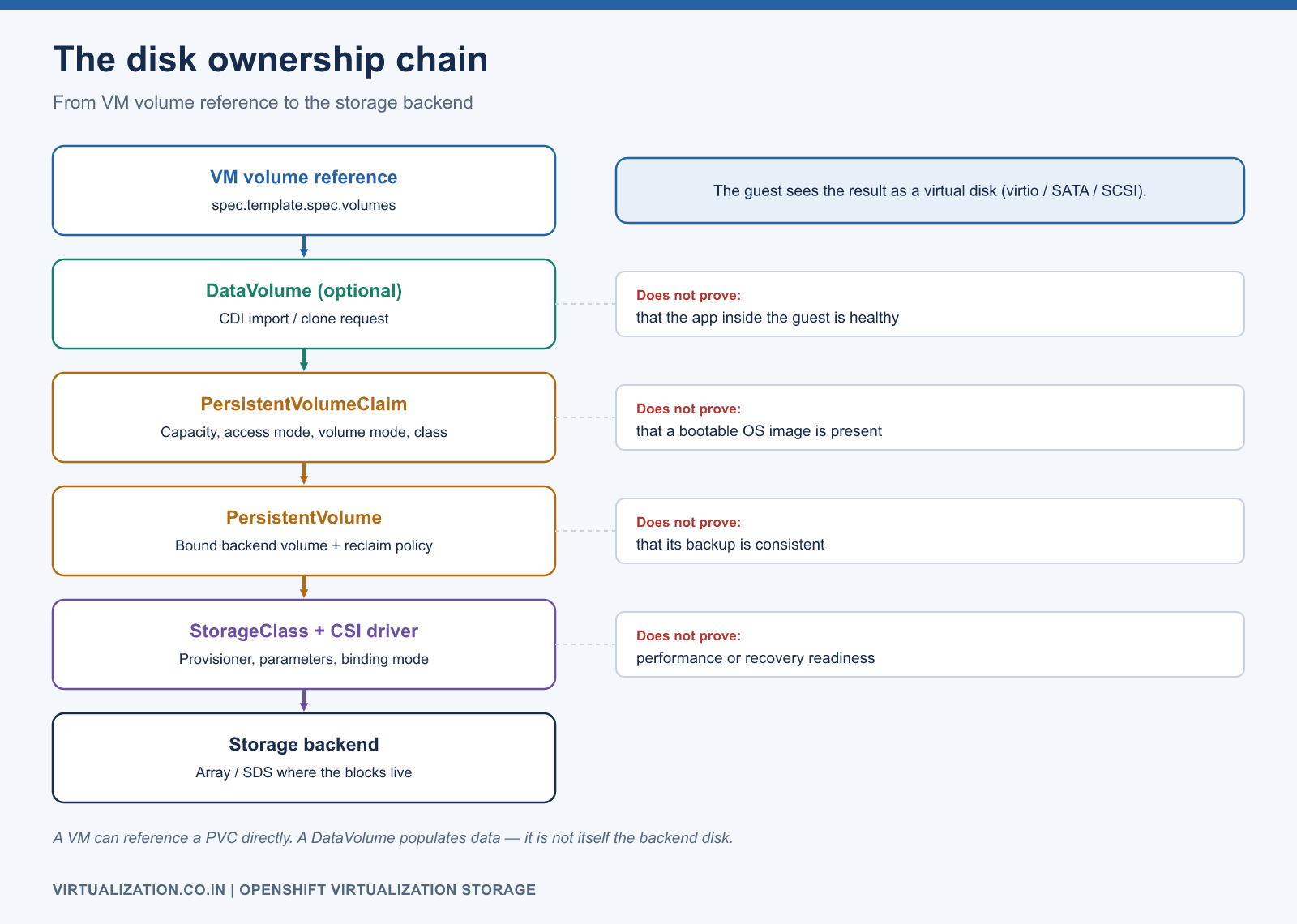
VM volume reference
   -> DataVolume, when population is managed by CDI
   -> PersistentVolumeClaim
   -> PersistentVolume
   -> CSI driver and storage backend
   -> Guest-visible virtual disk
A VM can also reference an existing PVC directly. A DataVolume is useful for data population; it is not itself the backend disk. Inspect all related objects when an import is stuck or a guest is missing a drive.
| Object | What it describes | What it does not prove |
|---|---|---|
| StorageClass | Provisioner, class parameters, binding behavior | Application performance or recovery readiness |
| PVC | Requested capacity, mode, access, class | That an OS image is present and bootable |
| PV | Bound storage resource and backend details | That its backup is consistent |
| DataVolume | Source and population request | That the application inside the guest is healthy |
| StorageProfile | CDI’s class-related storage properties | That unsupported backend modes become supported |
| VolumeSnapshotClass | Snapshot driver and policy configuration | That a snapshot survives backend loss |
See the Kubernetes references for persistent volumes and StorageClasses for object semantics.
Access mode and volume mode are independent
ReadWriteOnce describes read/write mounting by one node; it is not shorthand for “one pod.” ReadWriteMany expresses multi-node access. ReadWriteOncePod is a separate access mode with stricter single-pod semantics when supported. Filesystem and Block describe how the volume is presented, not how many nodes may access it.
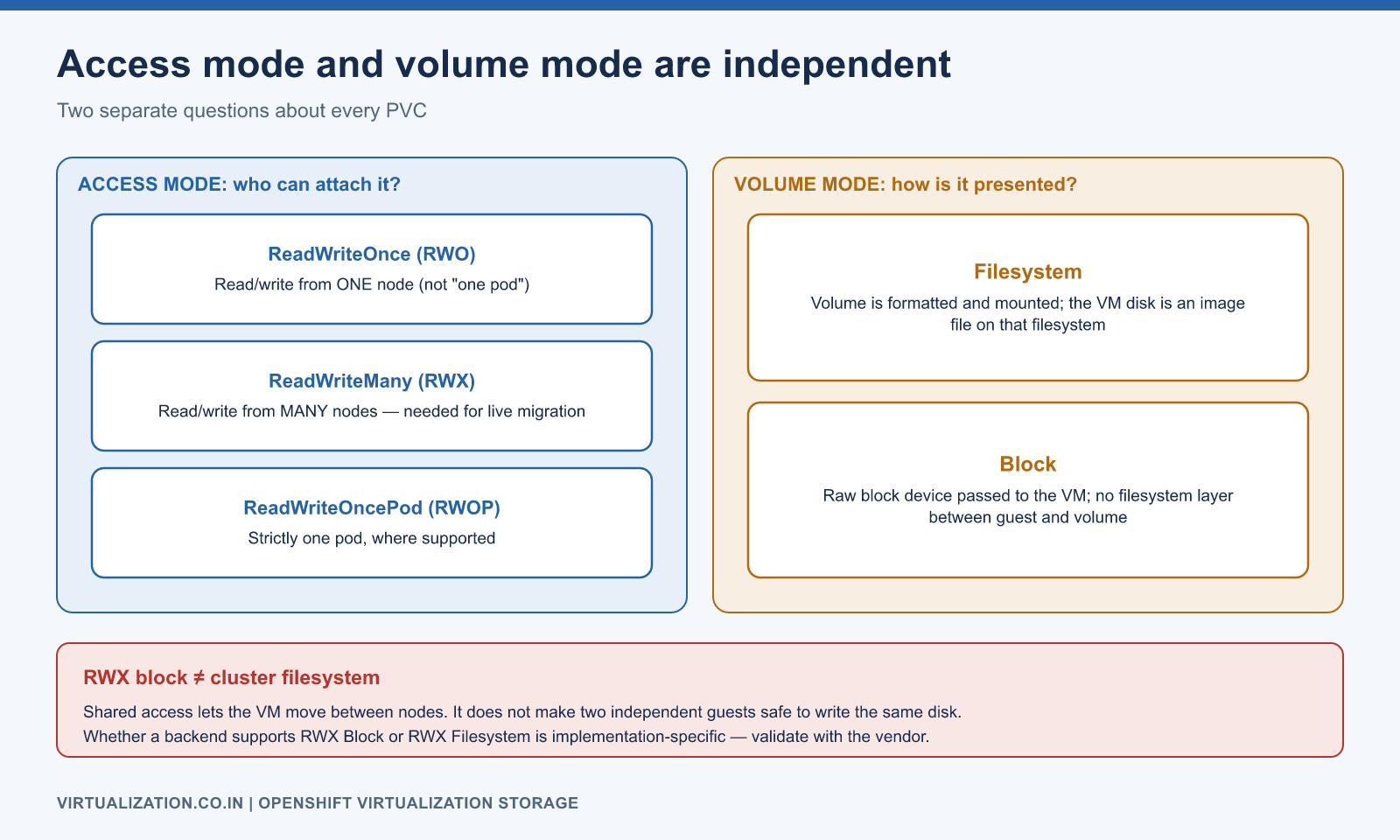
A backend’s ability to provide RWX block storage is implementation-specific. It does not mean the guest filesystem is a cluster filesystem or that two independently running guests should write the same ordinary disk. Live migration and shared-disk application clustering have different coordination requirements.
For the baseline used in this series, choose a supported shared-storage configuration for migratable workloads. Do not “fix” a storage problem by declaring RWX in YAML when the CSI driver or storage product cannot implement it. Validate the actual class with the vendor and the product support matrix.
Inspect the class before creating disks
oc get storageclass
oc get storageclass vm-shared -o yaml
oc get storageprofile vm-shared -o yaml
oc get volumesnapshotclass
oc get pvc -n apps
oc get dv -n apps
Replace vm-shared with a real class. Check its provisioner, binding mode, expansion support, reclaim policy, and associated profile. WaitForFirstConsumer can intentionally defer binding until scheduling supplies placement context. A pending PVC in that situation is not automatically a storage outage.
If a profile is incomplete, use supported backend properties when configuring it. Red Hat’s storage guidance explains profile customization, scratch space, and image population. A profile supplies defaults; it cannot add a capability to the storage system.
Example: import an approved boot image
This example creates a DataVolume for a trusted QCOW2 image. The URL is intentionally an example domain and must be replaced with an accessible, approved image. The class must support the requested RWX/Block combination. Size the target for the image’s virtual capacity and required growth, not just its compressed download size.
apiVersion: cdi.kubevirt.io/v1beta1
kind: DataVolume
metadata:
  name: app01-root
  namespace: apps
spec:
  source:
    http:
      url: https://images.example.com/approved/linux-base.qcow2
  storage:
    storageClassName: vm-shared
    accessModes:
      - ReadWriteMany
    volumeMode: Block
    resources:
      requests:
        storage: 60Gi
oc apply --dry-run=server -f app01-root.yaml
oc apply -f app01-root.yaml
oc get dv app01-root -n apps -w
oc describe dv app01-root -n apps
oc describe pvc app01-root -n apps
The create operation consumes storage and starts data population. Successful schema validation does not establish endpoint trust, image integrity, or backend capacity. If your image repository uses a private CA or authentication, configure CDI’s supported trust and secret references rather than disabling verification.
Build a capacity model that includes temporary space
Use separate figures for logical disk capacity, actual occupied backend space, snapshots, clones, temporary imports, growth, and protection reserve. Thin provisioning delays physical allocation; it does not remove the eventual capacity obligation.
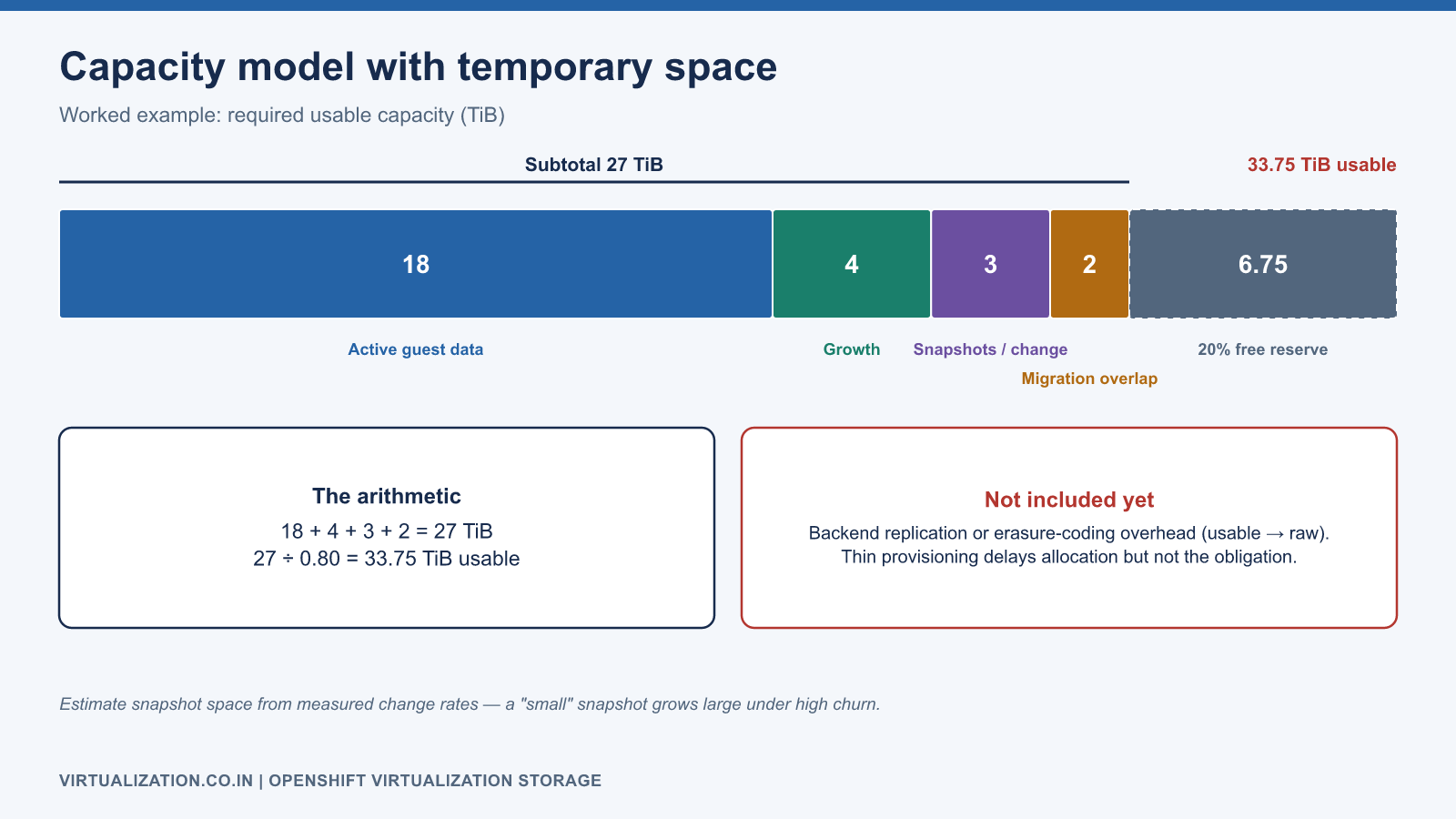
An illustrative planning model is:
Required usable capacity =
  active guest data
  + expected growth during planning horizon
  + retained snapshot/change data
  + migration/import scratch and overlap
  + operational free-space reserve
If active data is 18 TiB, growth is 4 TiB, retained changes need 3 TiB, and migration overlap needs 2 TiB, the subtotal is 27 TiB. Keeping 20% of usable capacity free requires at least 27 / 0.80 = 33.75 TiB usable. This example does not include backend replication or erasure-coding conversion to raw capacity; calculate that separately using the storage design.
Snapshot space depends on changed blocks and retention. A nominally small snapshot can become large under high churn. Estimate it from measured change rates and verify the backend’s actual allocation behavior.
Evaluate latency, IOPS, and throughput together
Report workload shape: block size, read/write mix, random/sequential behavior, queue depth, concurrency, sync-write requirements, and working-set size. A large sequential transfer benchmark does not predict a database’s small synchronous write latency.
Run qualification in an isolated environment with representative data and applications. Capture median and tail latency during normal operation, concurrent migration, backup, and a controlled storage degradation scenario. A storage class that performs well only when nothing else is running may fail the production acceptance test.
Record guest observations and backend observations at the same time. Guest latency can include CPU scheduling and network delay; backend utilization alone does not explain the full result. Compare the same workload, dataset, and warm-up period before and after migration.
Snapshots, backups, and consistency
A storage snapshot is a point-in-time backend operation. Application consistency may require guest quiescing or application-aware procedures. Multi-disk applications need coordinated consistency across their data and logs. Do not assume a set of individually successful disk snapshots forms a recoverable database state.
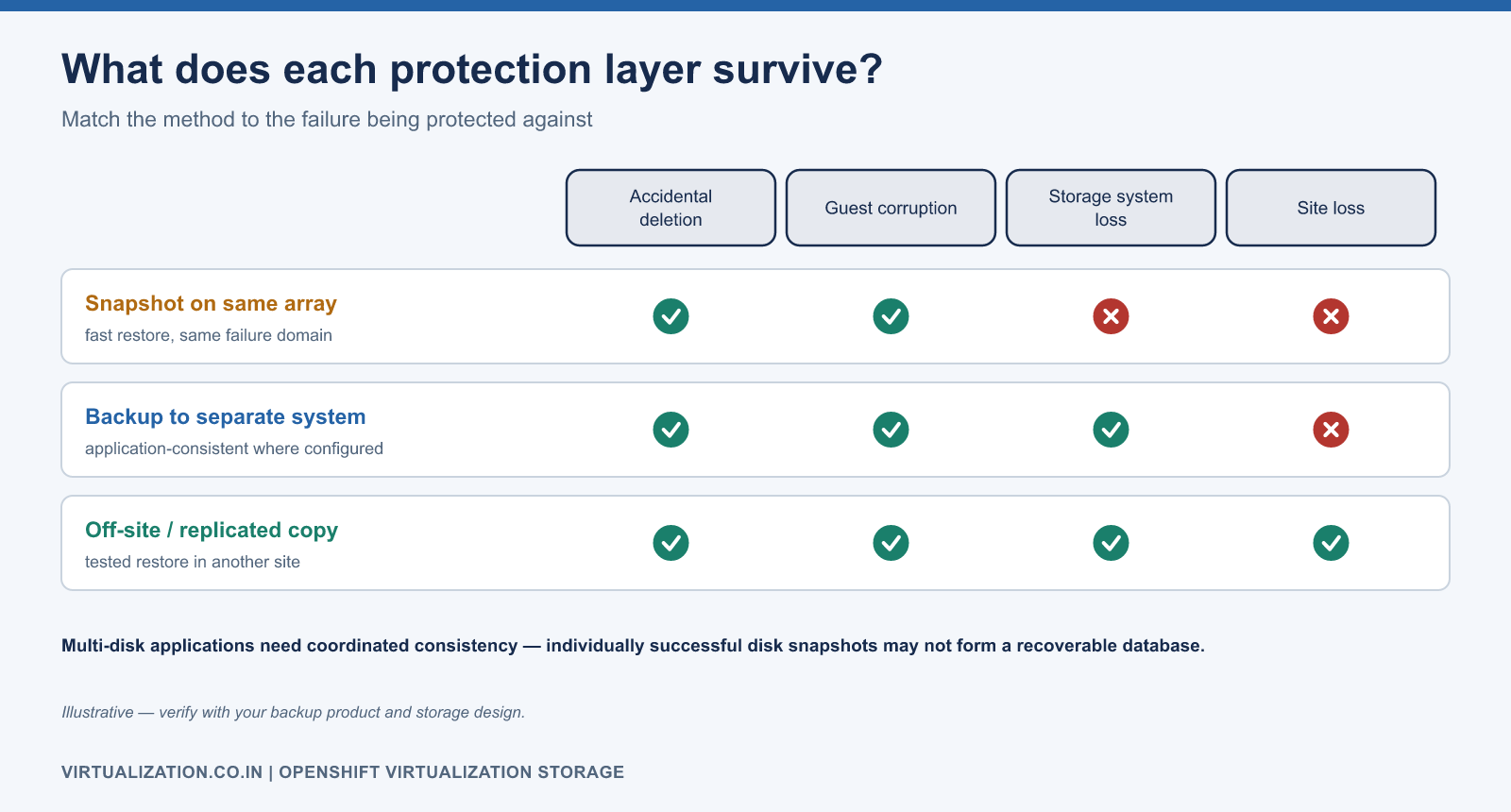
Define the failure being protected against: accidental deletion, guest corruption, storage system loss, or site loss. A snapshot retained on the same failed system may not satisfy the recovery requirement. Test restoration to an isolated environment, verify transactions, and record the recovery time.
Before deletion, inspect owner references and reclaim policies. Removing a VM, DataVolume, or PVC can have different cascading effects. Archive the relevant definitions and verify the data retention decision before performing a destructive operation.
A structured failure investigation
| Symptom | Evidence | Next question |
|---|---|---|
| PVC pending | PVC events and StorageClass | Waiting for consumer or provisioning failure? |
| Import stalled | DataVolume conditions, importer logs | Source access, scratch space, quota, or conversion? |
| Attachment failure | Pod events and CSI evidence | Topology, stale attachment, or backend reachability? |
| Guest sees missing disk | VM volume/disk mapping and guest inventory | Definition mismatch, driver, or boot ordering? |
| Guest I/O slow | Guest latency plus node/backend metrics | CPU delay, congestion, saturation, or sync-write cost? |
| Snapshot unavailable | Snapshot class and driver capability | Missing configuration or unsupported feature? |
Never delete and recreate a production PVC as an exploratory troubleshooting step. Preserve evidence, determine who owns the data, and choose a recovery action consistent with the backup and reclaim design. Use cluster sizing to connect storage planning to compute reserve and live migration to validate mobility.
Explore the complete series
- VMware vs OpenShift Virtualization: Complete Technical Comparison
- OpenShift Virtualization Architecture Explained
- Understanding KubeVirt, VM and VMI
- VMware to OpenShift: Complete Migration Strategy
- MTV Architecture and Internal Working
- OpenShift Virtualization Networking Deep Dive
- OpenShift Virtualization Storage Deep Dive
- OpenShift VM Live Migration Explained
- OpenShift Cluster Sizing for Virtualization
- Migrating Windows VMs Using MTV
- Migrating Linux VMs Using MTV
- VMware PowerCLI vs OpenShift CLI
- Building OpenShift PowerShell Cmdlets
- OpenShift Virtualization Troubleshooting Guide
- Enterprise-Scale VMware to OpenShift Migration Architecture