VMware to OpenShift Virtualization — Article 9 of 15
Technical baseline: OpenShift Virtualization 4.20 and MTV 2.11 documentation. Reviewed 31 October 2026. Examples are instructional and have not been executed against a production cluster; check your installed release, support matrix, and environment before use.
Virtualization sizing must satisfy normal operation, planned maintenance, and failure recovery. A design that fits the sum of configured VM memory can still fail because of CPU placement, runtime overhead, storage throughput, or insufficient capacity on the remaining eligible nodes.
- Collect evidence before choosing host counts
- Separate five capacity budgets
- Memory sizing with a worked example
- Account for virtualization overhead
- CPU sizing is more than a vCPU ratio
- Solve placement, not just arithmetic
- Storage and migration throughput
- Inspect the actual cluster budget
- A qualification test plan
- Deliver a defensible sizing document
Collect evidence before choosing host counts
Export the VM inventory and collect time-series utilization covering busy hours, month-end jobs, backups, and seasonal peaks. Record configured vCPU and memory separately from observed use. Capture disk latency and throughput, network traffic, guest swapping, application response time, and special placement constraints.
Choose the planning horizon and service objectives first. A six-month migration landing zone and a three-year steady-state platform have different growth and coexistence requirements. Keep assumptions visible so a later reviewer can reproduce the result.
Separate five capacity budgets
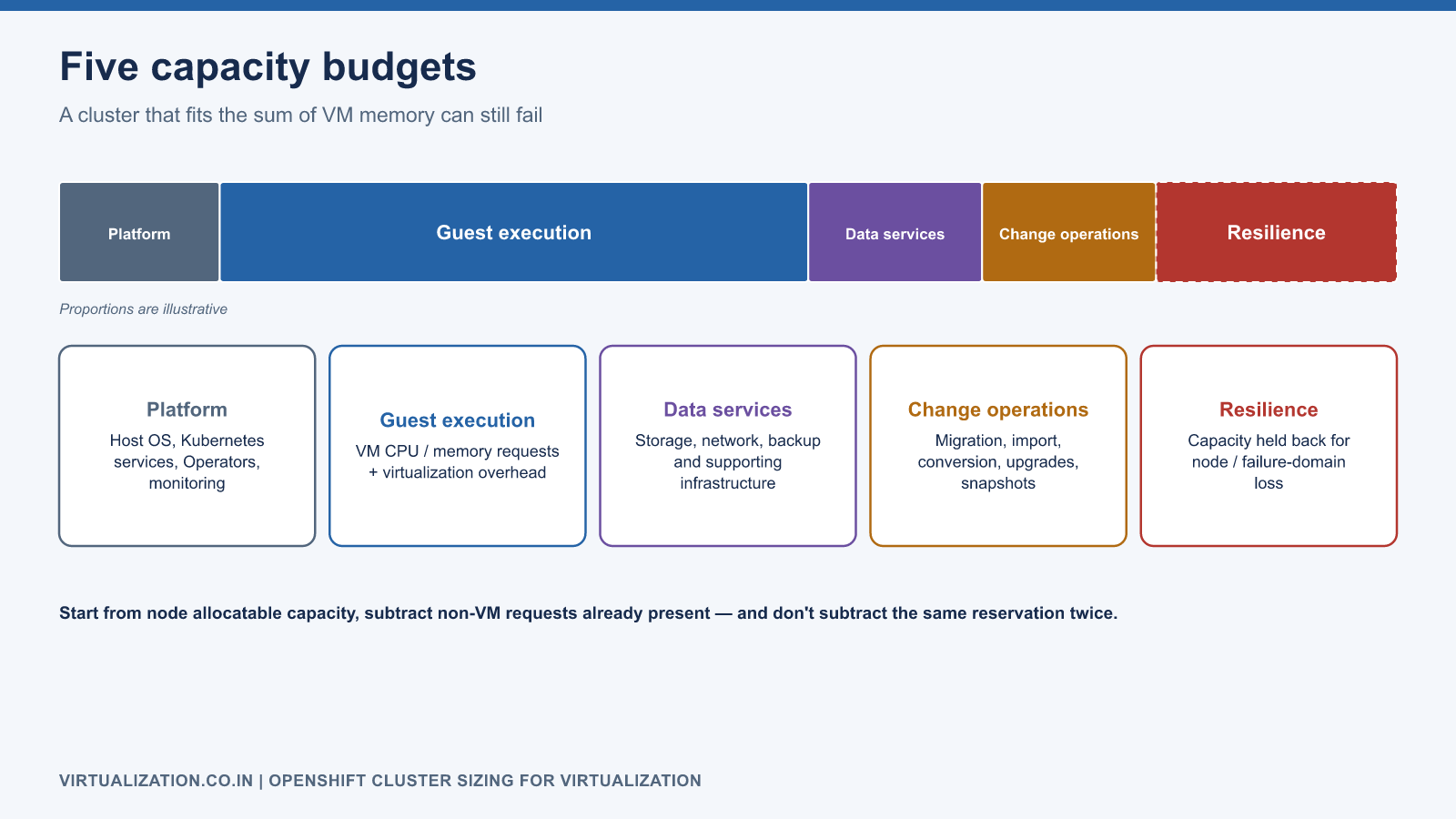
| Budget | Includes |
|---|---|
| Platform | Host operating system, Kubernetes services, Operators, monitoring |
| Guest execution | VM CPU/memory requests and virtualization overhead |
| Data services | Storage, network, backup and supporting infrastructure |
| Change operations | Migration, import, conversion, upgrades, snapshots |
| Resilience | Capacity retained for node or failure-domain loss |
Use node allocatable capacity as the scheduling starting point, then account for non-VM workloads already consuming requests. Do not subtract the same reservation twice. The Kubernetes resource-management reference explains requests, limits, and scheduling behavior.
Memory sizing with a worked example
Assume an illustrative compute pool of 512 GiB hosts. After measured platform and non-VM requirements, each contributes 448 GiB to the VM budget. Suppose all VM execution requests, including measured virtualization overhead, total 1,700 GiB. The design must tolerate one unavailable host while keeping a further 15% reserve on surviving VM capacity.
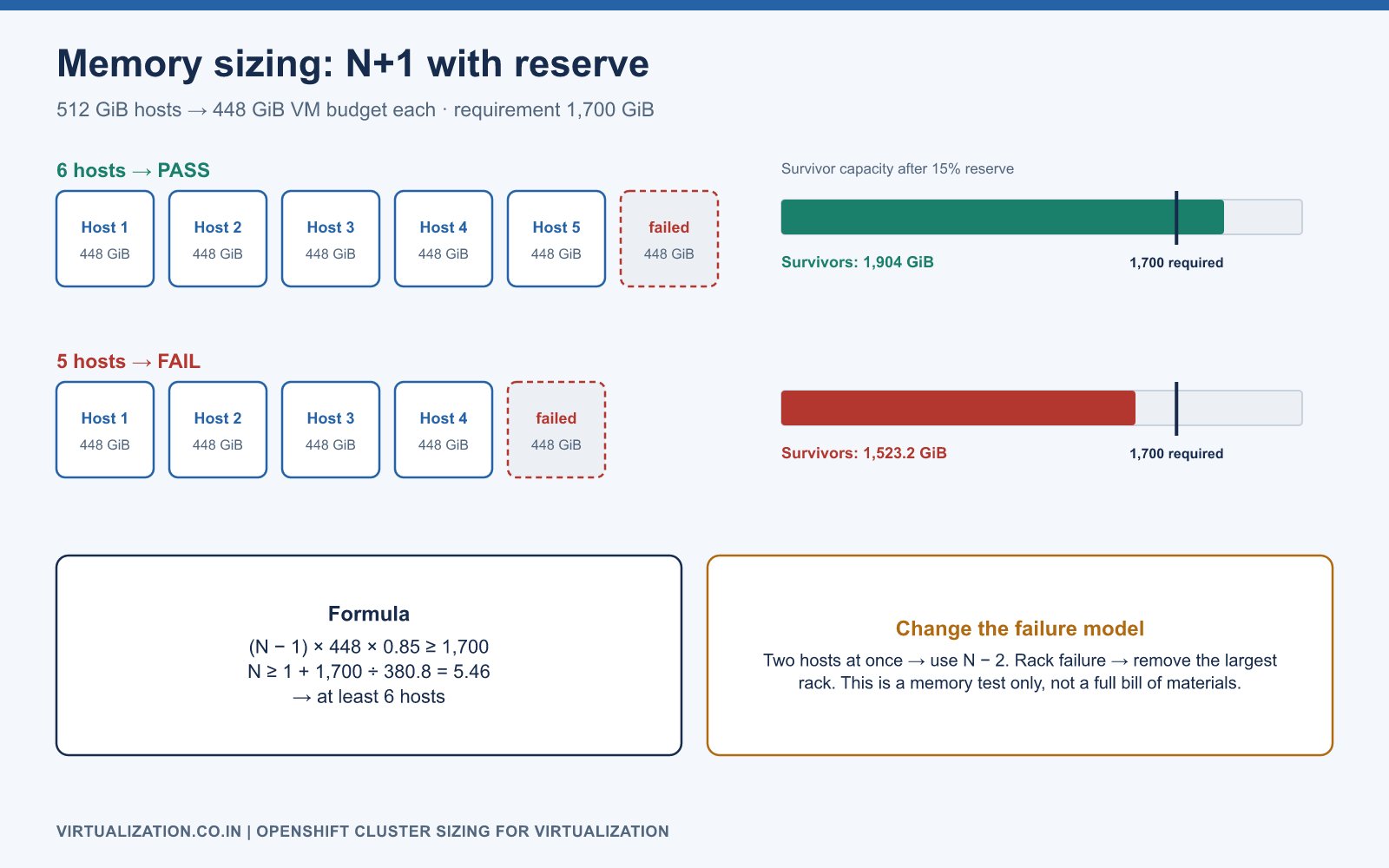
(N - 1) × 448 GiB × 0.85 >= 1,700 GiB
N >= 1 + 1,700 / 380.8
N >= 5.46, so choose at least 6 hosts for this memory test
With six hosts, five survivors provide 2,240 GiB before the additional reserve and 1,904 GiB after it. Five hosts would leave only 1,523.2 GiB after one failure and reserve, which is insufficient. This is a necessary memory test, not a complete bill of materials.
If two hosts may be unavailable simultaneously, replace N - 1 with N - 2. If rack failure is the requirement, remove the largest relevant rack’s capacity. Do not call a system N+1 resilient when its business requirement is loss of a three-host failure domain.
Account for virtualization overhead
Guest configured memory is not the entire launcher workload footprint. Runtime processes and enabled devices add overhead. The Red Hat resource-overhead guidance describes a version-specific estimation model.
For final sizing, create representative VM shapes on the selected release and inspect their actual launcher requests. Include devices, guest memory, huge pages, dedicated CPU requirements, and any sidecars. Do not apply a single arbitrary overhead percentage to every shape and assume a 2 GiB VM behaves like a 256 GiB VM.
CPU sizing is more than a vCPU ratio
Configured vCPUs describe virtual topology; they do not reveal simultaneous demand. Build a demand model using correlated busy intervals and latency requirements. Sum demand at matching timestamps where possible rather than adding independently observed peaks that never coincide—or, at the opposite extreme, averaging away a predictable shared batch window.
Use a conservative overcommit starting point, then validate. Dedicated CPU workloads need a separate placement budget. Logical threads are not automatically equivalent to physical cores for throughput or licensing. NUMA locality, CPU model compatibility, and large VM shape can reduce feasible placement even when totals look acceptable.
If a workload is latency-sensitive, measure its application tail latency under the proposed consolidation ratio. A low overall host CPU average can coexist with unacceptable scheduling delay for one guest.
Solve placement, not just arithmetic
Consider three remaining nodes with 80, 80, and 80 GiB free. Their combined 240 GiB cannot place a VM requiring 128 GiB on a single node. This is fragmentation. Similar constraints occur with dedicated CPUs, huge pages, devices, storage topology, and node labels.
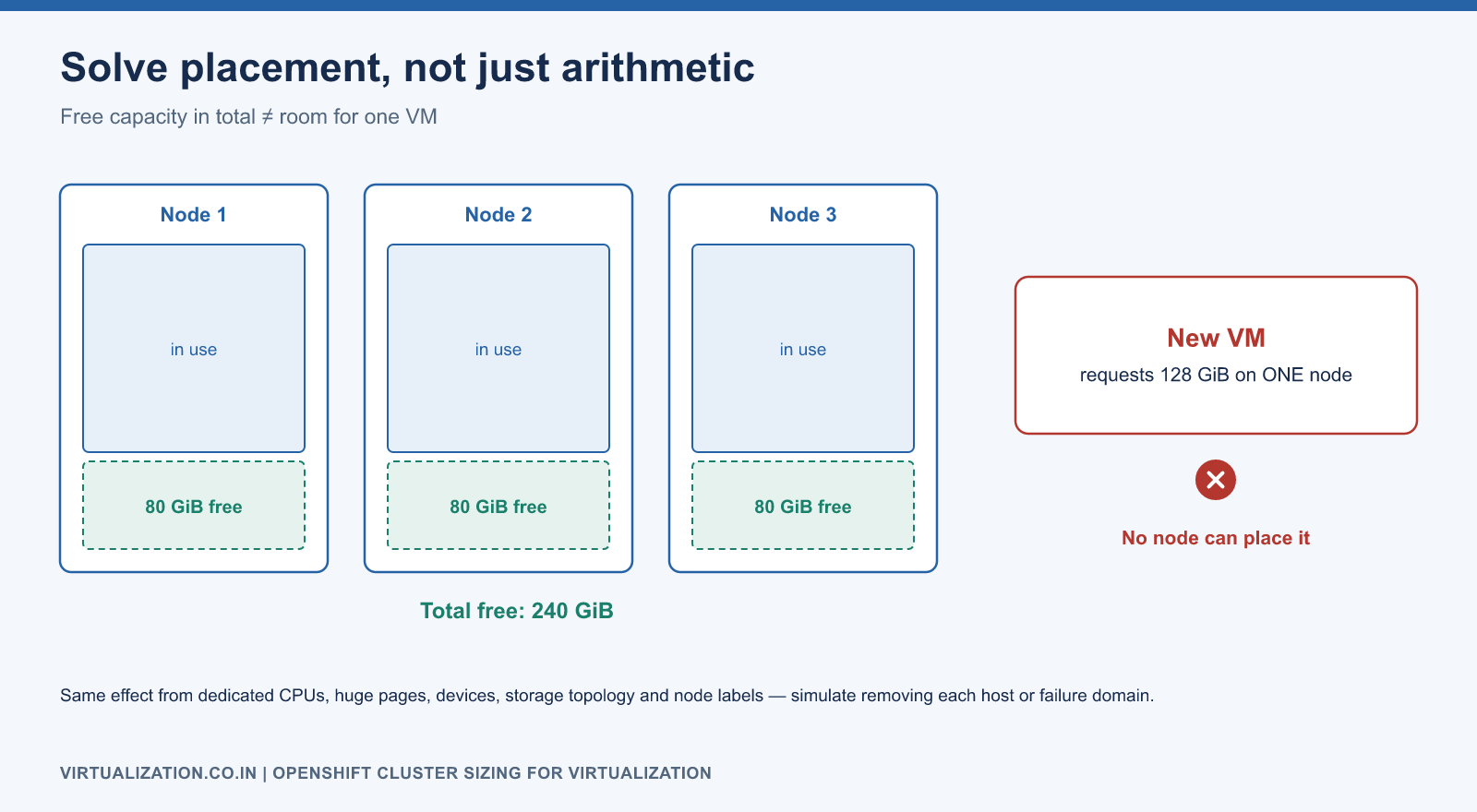
Create a placement worksheet or simulator containing VM resource requests and candidate-node sets. Remove a host or failure domain and attempt to place the affected VMs on survivors. Repeat for each planned maintenance/failure scenario. Kubernetes node assignment rules explain selectors and affinity; the exercise itself should use your actual VM requirements.
Storage and migration throughput
Capacity and performance need independent tests. Estimate active data, growth, snapshots, temporary migration data, and operational reserve. Then evaluate application IOPS, throughput, and latency during backup and migration concurrency.
For transfer planning, a simple lower bound is bytes to move / effective bytes per second. Moving 12 TiB at a measured 1 GiB/s takes about 3.4 hours of pure transfer. It excludes source contention, delta copies, conversion, boot, and acceptance. Network link speed is not the same as effective application transfer speed.
For warm migrations, measure the changed-data rate and final cutover duration. For live migration, measure memory dirtying and available migration bandwidth. These are different capacity models and should not share an unexamined “migration throughput” number.
Inspect the actual cluster budget
oc get nodes -o custom-columns='NAME:.metadata.name,CPU:.status.allocatable.cpu,MEMORY:.status.allocatable.memory'
oc describe node worker01
oc get pods -A --field-selector spec.nodeName=worker01 -o wide
oc adm top nodes
oc get resourcequota,limitrange -n apps
oc get vmi -A -o wide
Replace the node and namespace names. Current utilization from top is a short-term observation; it does not replace historical peak analysis. describe node helps compare allocated requests with current usage. Namespace quotas may block creation even when nodes have capacity, so inspect both layers.
A qualification test plan
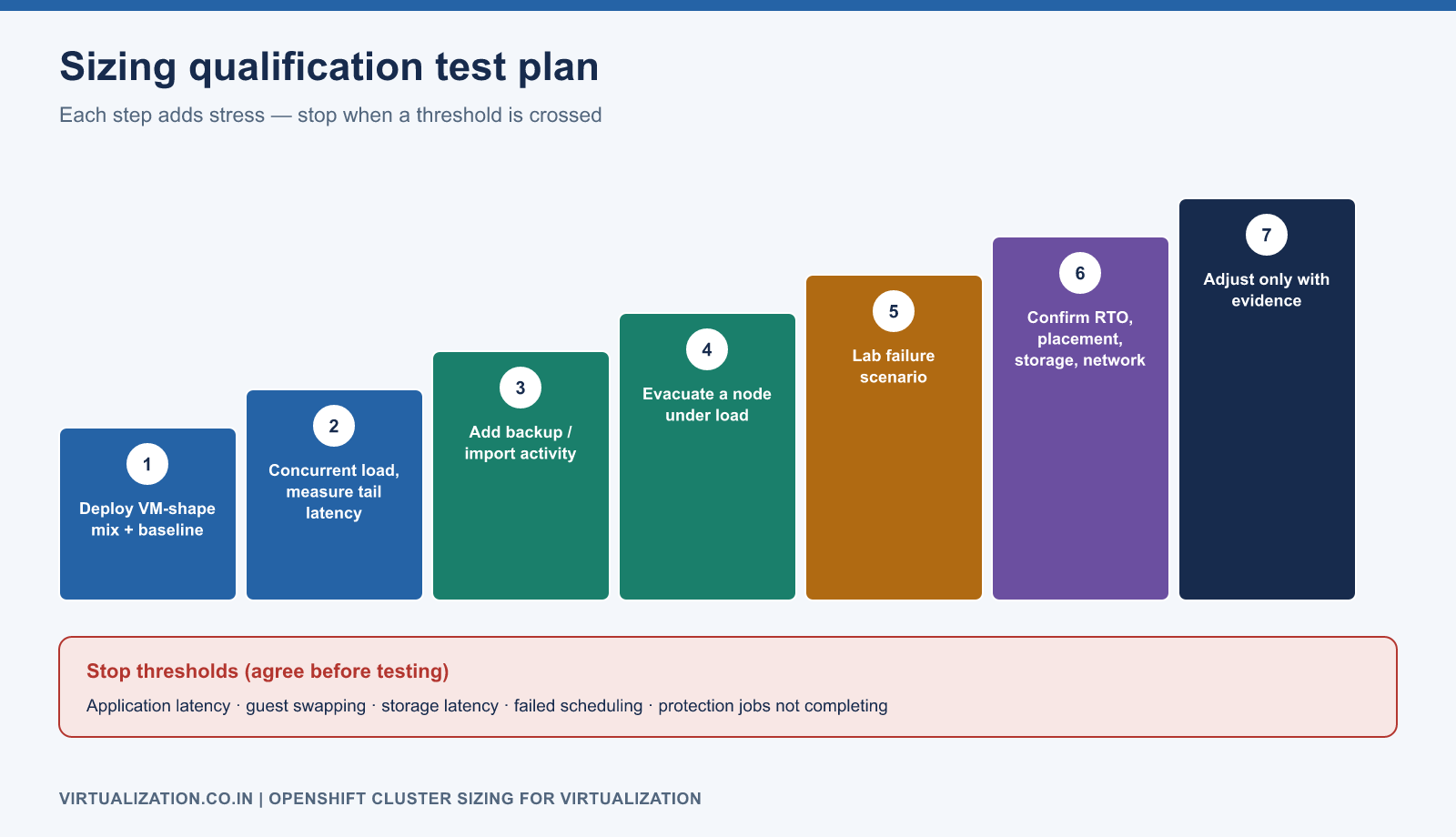
- Deploy the expected mix of VM shapes and establish an application baseline.
- Run representative concurrent load and measure tail latency.
- Add backup or import activity at the intended concurrency.
- Perform a planned node evacuation with normal load still running.
- In a controlled lab, exercise the approved failure scenario.
- Confirm recovery objectives, placement, and storage/network behavior.
- Increase load or reduce reserve only when the evidence supports it.
Set stop thresholds before the test: application latency, guest swapping, storage latency, failed scheduling, and protection-job completion. Record the workload generator and dataset so the test can be repeated after upgrades.
Deliver a defensible sizing document
The output should include measured demand, VM shape distribution, assumptions, version and hardware baseline, candidate-node restrictions, failure scenario, headroom policy, storage model, migration budget, and test evidence. State which dimension currently limits growth.
Revisit sizing after each migration wave. Retired source workloads may have hidden dependencies, and right-sizing opportunities should be validated rather than applied indiscriminately during cutover. Connect this model to the enterprise migration architecture and the storage qualification procedure.
Explore the complete series
- VMware vs OpenShift Virtualization: Complete Technical Comparison
- OpenShift Virtualization Architecture Explained
- Understanding KubeVirt, VM and VMI
- VMware to OpenShift: Complete Migration Strategy
- MTV Architecture and Internal Working
- OpenShift Virtualization Networking Deep Dive
- OpenShift Virtualization Storage Deep Dive
- OpenShift VM Live Migration Explained
- OpenShift Cluster Sizing for Virtualization
- Migrating Windows VMs Using MTV
- Migrating Linux VMs Using MTV
- VMware PowerCLI vs OpenShift CLI
- Building OpenShift PowerShell Cmdlets
- OpenShift Virtualization Troubleshooting Guide
- Enterprise-Scale VMware to OpenShift Migration Architecture