VMware to OpenShift Virtualization — Article 10 of 15
Technical baseline: OpenShift Virtualization 4.20 and MTV 2.11 documentation. Reviewed 31 October 2026. Examples are instructional and have not been executed against a production cluster; check your installed release, support matrix, and environment before use.
Windows VM migration requires coordinated disk conversion, driver readiness, network identity, licensing checks, and application validation. This runbook uses MTV as the migration orchestrator and treats a successful Windows boot as the beginning of acceptance, not the end.
Define the migration record
Capture the source VM identifier, Windows edition/build, firmware, Secure Boot state, disk/controller layout, network interfaces, IP configuration, domain membership, application services, scheduled tasks, backup status, and recovery objectives. Identify encryption, TPM dependencies, clustered roles, shared disks, and software tied to hardware identity.
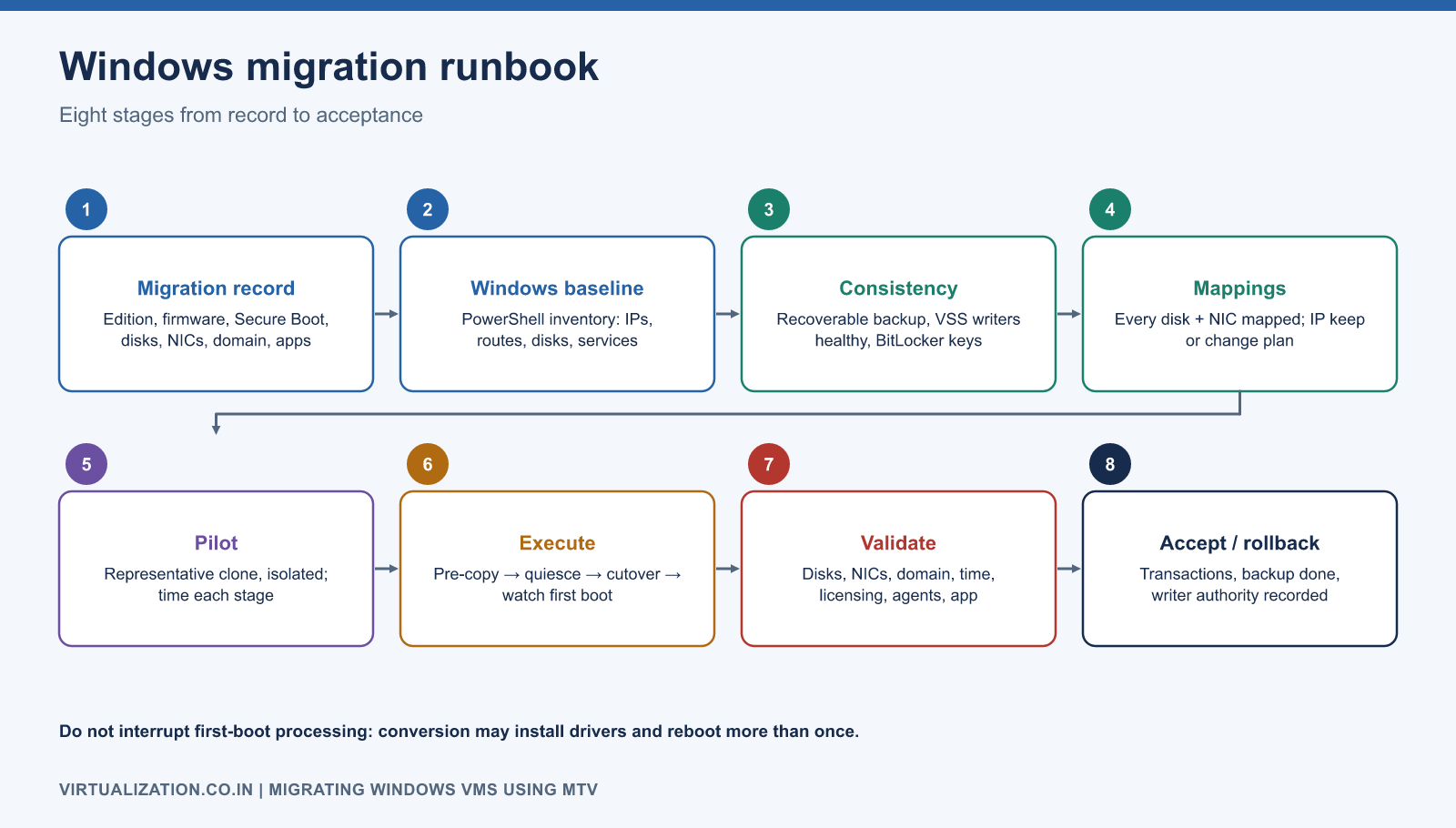
An upstream converter’s ability to read a guest is not equivalent to supported MTV migration or application certification. Check the installed MTV patch release, supported guest matrix, target virtualization release, and application vendor position. The MTV 2.11 release notes are especially relevant to conversion fixes and known limitations.
Collect a reproducible Windows baseline
Run the following read-only inventory in an elevated PowerShell session where required. Store its output in an access-controlled migration record; network, disk, and service inventories can expose sensitive infrastructure information.
Get-CimInstance Win32_OperatingSystem |
    Select-Object Caption, Version, BuildNumber, LastBootUpTime
Get-Disk | Select-Object Number, FriendlyName, PartitionStyle, Size, OperationalStatus
Get-Volume | Select-Object DriveLetter, FileSystemLabel, FileSystem, Size, SizeRemaining
Get-NetAdapter | Select-Object Name, InterfaceDescription, MacAddress, Status
Get-NetIPConfiguration -Detailed
Get-DnsClientServerAddress
Get-NetRoute -AddressFamily IPv4 |
    Sort-Object DestinationPrefix, RouteMetric
Get-Service | Where-Object StartType -eq 'Automatic' |
    Select-Object Name, Status, StartType
Get-ScheduledTask | Select-Object TaskPath, TaskName, State
Microsoft documents the interface and DNS information returned by Get-NetIPConfiguration. Save exact interface-to-application mappings, not only a list of IP addresses. A server with management, application, and backup NICs can boot successfully while routing traffic through the wrong interface.
Prepare consistency and recovery
Verify a recent recoverable backup and the procedure for restoring the application. For a database, confirm the application’s consistency method with its owner. A storage snapshot that is only crash-consistent may not satisfy the application’s recovery objective.
For warm Windows migration on the MTV 2.11 baseline, the documented prerequisites require VSS to be running for snapshot quiescing. Check writer health and investigate errors before migration:
Get-Service VSS
vssadmin list writers
vssadmin list providers
If the approved runbook requires it, Start-Service VSS changes service state. Do not disable failing writers or treat a running service alone as proof of application consistency. Later MTV releases can differ in VSS handling; follow the versioned migration prerequisites for the version actually installed.
Confirm encryption recovery material is available through the organization’s secure process. Do not print recovery keys into an article example, terminal transcript, or migration ticket. If the configuration is unsupported, choose an approved application migration or rebuild path instead of improvising decryption during cutover.
Prepare the destination and mappings
Create or select the target namespace, storage classes, and VM networks. Check that every disk has a destination and every NIC has a reviewed network mapping. Include the VM’s expected growth and the migration’s temporary storage in the capacity check.
If retaining the source IP, prove the target network reaches the correct subnet and can enforce the required controls. If changing the IP, prepare DNS, application configuration, firewall rules, monitoring, and client updates. Treat address preservation as a verified outcome, not an assumption based on a checkbox.
Keep a mapping table with source disk identifier, capacity, Windows drive letter or mount point, target PVC, and validation method. Drive letters alone are insufficient for disks mounted into folders or applications using volume GUID paths.
Run a representative pilot
Use a clone or approved nonproduction representative without exposing duplicate domain or application identities to the production network. Test the same firmware, Windows version, disk layout, security tooling, and application agents as the real VM.
Record disk-transfer time, conversion time, first-boot time, reboot count, and application readiness. Windows conversion can perform driver and agent work during first boot and may reboot multiple times. The virt-v2v manual explains this staged conversion. Do not interrupt first-boot processing just because the console temporarily appears inactive.
Execute the migration
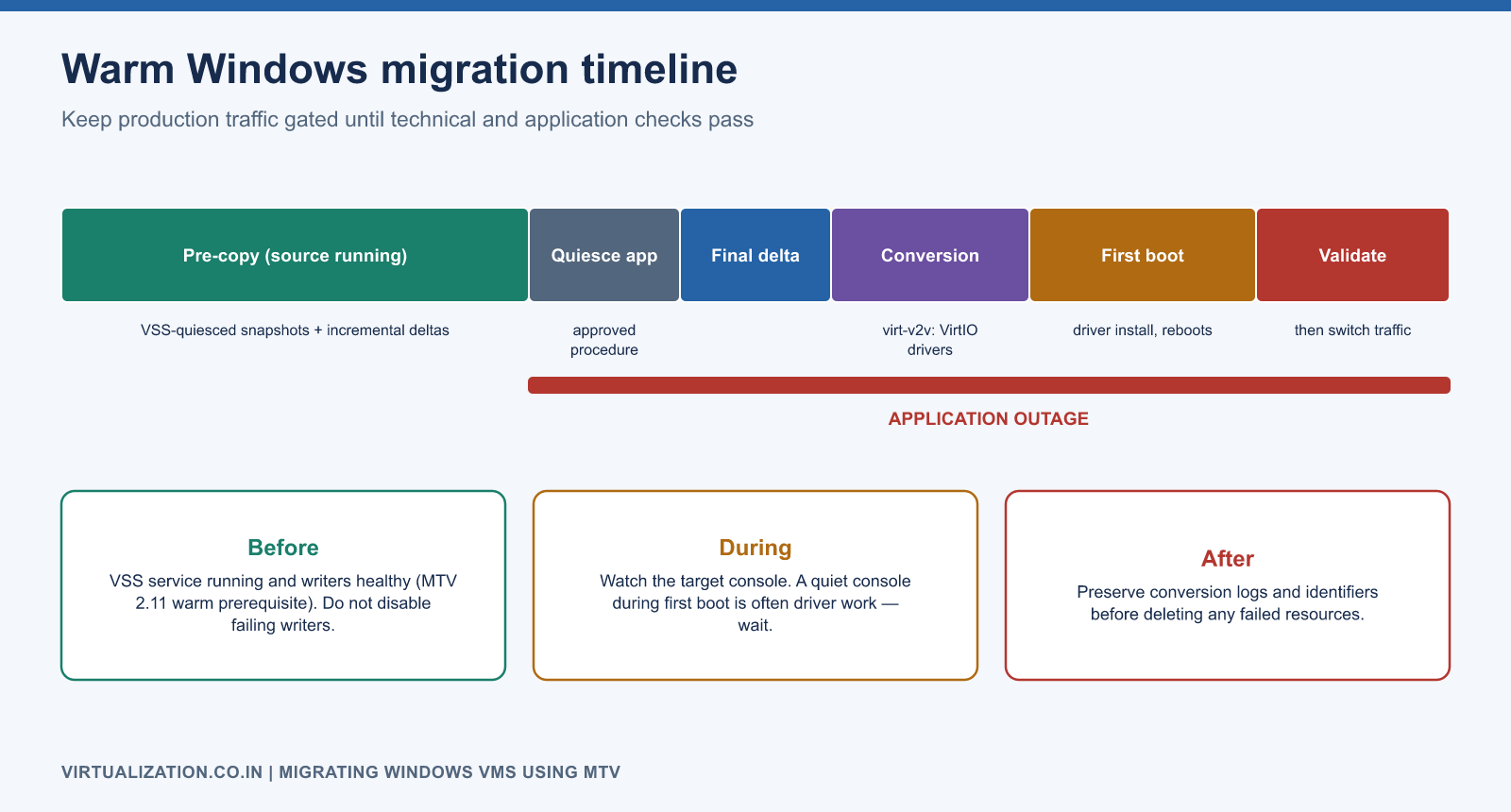
- Validate provider readiness and review every plan warning.
- Confirm the selected VM’s immutable source identity and target namespace.
- For warm migration, start pre-copy and measure progress and source load.
- At cutover, stop or quiesce application writes using the approved procedure.
- Let MTV perform the documented cutover and conversion sequence.
- Observe the target console through initial boot and any conversion reboots.
- Keep production traffic gated until technical and application checks pass.
Use the console’s plan status together with namespace events and workload status:
oc get plans.forklift.konveyor.io -n openshift-mtv
oc get migrations.forklift.konveyor.io -n openshift-mtv
oc get vm,vmi -n apps
oc get dv,pvc -n apps
oc get events -n apps --sort-by=.metadata.creationTimestamp
Do not delete failed conversion resources until their relevant logs and identifiers are preserved.
Validate Windows after conversion
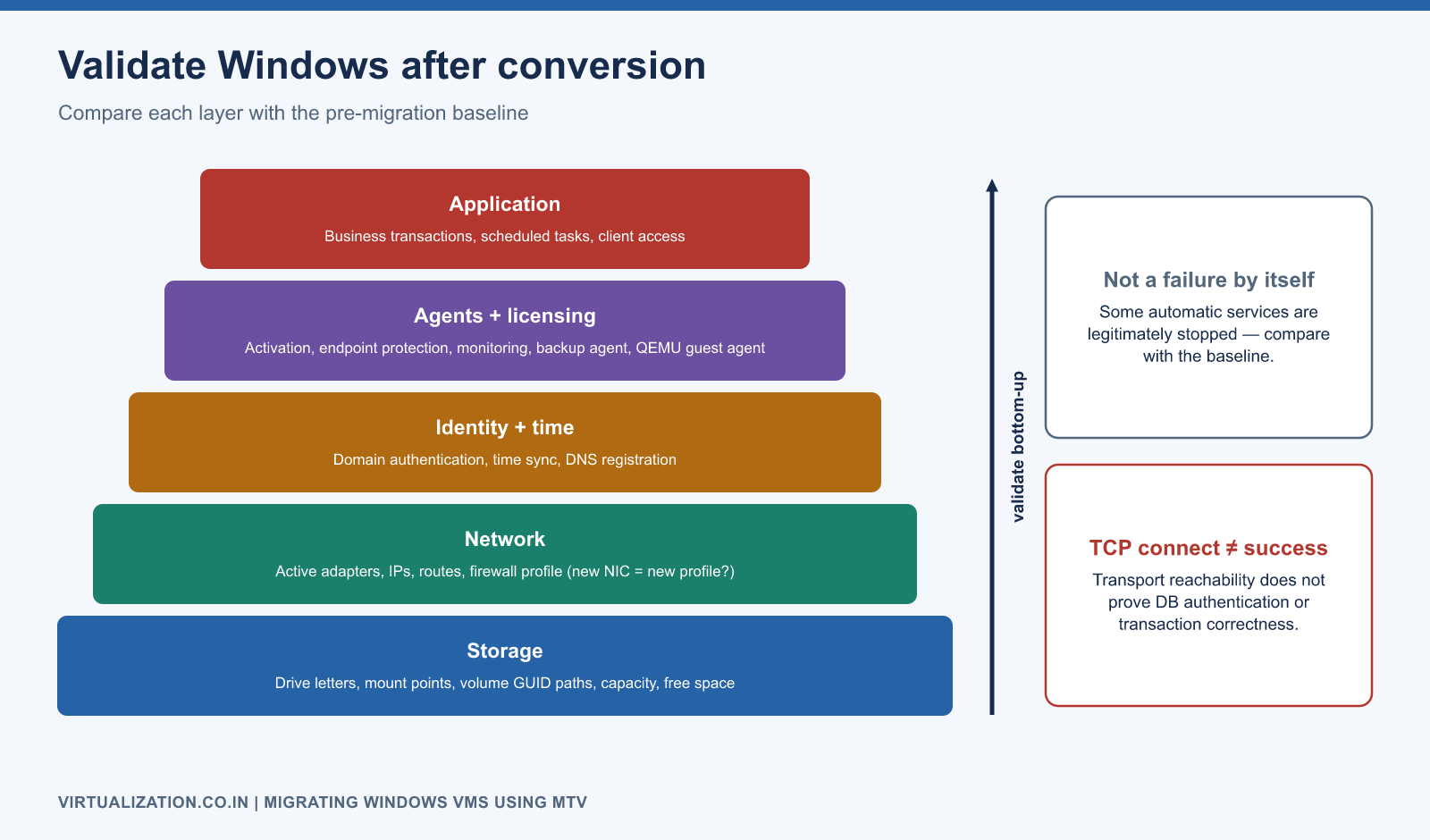
Compare disk capacity, drive letters, mount points, free space, and application paths with the baseline. Check the active adapters and routes. A new virtual NIC can produce a different Windows network profile or leave historical interface configuration behind; inspect the actual state before changing addresses.
Get-NetConnectionProfile
Get-NetIPConfiguration -Detailed
Get-Service | Where-Object StartType -eq 'Automatic' |
    Where-Object Status -ne 'Running'
Get-WinEvent -FilterHashtable @{
    LogName = 'System'
    StartTime = (Get-Date).AddHours(-2)
    Level = 1,2
} -MaxEvents 100
Test-NetConnection -ComputerName db.example.com -Port 1433
Replace the example dependency and port. Some automatic services are legitimately stopped; compare with the pre-migration baseline and application requirements rather than declaring all such services failures. A successful TCP connection confirms transport reachability, not database authentication or transaction correctness.
Verify domain authentication, time synchronization, licensing/activation status through the approved process, endpoint protection, monitoring, backup agents, and QEMU guest-agent integration where configured. Test scheduled tasks that may not run during the short acceptance window.
Common failure branches
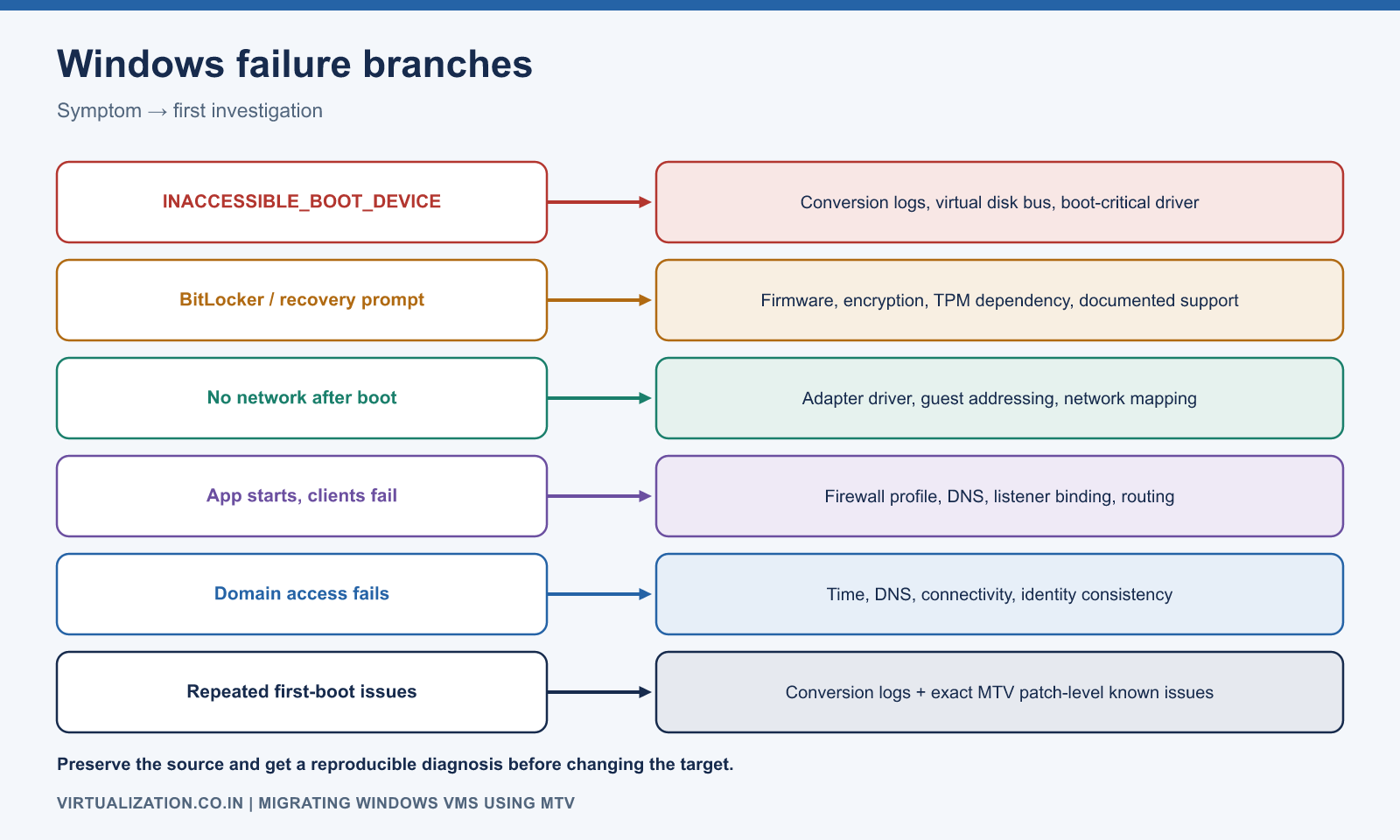
| Symptom | First investigation |
|---|---|
| Boot device inaccessible | Conversion logs, virtual disk bus, boot-critical driver |
| Recovery prompt | Firmware/encryption/TPM dependency and documented support |
| No network after boot | Adapter driver, guest addressing, network mapping |
| Application starts but clients fail | Firewall profile, DNS, listener binding, routing |
| Domain access fails | Time, DNS, connectivity, identity consistency |
| Repeated first-boot issues | Conversion logs and exact MTV patch-level known issues |
Avoid random registry edits or switching firmware as trial-and-error fixes on the only target copy. Preserve the source and obtain a reproducible diagnosis.
Acceptance and rollback
Require an application transaction test, client access test, monitoring confirmation, and target backup completion. Compare performance with the agreed baseline. Record which system is the authoritative writer and the time that authority changed.
Before target writes, a rollback may return service to the isolated source after validating its state. After target writes, source restart alone can lose data; follow the reconciliation or restore design. Keep the source and target from serving the same identity simultaneously. Use the migration strategy for the rollback decision gates and Linux runbook for mixed-application waves.
Explore the complete series
- VMware vs OpenShift Virtualization: Complete Technical Comparison
- OpenShift Virtualization Architecture Explained
- Understanding KubeVirt, VM and VMI
- VMware to OpenShift: Complete Migration Strategy
- MTV Architecture and Internal Working
- OpenShift Virtualization Networking Deep Dive
- OpenShift Virtualization Storage Deep Dive
- OpenShift VM Live Migration Explained
- OpenShift Cluster Sizing for Virtualization
- Migrating Windows VMs Using MTV
- Migrating Linux VMs Using MTV
- VMware PowerCLI vs OpenShift CLI
- Building OpenShift PowerShell Cmdlets
- OpenShift Virtualization Troubleshooting Guide
- Enterprise-Scale VMware to OpenShift Migration Architecture