VMware to OpenShift Virtualization — Article 12 of 15
Technical baseline: OpenShift Virtualization 4.20 and MTV 2.11 documentation. Reviewed 31 October 2026. Examples are instructional and have not been executed against a production cluster; check your installed release, support matrix, and environment before use.
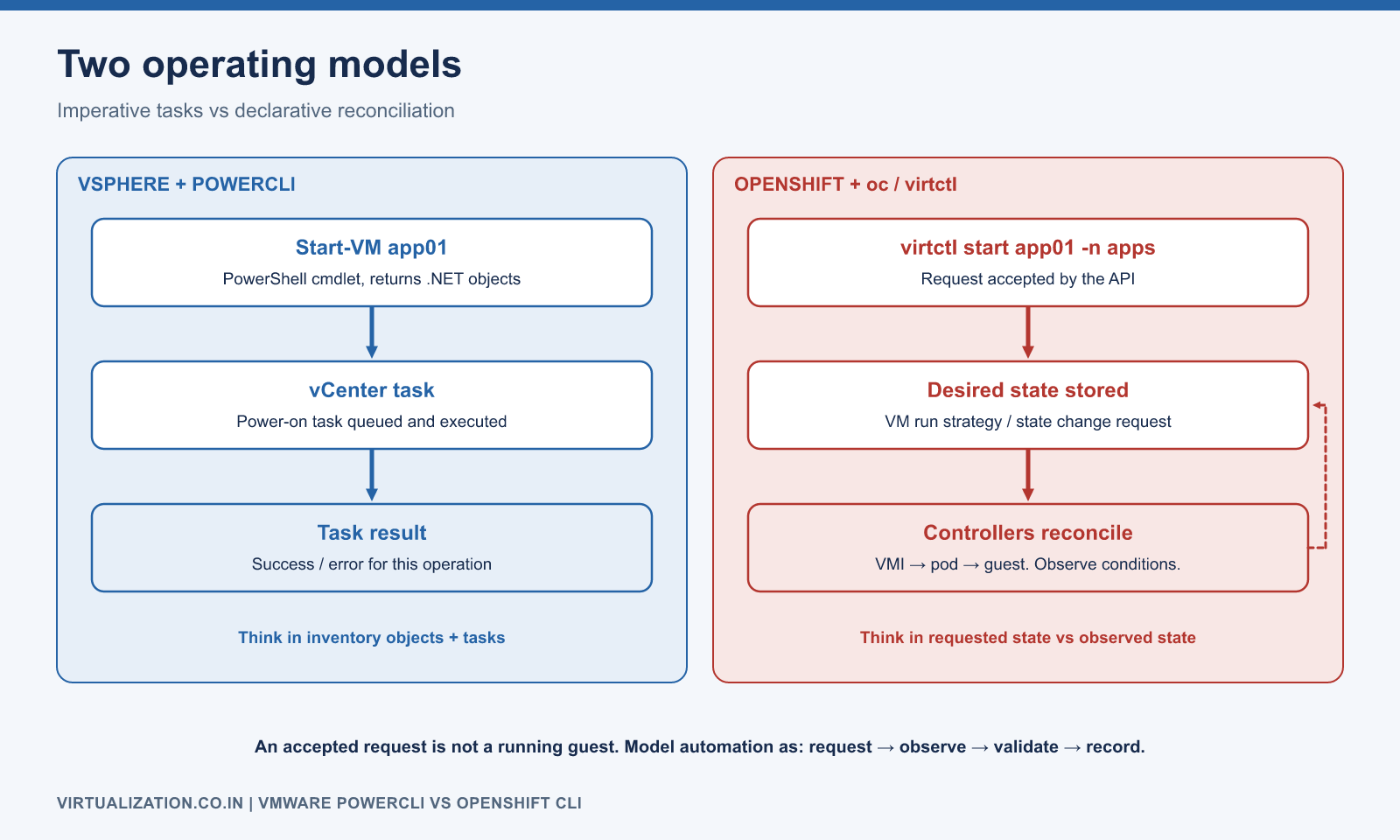
PowerCLI and the OpenShift command-line tools solve similar administrative problems through different interfaces. PowerCLI normally returns PowerShell objects representing vSphere entities. oc operates on Kubernetes resources, while virtctl exposes virtualization-specific operations. Reliable automation needs to preserve that distinction.
Translate the operating model first
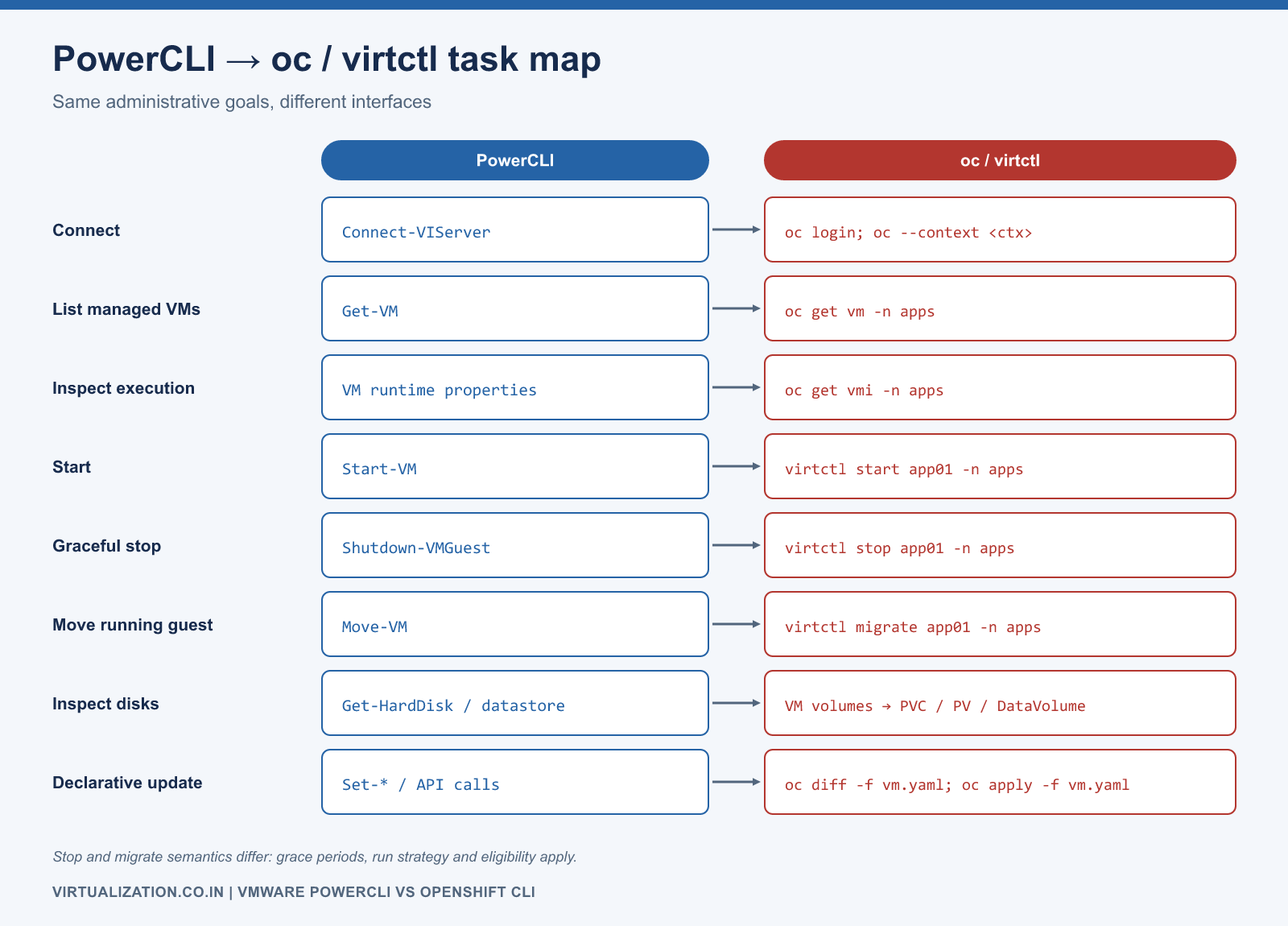
| Task | vSphere / PowerCLI | OpenShift Virtualization |
|---|---|---|
| Connect | Connect-VIServer |
Authenticate with oc; select an explicit context |
| List managed VMs | Get-VM |
oc get vm -n apps |
| Inspect execution | VM runtime properties | oc get vmi -n apps |
| Start | Start-VM |
virtctl start app01 -n apps |
| Graceful stop | Shutdown-VMGuest, when guest integration permits |
virtctl stop app01 -n apps, subject to lifecycle/grace-period behavior |
| Move running guest | Appropriate Move-VM workflow |
virtctl migrate app01 -n apps, if eligible |
| Inspect persistent disks | Virtual disk/datastore information | VM volume references, PVC/PV, DataVolume |
| Declarative update | API/property operations or automation tooling | Review and apply a resource manifest |
This is a task mapping, not a guarantee of identical shutdown, migration, or completion semantics. Use Broadcom’s Get-VM, Start-VM, and Move-VM references for vSphere behavior.
Treat context as part of every operation
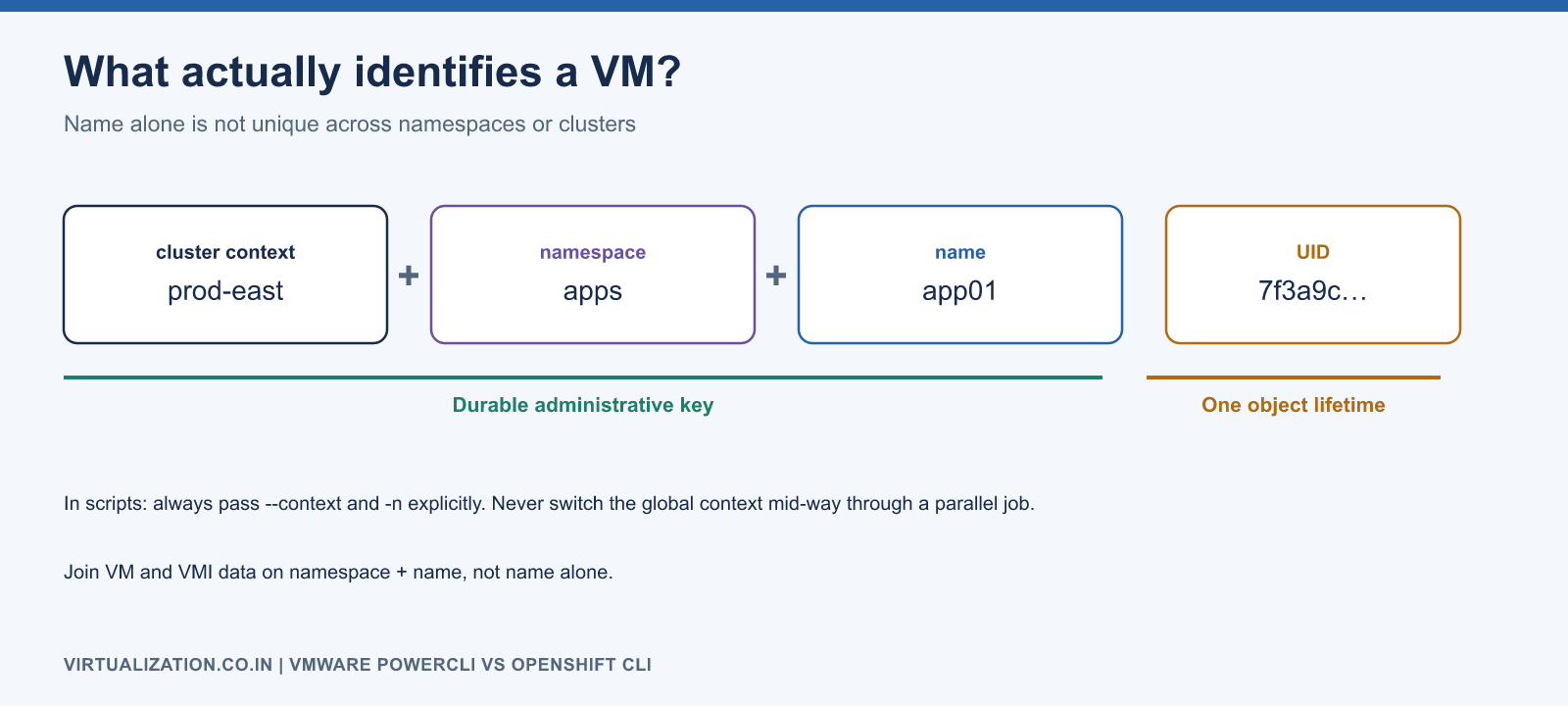
A VM name is not globally unique across OpenShift namespaces or clusters. The durable administrative key is at least cluster/context, namespace, and name; use Kubernetes UID when tracking a specific object’s lifetime.
oc config get-contexts
oc config current-context
oc whoami
oc --context lab-cluster get vm -n apps
Prefer explicit --context and -n in scripts. Avoid changing a global default context halfway through a parallel job. Keep credentials in the supported login/kubeconfig mechanism, with appropriate file permissions, instead of embedding tokens into scripts or command transcripts.
On the vSphere side, use the intended server connection explicitly when multiple sessions exist. A script that works in a clean terminal can behave differently in a long-lived administrator session containing several connections.
Convert JSON into objects instead of parsing tables
Human-readable tables can change column widths or omit information. Request JSON, check the native command exit code, then deserialize. A command that prints an error must not quietly become an empty inventory.
$contextName = 'lab-cluster'
$namespace = 'apps'
$vmText = & oc --context $contextName get vm -n $namespace -o json
if ($LASTEXITCODE -ne 0) { throw 'VM inventory request failed.' }
$vmList = ($vmText -join "`n") | ConvertFrom-Json

$vmiText = & oc --context $contextName get vmi -n $namespace -o json
if ($LASTEXITCODE -ne 0) { throw 'VMI inventory request failed.' }
$vmiList = ($vmiText -join "`n") | ConvertFrom-Json

$instances = @{}
foreach ($vmi in $vmiList.items) {
    $instances[$vmi.metadata.name] = $vmi
}

$report = foreach ($vm in $vmList.items) {
    $instance = $instances[$vm.metadata.name]
    [pscustomobject]@{
        Context = $contextName
        Namespace = $vm.metadata.namespace
        Name = $vm.metadata.name
        RunStrategy = $vm.spec.runStrategy
        HasVMI = ($null -ne $instance)
        Phase = if ($instance) { $instance.status.phase } else { 'No VMI' }
        Node = if ($instance) { $instance.status.nodeName } else { $null }
    }
}
$report | Export-Csv -LiteralPath '.\vm-inventory.csv' -NoTypeInformation
This reads one namespace. If extending it across namespaces, key the join by namespace and name, not name alone. VM and VMI reads are separate snapshots in time, so a guest starting between the two requests can temporarily produce an inconsistent view. Include collection time and handle such transitions in monitoring logic.
Keep requested state separate from observed state
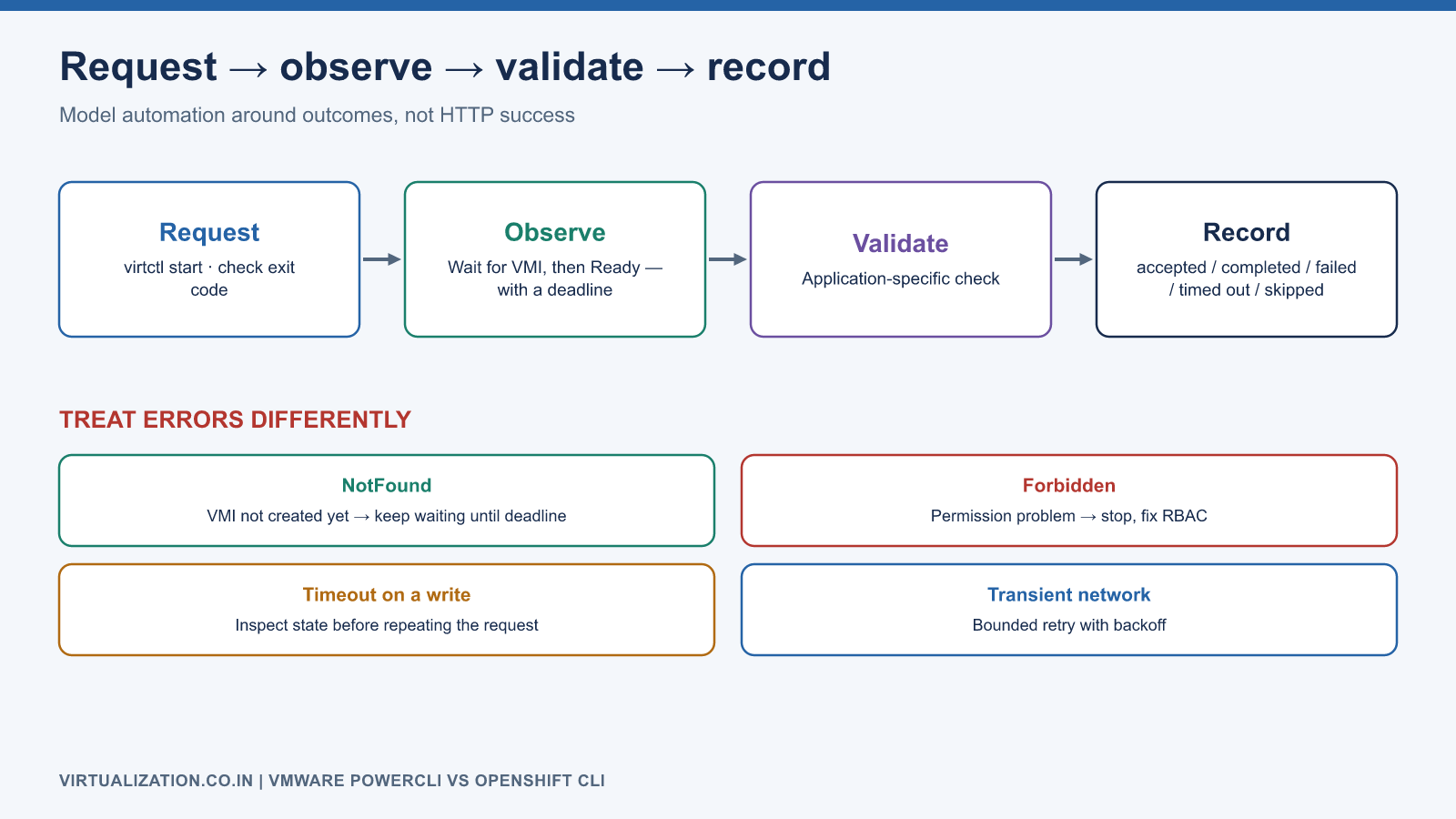
A successful API request often means the request was accepted. It does not mean the guest is running, the operating system is ready, or the application is healthy. Model automation as request, observe, validate, and record.
For an already selected VM, the following starts it and waits for a VMI Ready condition, with an explicit limit:
virtctl --context lab-cluster start app01 -n apps
if ($LASTEXITCODE -ne 0) { throw 'Start request failed.' }

# Run after the VMI object exists; creation can be asynchronous.
oc --context lab-cluster wait vmi/app01 -n apps `
    --for=condition=Ready --timeout=180s
if ($LASTEXITCODE -ne 0) { throw 'VMI did not become Ready in the allowed time.' }
A production workflow should first wait for VMI creation, distinguish NotFound from permission/network errors, and then wait for readiness. Finally run application-specific checks. Avoid an unbounded retry loop that can run indefinitely or hide an authorization failure.
Use manifests for repeatable configuration
For a reviewed VM manifest, inspect the live difference and validate admission before applying:
oc --context lab-cluster diff -f app01.yaml
oc --context lab-cluster apply --dry-run=server -f app01.yaml
oc --context lab-cluster apply -f app01.yaml
diff commonly returns a nonzero status when differences exist; scripts must distinguish differences from errors. Server-side dry run validates against the actual API and admission chain, but cannot prove image availability, network reachability, storage performance, or guest boot success. The Kubernetes CLI reference covers the underlying resource-oriented command patterns.
If GitOps owns the object, update its source of truth and coordinate reconciliation. An imperative edit can be reverted by another controller. Record field ownership and make the operational procedure clear about whether emergency changes are temporary or committed back to source.
Error handling, retries, and concurrency
PowerShell’s $ErrorActionPreference is not a substitute for inspecting a native executable’s exit code across supported PowerShell versions. Capture it immediately after the relevant process, before another native command overwrites it. Keep standard output machine-readable and separate diagnostics.
Retry read operations only for identified transient failures with a bound and backoff. For writes, determine whether a timed-out request was accepted before repeating it. A migration request can create a new object; blindly repeating a create is different from repeating an idempotent read.
Limit parallelism according to API capacity and platform workload, not the speed of the administrator’s laptop. Report per-VM outcomes, including accepted, completed, failed, timed out, and skipped. Preserve original exceptions without publishing credentials or sensitive manifests.
Build equivalence around outcomes
When replacing a PowerCLI script, write an acceptance table for its actual business task. For example, a nightly inventory should produce consistent ownership, power/execution state, disk capacity, and location information. It should also identify missing permissions and partial results. Matching the old column names without preserving their meaning is not a successful port.
For a start/stop workflow, define graceful shutdown behavior, timeout, escalation, and application checks. For migration, define eligibility and client continuity. For reporting, retain units and timestamps so numbers remain comparable.
The next article builds PowerShell functions around these principles. Use the VM/VMI guide to interpret lifecycle state and the troubleshooting guide when a request is accepted but the expected result does not follow.
Explore the complete series
- VMware vs OpenShift Virtualization: Complete Technical Comparison
- OpenShift Virtualization Architecture Explained
- Understanding KubeVirt, VM and VMI
- VMware to OpenShift: Complete Migration Strategy
- MTV Architecture and Internal Working
- OpenShift Virtualization Networking Deep Dive
- OpenShift Virtualization Storage Deep Dive
- OpenShift VM Live Migration Explained
- OpenShift Cluster Sizing for Virtualization
- Migrating Windows VMs Using MTV
- Migrating Linux VMs Using MTV
- VMware PowerCLI vs OpenShift CLI
- Building OpenShift PowerShell Cmdlets
- OpenShift Virtualization Troubleshooting Guide
- Enterprise-Scale VMware to OpenShift Migration Architecture