MTV storage copy offload accelerates VMware-to-OpenShift disk migration by asking a supported storage array to perform the bulk block copy. Understanding the separate roles of the populator pod, ESXi, the VIB, and the array is essential: a migration can complete successfully even when hardware XCOPY was not used.
Technical scope: the documented MTV 2.12 offload workflow, the MTV 2.11.6 VIB behavior change, and upstream Forklift implementation details. Reviewed 31 October 2026. Upstream source describes implementation, not a guarantee of support in every MTV release. Commands are instructional and were not executed against a production migration environment.
- The architecture in one paragraph
- What XCOPY changes in the data path
- Component responsibilities
- How the populator connects a source VMDK to a destination PVC
- Why temporary RDM handling appears in this workflow
- The role of the VIB
- VIB versus SSH invocation
- MTV 2.11.6 changed automatic VIB installation
- Storage mapping: what to review
- Hardware offload versus host-based fallback
- Verify the actual copy path
- Troubleshooting by failure boundary
- Performance planning and acceptance
- Related technical guides
The architecture in one paragraph
The MTV controller coordinates migration. A CSI provisioner supplies destination storage. The XCOPY populator coordinates disk population across Kubernetes, VMware, and the storage-management API. ESXi runs the disk-clone operation through vmkfstools. When the storage configuration qualifies, VMware’s VAAI Full Copy path uses SCSI XCOPY so the array copies blocks internally. Guest conversion and application validation remain separate stages.
What XCOPY changes in the data path
XCOPY means SCSI Extended Copy. In the same-array offload path, the array performs the block movement between the source backing storage and destination volume. The populator still needs management connectivity, and ESXi still issues storage commands; the benefit is avoiding a bulk disk stream through the OpenShift transfer pod. Red Hat documents the same-supported-array requirement and the distinction from conventional network transfer. Red Hat storage copy offload
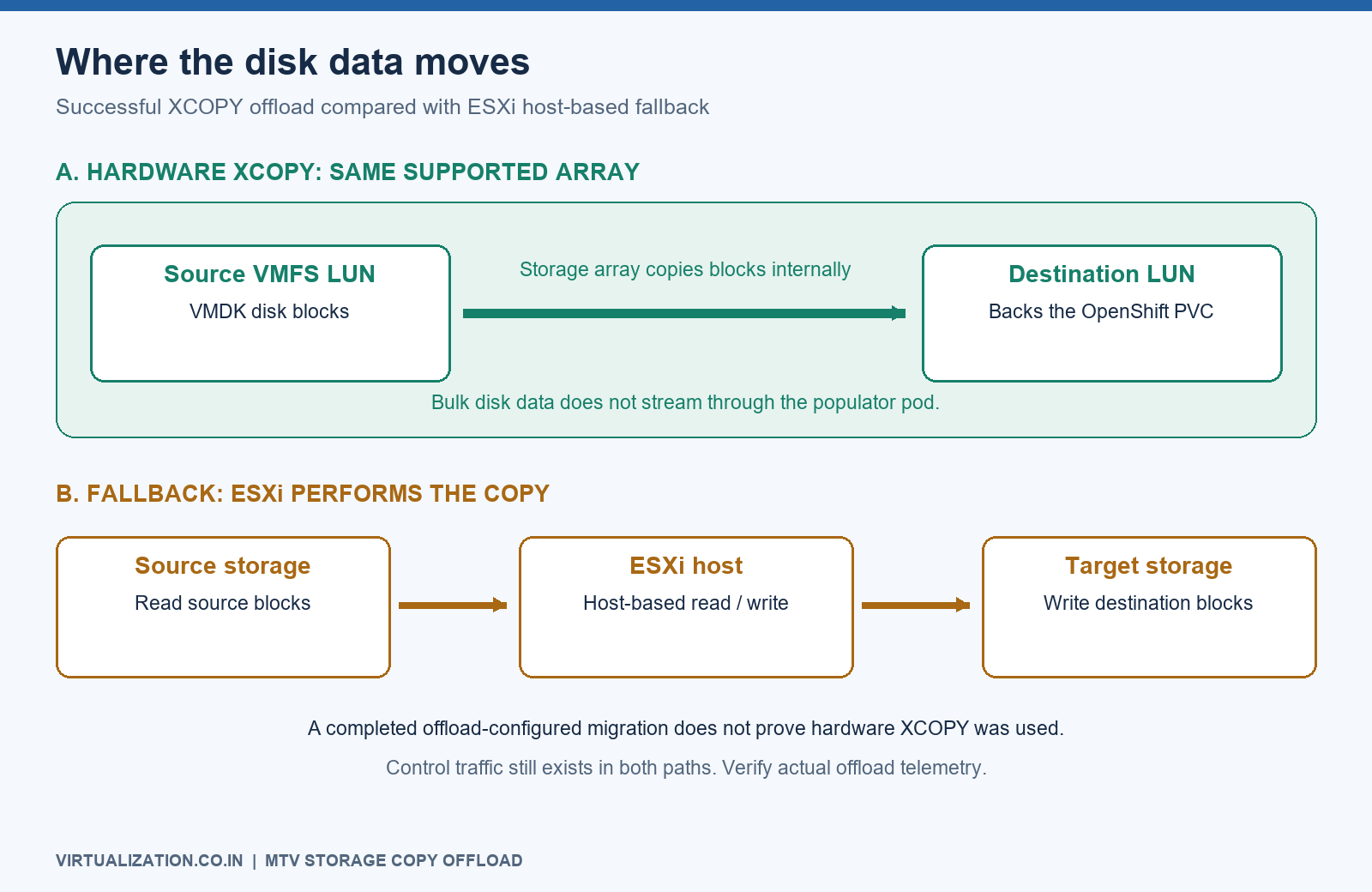
Consider a VM with a 500 GiB operating-system disk and a 2 TiB data disk. The desired end state is two correctly populated target disks attached to the migrated VM. The engineering questions are where those bytes move, who coordinates the operation, and how completion is proven. The nominal disk sizes alone do not predict duration: allocated blocks, source layout, snapshots, backend behavior, conversion, and other array activity all influence the result.
Avoid treating offload as a promise of an instant clone. Hardware-assisted copying and a storage vendor’s metadata-only snapshot clone are different concepts. Measure the actual operation selected by the migration workflow.
Component responsibilities
| Component | Main responsibility | What it does not establish |
|---|---|---|
| MTV migration controller | Coordinates plan execution and VM migration stages | That every disk used hardware acceleration |
| CSI provisioner | Creates the storage backing a requested PVC | That VMware disk data has been populated |
| Populator controller | Coordinates the custom volume-population lifecycle | Guest OS or application readiness |
| XCOPY populator pod | Coordinates storage access, clone invocation, and progress | A guarantee that disk bytes pass through the pod |
ESXi vmkfstools |
Executes the selected virtual-disk clone workflow | That the array accepted every operation as XCOPY |
| Storage array | Executes eligible hardware-offloaded copy operations | Guest driver conversion or application consistency |
| Guest conversion workflow | Adapts a supported guest for target virtual hardware | Successful application transactions |
These boundaries make incident ownership clearer. An array-access problem, a failed ESXi invocation, and a guest boot failure should not all be recorded simply as “MTV migration failed.”
How the populator connects a source VMDK to a destination PVC
In the upstream design, MTV associates a PVC with a VSphereXcopyVolumePopulator resource through dataSourceRef. The populator uses storage-specific integration to arrange access to the target volume from ESXi, then invokes the clone workflow. This is why it needs more than Kubernetes credentials: it must interact with both VMware and the appropriate storage-management interface. Forklift populator design
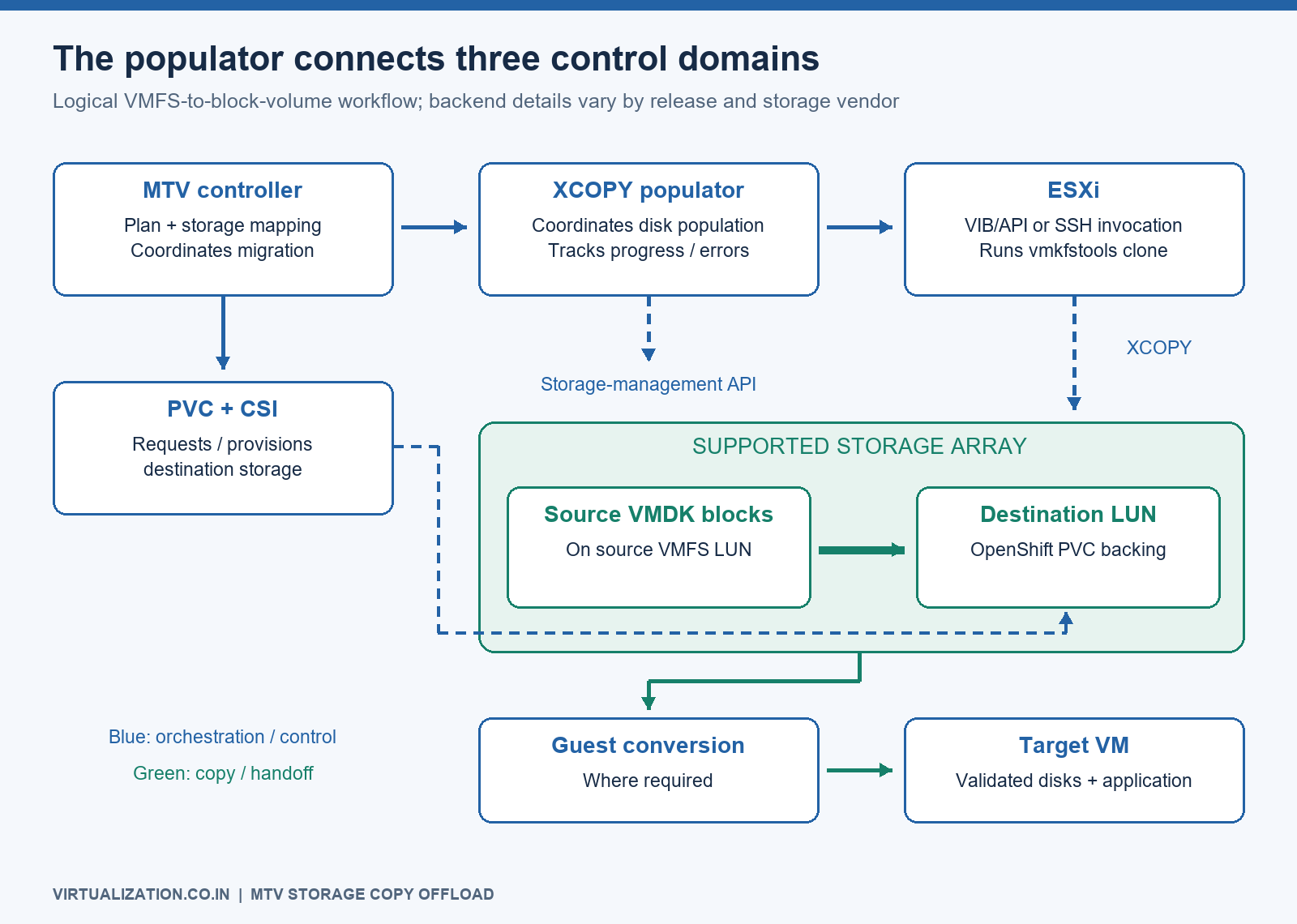
Use the following logical sequence when planning or diagnosing a migration. Exact intermediate PVCs, pod names, and backend operations vary by release and provider.
- Select the mapping. Resolve the source datastore to the intended target StorageClass and offload configuration.
- Prepare destination storage. Verify that the requested target volume exists and has sufficient capacity.
- Resolve identities. Correlate the source VMDK, destination PVC/PV, backend volume identifier, and ESXi device visibility.
- Arrange access. Establish the required destination presentation to the selected ESXi host through the supported storage integration.
- Invoke the clone. Use the configured VIB/API or SSH path to start the ESXi-side operation.
- Observe execution. Track progress, failure conditions, and evidence of actual hardware offload.
- Complete population and handoff. Allow the supported workflow to finish its storage-access lifecycle and proceed with conversion and VM creation.
- Validate the guest and application. Confirm disk identity, mounts, networking, and business transactions.
The sequence is an operational checklist, not a substitute for the installed controller’s implementation. In particular, do not manually create broad storage mappings or remove temporary resources just because they appear in a conceptual diagram.
Why temporary RDM handling appears in this workflow
For a VMFS-backed source and a block-volume destination, ESXi needs a way to address the target LUN as the clone destination. The upstream wrapper uses an RDM destination in its vmkfstools invocation. It also tracks temporary RDM descriptor artifacts for cleanup. This makes the raw destination device usable by the ESXi clone workflow without requiring OpenShift to mount the source VMFS filesystem. Wrapper implementation
The final OpenShift VM consumes its disk through the target PVC. The temporary ESXi representation does not mean the application must retain a VMware RDM dependency after migration. Also, this VMFS-to-block-volume explanation should not be generalized blindly to every vVol, source-RDM, or vendor-specific import path.
For troubleshooting, retain the relationship between four identifiers: source VMDK path, target PVC name, backend volume ID, and ESXi device ID. Human-readable names alone can be misleading when many migration disks are created concurrently.
The role of the VIB
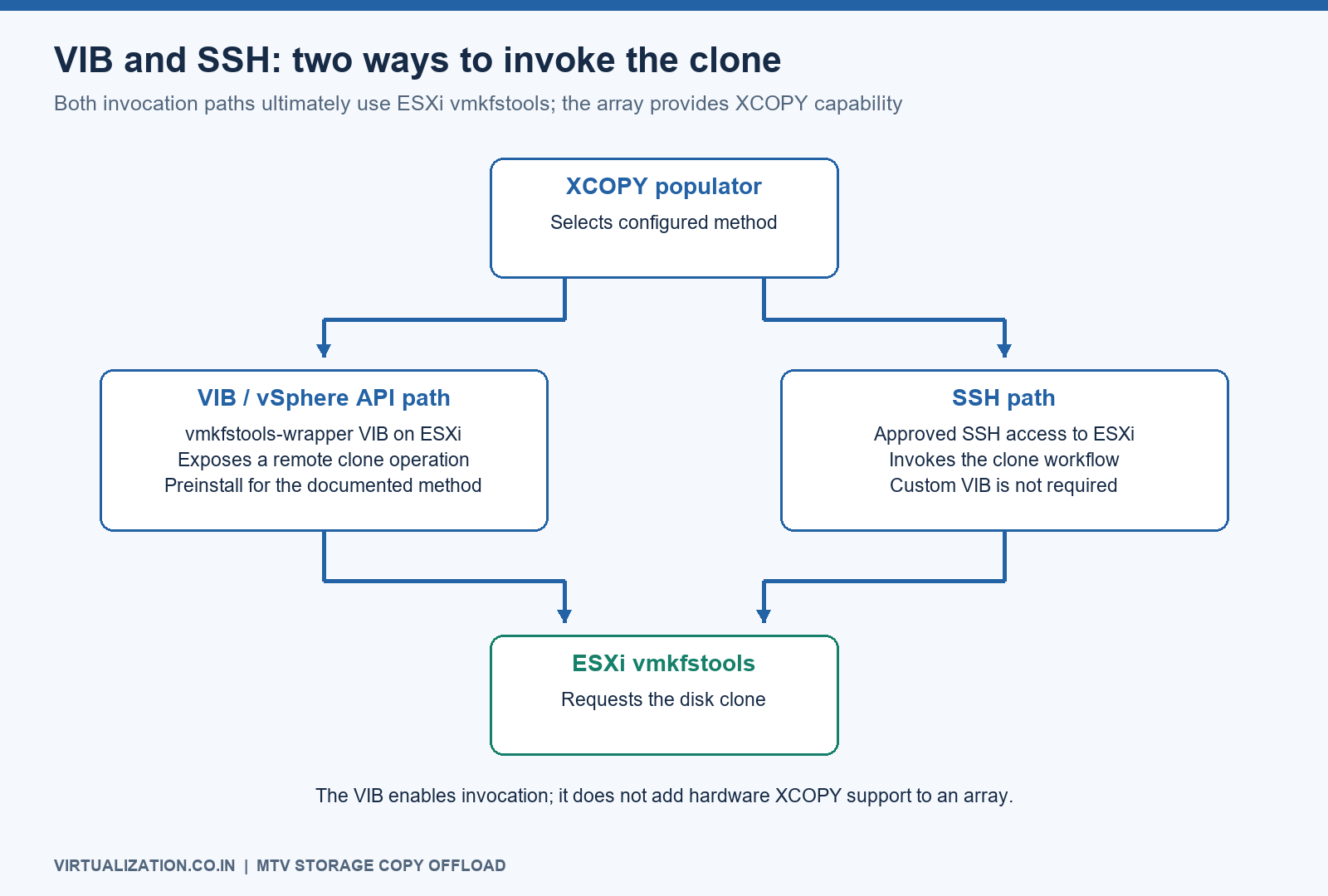
A VIB is a vSphere Installation Bundle, the software package format used by ESXi. For the VIB invocation method, vmkfstools-wrapper provides an ESXCLI extension/wrapper through which the clone operation can be requested remotely. The wrapper exposes the operation; the ESXi storage stack and storage array provide the hardware-copy capability. Wrapper interface documentation
Installing the VIB cannot make an unsupported array support XCOPY. Conversely, an array can support XCOPY while a migration fails because the wrapper is missing, incompatible, or inaccessible. Keep invocation readiness and storage-offload readiness as separate preflight checks.
VIB versus SSH invocation
Red Hat documents both VIB and SSH methods and recommends SSH in its MTV 2.12 planning guidance. The SSH path avoids the custom VIB and uses approved SSH access to invoke the ESXi workflow. Both methods still depend on the underlying storage configuration for successful hardware offload. Cloning methods
| Design question | VIB method | SSH method |
|---|---|---|
| How is the operation invoked? | Through the installed wrapper and VMware API/ESXCLI path | Through the supported SSH invocation workflow |
| Custom VIB required? | Yes, for this method | No |
| Main preflight concern | Package version, installation, exposed operation, privileges | Host access, keys, restrictions, supported configuration |
| Does it guarantee XCOPY? | No | No |
| Does it replace storage access checks? | No | No |
Choose an invocation method with the VMware and security teams. Record how access is granted, scoped, audited, and removed after the migration program. Avoid adding ad hoc root access simply to get a pilot working; the final access model should be tested during the pilot.
MTV 2.11.6 changed automatic VIB installation
Earlier behavior could make concurrent populator operations repeatedly check or install the VIB on ESXi. MTV 2.11.6 removed automatic installation from that flow after host resource and concurrency problems. For the VIB method, the release notes require manual preinstallation before migration. This does not turn VIB installation into a requirement for the alternative SSH method. MTV 2.11.6 resolved issues
Record the exact MTV patch level in your runbook. An instruction that worked for an earlier patch can describe the wrong installation behavior for a later one. Also verify relevant ESXi hosts, rather than testing one host and assuming a later wave will execute on it.
Storage mapping: what to review
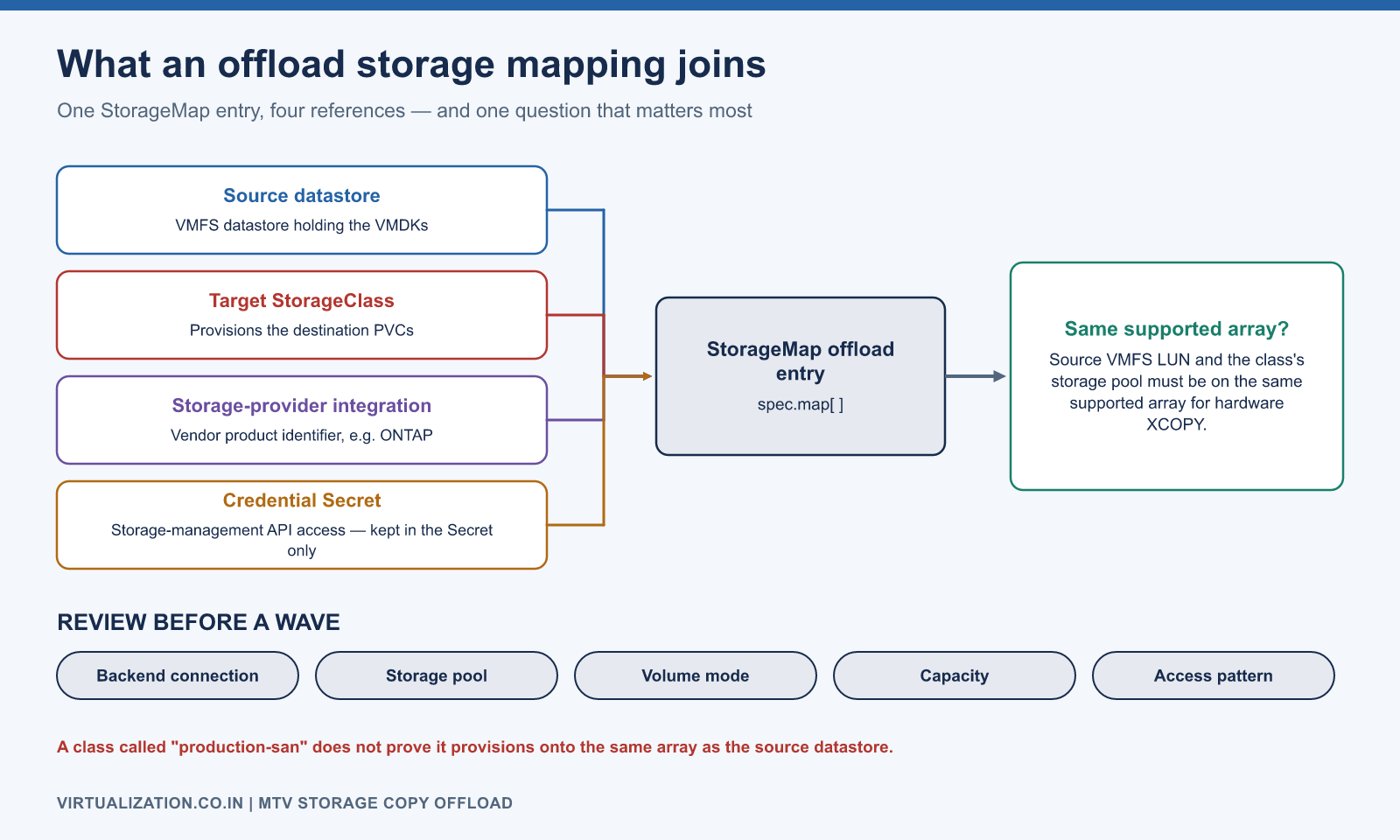
An offload mapping joins a source datastore, a target StorageClass, a storage-provider integration, and a reference to its credential Secret. The following is an illustrative fragment of StorageMap.spec.map, not a complete manifest:
map:
  - source:
      id: datastore-123
    destination:
      storageClass: target-san-block
    offloadPlugin:
      vsphereXcopyConfig:
        secretRef: destination-array-credentials
        storageVendorProduct: ontap
The example uses the ONTAP product identifier. Replace every environment-specific value and use the schema supported by your installed release. Keep credential values in the approved Secret mechanism. The upstream reference shows this mapping structure and its relationship to the populator. Storage-map configuration
Review the actual array behind the StorageClass, not just its name. A class called production-san does not prove it provisions onto the same array as the source VMFS datastore. Track the backend connection, storage pool, volume mode, capacity, and supported access pattern.
Hardware offload versus host-based fallback
When the clone cannot use the intended hardware-offload path, an ESXi host-based copy may occur. The bulk path then becomes source storage to ESXi to destination storage. This differs from both array-internal XCOPY and a disk stream through an OpenShift importer. Cross-array and unsupported combinations must be reviewed against the product’s support conditions; a possible upstream fallback is not a blanket support guarantee. Forklift fallback explanation
Use a pilot with an explicit acceptance criterion: not merely “migration completed,” but “the expected disk-copy path was observed and application latency stayed within its limit.” If fallback is acceptable for a particular wave, estimate and test its different host load and duration.
Snapshot layout also deserves review. Red Hat documents that preexisting snapshot chains can prevent hardware acceleration in this workflow; its discussion distinguishes those from snapshots created by warm migration. Do not respond by indiscriminately deleting production snapshots. Assess backup dependencies, consolidation impact, and the approved source preparation procedure first. Snapshot considerations
Verify the actual copy path
Recent MTV 2.12 updates document per-disk xcopyUsed reporting and populator metrics for offload use and progress. Availability depends on the patch level. A missing metric should therefore trigger a version check before it is interpreted as a failed copy. MTV 2.12 release notes
Start with resource discovery and a narrowly scoped inspection. These Bash commands are read-only; replace the namespace and selected object names:
oc api-resources --api-group=forklift.konveyor.io
oc get plans.forklift.konveyor.io -n openshift-mtv
oc get migrations.forklift.konveyor.io -n openshift-mtv
oc get vspherexcopyvolumepopulators.forklift.konveyor.io -A
oc get pvc -n apps -o wide
oc get pods -n apps --show-labels
oc get events -n apps --sort-by=.metadata.creationTimestamp
After identifying the relevant populator pod, inspect its container names and logs rather than guessing a deployment or container name:
oc get pod POPULATOR_POD -n POD_NAMESPACE \
  -o jsonpath='{.spec.containers[*].name}'
oc logs POPULATOR_POD -n POD_NAMESPACE -c CONTAINER_NAME --since=30m
Correlate the log timeline with ESXi and array telemetry. Separate time spent provisioning, discovering devices, invoking the clone, copying, and converting the guest. High overall elapsed time does not automatically mean slow XCOPY; the operation may have waited before copying began.
Troubleshooting by failure boundary
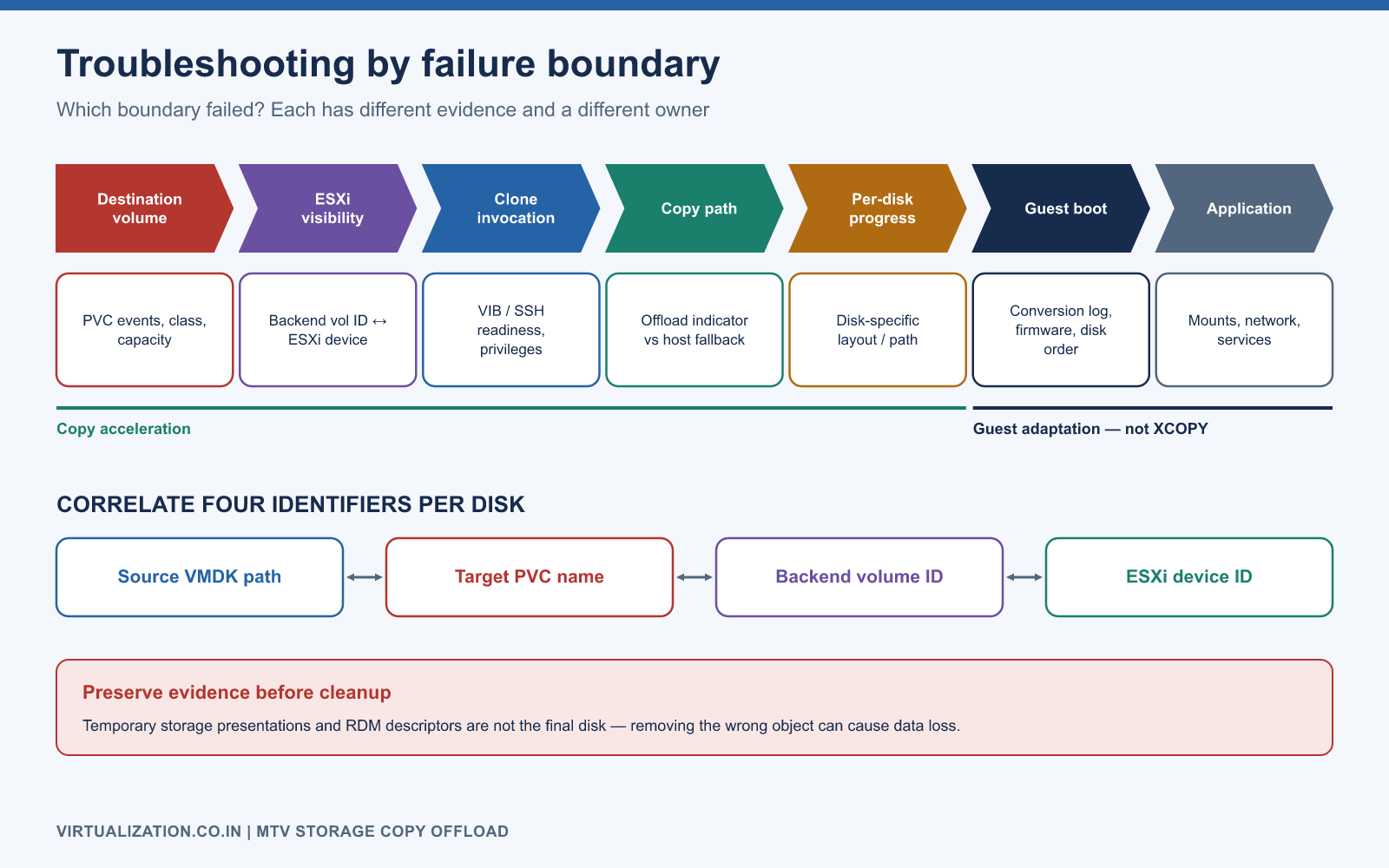
| Symptom | Evidence to collect | Investigation direction |
|---|---|---|
| No usable destination volume | PVC events, StorageClass, backend capacity | Provisioning, quota, topology, or unsupported mode |
| Destination not visible to ESXi | Backend volume ID, host identity, device discovery evidence | Supported host presentation and storage paths |
| Clone invocation fails | Populator error, selected method, wrapper/SSH readiness | VIB version, exposed operation, credentials, privileges |
| Copy succeeds but host load is unexpectedly high | Offload indicator, ESXi counters, array activity | Host-based fallback or competing work |
| One disk finishes and another stalls | Per-disk source/destination IDs and stage | Disk-specific layout, path, or backend condition |
| Target VM cannot boot | Conversion log, firmware, disk order, console | Guest adaptation rather than copy acceleration |
| Application fails after boot | Mounts, network identity, service logs | Application consistency and dependencies |
Preserve failed execution evidence before cleanup. Temporary storage presentations and descriptors are not interchangeable with the final destination disk. Removing the wrong object can turn a recoverable migration failure into data loss. Use the supported cleanup/retry procedure and verify ownership first.
Performance planning and acceptance
Use an end-to-end time model: storage preparation plus copy plus conversion plus boot plus application validation. Offloading one component does not eliminate the others. Record both elapsed time and impact on existing production workloads.
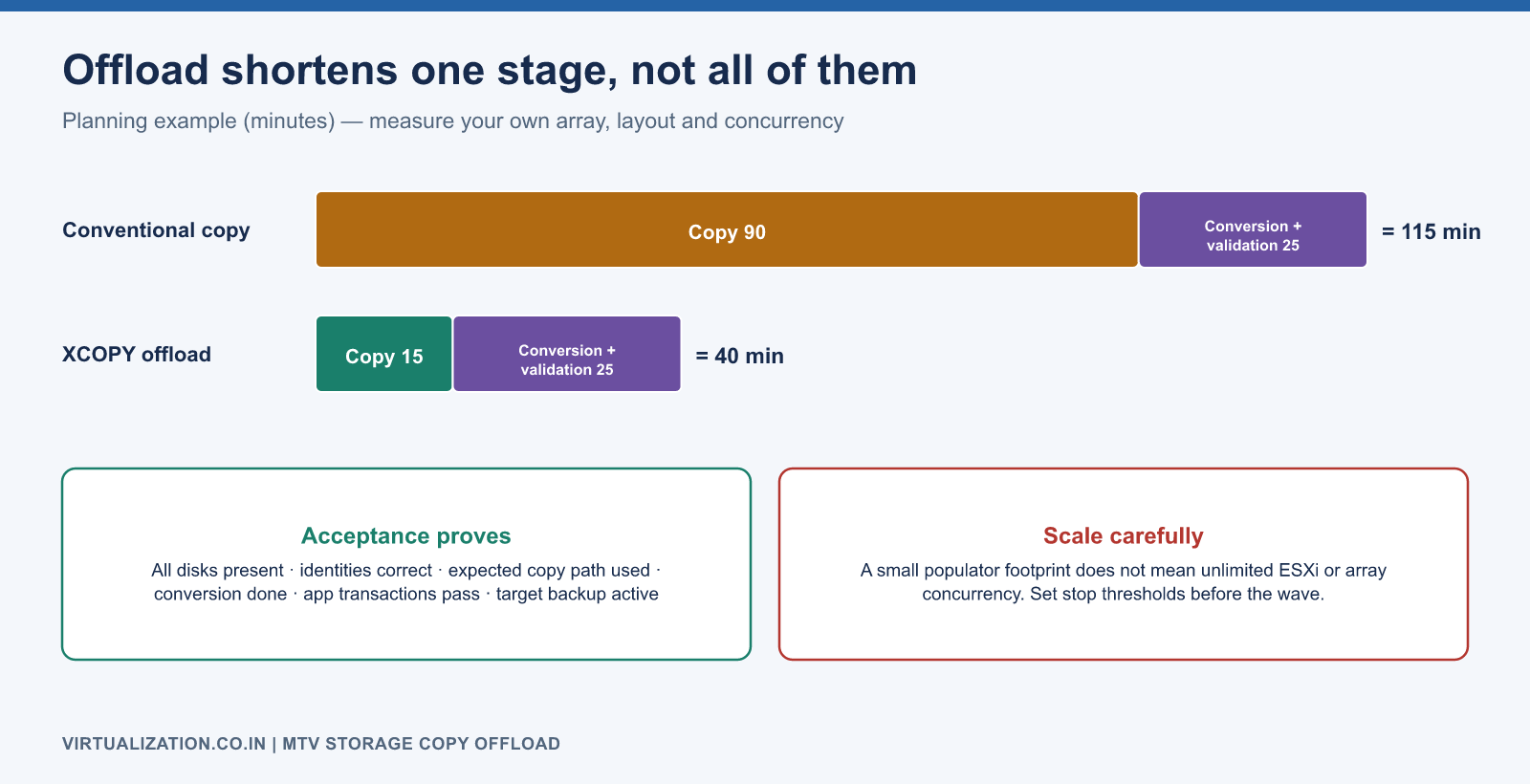
For illustration, if a conventional copy stage takes 90 minutes and conversion/validation take 25 minutes, reducing copy to 15 minutes changes the subtotal from 115 to 40 minutes. That is a planning example, not a performance claim. Real numbers must come from your array, guest layout, concurrency, and migration method.
Increase concurrency gradually. A small populator CPU footprint does not imply unlimited backend or ESXi concurrency. Observe storage latency, pending operations, host resource use, and application response time. Establish stop thresholds before the wave starts.
Acceptance should prove all intended disks are present, source-to-target identities are correct, the expected copy path was used, conversion completed, the application passed its transaction checks, and target backup protection is active. Keep rollback tied to the point at which the target begins accepting authoritative writes.